WhatsApp campaign reports
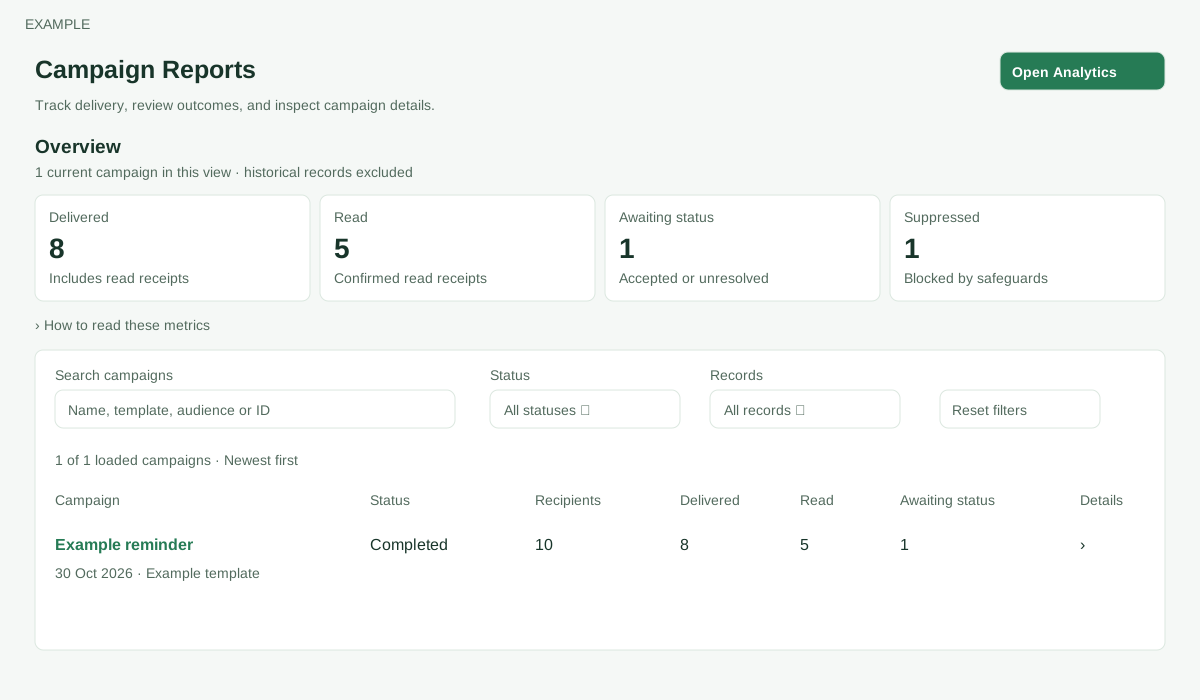
Open the page
WhatsApp → Campaign Reports. WhatsApp access is required; draft and deletion controls also depend on bulk permission and ownership.
Administrators can access company campaigns; other users are limited to their own campaigns. This scope also applies when opening a delivery or exclusion report.
Find and inspect campaigns
- Review Overview for current campaigns in the filtered view; historical records are excluded from its totals. The list loads the latest 100 accessible records. Search by name, template, audience or ID. Filter Status (options are populated from loaded records) and Records (All records, Current campaigns or Historical records), or Reset filters.
- Overview shows Delivered, Read, Awaiting status and Suppressed for current campaigns in the filtered view. Delivered includes Read; Awaiting status combines accepted/unsettled and unknown, and is not a failure count. The table shows Campaign, Status, Recipients, Delivered, Read and Awaiting status. Expand Details to review the campaign funnel and available report links.
- Discarded campaigns may show Delete permanently for authorized users; this deletes data and should be used only when intended.
Expand Details for Audience, Dispatch, Delivery & settlement and Failure categories; failure categories can overlap. Historical records retain original counters, have no modern audience or settlement figures and are not dispatched by the current worker. A resumable owned draft offers Continue campaign or Review & queue. Delete permanently is offered for an eligible owned discarded draft and removes its unpublished preview data after confirmation.
Read the expanded Details
Audience: Matched contacts are filter matches, Discovered endpoints are found phone endpoints, Valid / unique recipients are deduplicated valid ledger numbers, Excluded are invalid, absent, duplicate or missing-template-data entries, Suppressed were blocked by safeguards, and Deferred are held for later. One contact can have multiple numbers and a number can be shared; upload campaigns use their recorded snapshot.
Dispatch: Staging pending counts prepared work awaiting dispatch, Dedicated queue counts queued attempts and Dead letters identify attempts requiring investigation. Delivery & settlement: Accepted / unsettled is provider acceptance without a later recorded outcome; Provider sent includes sent, delivered and read; Delivered includes Read; Pending settlement combines accepted/unsettled and unknown. These are not independent steps to add.
Failure categories: Soft includes transient or recipient-soft failures; Configuration concerns sender or template setup; Hard is recipient-hard; Unknown needs reconciliation and may overlap a delivery status. Categories overlap. The details also display Template, Sender, Filter snapshot or upload Audience source, and campaign lineage Root, Source and Generation. Open delivery report to examine individual evidence. Historical rows instead show Recorded submitted/sent, Delivered, Read and Failed, and cannot reconstruct the modern funnel.