WhatsApp campaign delivery report
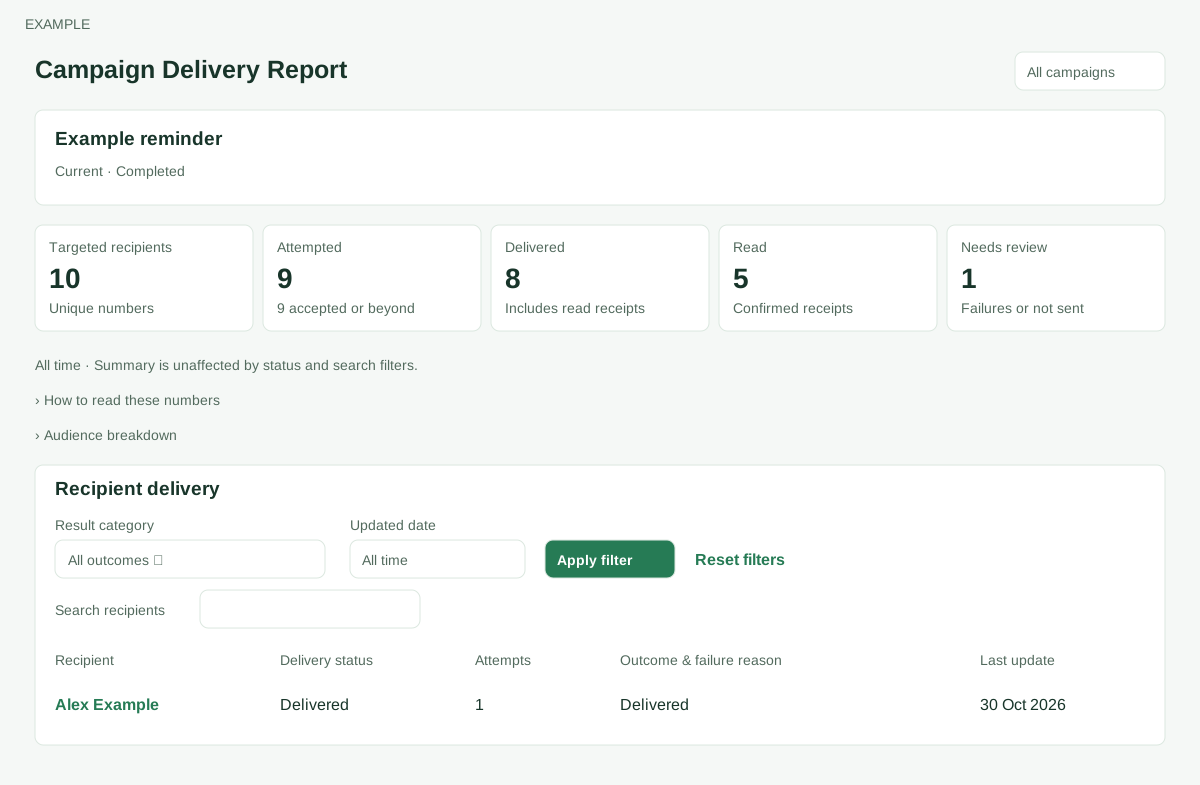
Open the page
Campaign Reports → open a campaign’s delivery report. WhatsApp access and access to the selected campaign are required; recovery additionally depends on bulk permission and rollout.
Read delivery results
- Review the campaign state and any pause or recovery notices. Audience breakdown shows audience rows and exclusions such as invalid numbers, opt-outs, duplicates and missing template values.
- Filter Recipient delivery by Result category and Updated date, then Apply filter. Search by recipient name, number or reason and table paging narrow recipient rows (50 per page); Reset filters clears the date and category, and Try again reloads a failed table. Categories include Delivered (includes read), Read, Accepted / sent, Failed or unknown, Pending dispatch and No attempt / not sent. Review Recipient, Delivery status, Attempts, Outcome & failure reason and Last update. Open View delivery evidence where available for more context; a next retry time may appear.
- Use Audience exclusions for compilation evidence where shown. Treat recipient details as private.
Recover work deliberately
- Where available, Resume unsent recipients changes campaign state. Recover retryable recipients lets an authorized user choose Sender and Approved marketing template, Review resend audience and then Confirm child campaign. Review the audience before confirmation; this can initiate new deliveries.
- Resume unsent recipients preserves the audience and message snapshot and does not replay already submitted recipients. A Meta billing pause offers Resume campaign only after a conclusive eligible sender check, dispatch availability and permission; use Manage sender and Sync from Meta after resolving the displayed billing issue. Child campaigns exclude successful, active, unknown, suppressed and hard-bounced recipients. Historical evidence is incomplete, and only exact explicitly retryable attempts may qualify. An unknown result is not proof of failure; inspect the displayed evidence before retrying.
Summary cards are unaffected by status and search filters; dates refer to the latest recipient update. The original audience breakdown is independent of delivery filters. Check result and campaign state before retrying any uncertain action.
Inspect recipient evidence
In Outcome & failure reason, expand View delivery evidence on a recipient row. Recorded status and Provider request are always shown; Failure category, Meta/reason code and optional subcode, Recorded reason, HTTP status, Message ID, Contact ID and Read at appear when recorded. Queue appears for applicable non-accepted, non-sent, non-delivered and non-read statuses. Last update can show Next retry separately. The evidence is an expandable row section, and absent fields do not prove an event did not happen.
For example, a temporary failure with a next retry time may already have an automatic retry scheduled. For unknown provider outcome, wait for confirmation or investigate before retrying; it is not confirmed failure. If the table fails, use Try again. If recovery eligibility cannot be checked, reload; if no eligible recipients appear, review the displayed exclusions and sender/template configuration rather than assuming all failures can be resent. Child-campaign confirmation is a sending action, not merely a report refresh.