WhatsApp analytics
Open the page
WhatsApp → Analytics. WhatsApp access is required.
Set the reporting period
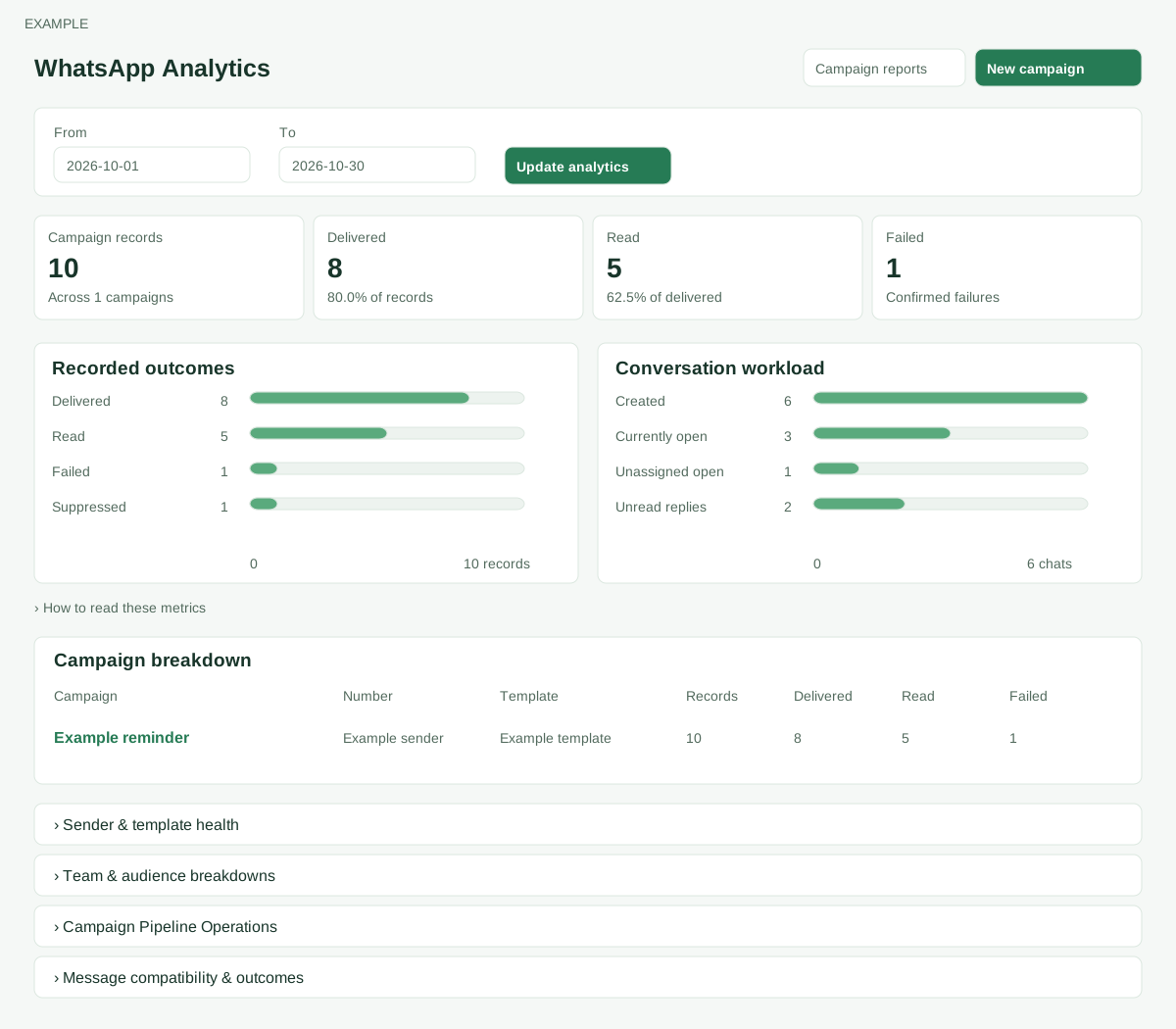
- Choose From and To and select Update analytics; reversed dates are normalized to earliest first. By default the range is today and the preceding 29 days. Campaign results use campaign creation dates and reflect the latest recorded statuses; they are not limited to delivery updates made within that period. Review Campaign records, Delivered, Read and Failed. Campaign records count campaign log rows, including typed and historical records; they are neither unique recipients nor confirmed sends. Delivery rate is Delivered ÷ Campaign records; read rate is Read ÷ Delivered. Failed includes several failure statuses, including some before a provider request; pending and unknown are not counted as failed.
- Read is included in Delivered, so do not add the two. Conversation workload represents current state of chats created in the period and its counts can overlap.
Explore breakdowns
- Recorded outcomes shows Delivered, Read, Failed and Suppressed; Conversation workload shows Created, Currently open, Unassigned open and Unread replies. Campaign breakdown lists up to 20 campaigns by record count, with links to their delivery reports. Expand Sender & template health, Team & audience breakdowns, Campaign Pipeline Operations and Message compatibility & outcomes for more detail.
- Sender quality and routing are current; sessions cover the last 24 hours. Conversation categories are synchronized messages with provider IDs, not billable-conversation counts. Pipeline operations and observed message-type outcomes are current and not affected by the date filter; queue and ledger figures may overlap.
- Example: review delivery results and investigate failures in the campaign delivery report rather than adding overlapping figures.
Campaign breakdown
Each row shows Campaign and creation date (the campaign name opens its delivery report), sender Number, Template, Records, Delivered, Read and Failed. The 20 rows are ordered by record count, so the table is not a complete campaign list. Open All campaign reports for the accessible campaign list. For example, 80 delivered and 30 read out of 100 records means an 80% delivery rate and a 37.5% read rate among delivered; the 30 are already included in 80.
Sender & template health
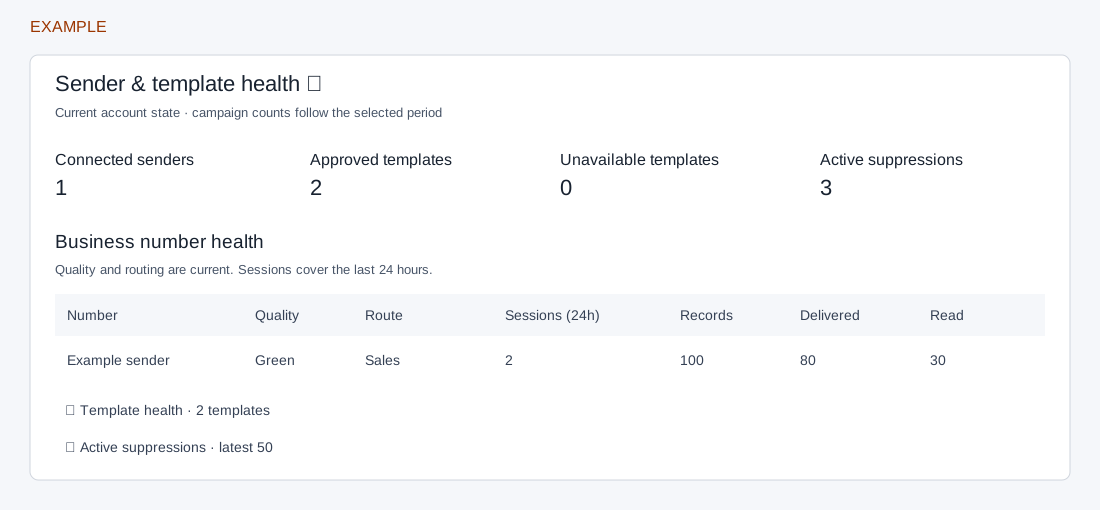
Expand the section. Connected senders shows the count and yellow/red quality subtotals; Approved templates and Unavailable templates describe current template status, while Active suppressions counts current suppression records. Attention required lists sender quality and template status alerts when present. These are current account indicators, not historical status at the period end.
Business number health lists Number and verified name, current Quality and Route (or Unrouted), Sessions (24h), and Records, Delivered and Read for campaigns created during the selected dates. Use a low-quality sender or unrouted number as a reason to inspect configuration; these figures do not prove a provider restriction.
Expand Template health for Template and language, Category, current Status and Quality, and selected-period Campaigns, Records, Delivered, Read and Failed. Read is part of Delivered. Expand Active suppressions for Phone, Type, Reason, Source Number and Updated: the newest 50 current active records are shown regardless of the date filter. A suppression can prevent a future send; correct consent or data only when appropriate, and protect recipient information.
Team & audience breakdowns
Department breakdown: Department, Chats, Records, Delivered and Read group campaigns and chats created in the period by sender routing; delivered includes read. Agent breakdown: Agent, Assigned chats, Open and Unread describe the current assignment and state of chats created in the period; Replies are messages sent during the period, a different time basis. These columns overlap and are not a funnel.
Conversation categories: Pricing Category and Conversation Type group synchronized messages with provider IDs dated in the period; Messages and Read count those messages and read statuses. They are not a billable-conversation total. Country breakdown: Country, Chats, Records, Delivered and Failed use phone prefixes. Campaign records follow campaign creation dates; chats follow message dates and a chat may appear under more than one number. Compare categories to find where to investigate, not as a unique-person census.
Campaign Pipeline Operations
This section is current state and ignores the date filter. Its Measure, Count and Meaning table reports:
- Staging ledger: prepared, claimed or retry records and the oldest prepared time.
- Shared queue: ready and retry depth, oldest ready time and retries over six hours.
- Provider uncertainty: unknown queue and ledger counts, plus accepted/sent records without an update for over one hour. The sources can overlap; do not add them or assume an unknown is failed.
- Dead letters: queue and ledger counts that can overlap and warrant investigation.
- Settlement backlog: campaigns awaiting final status and the overdue subset.
- Configuration pauses: campaigns waiting for configuration; inspect the campaign pause details.
- Capacity reconciliation and Billing reconciliation: records needing evidence about reservations or billing respectively.
Expand Sender capacity for Sender, Window start, Limit, Reserved, Consumed and Lock version. These describe the current capacity window and its accounting; lock version is a concurrency marker, not remaining capacity. Check the relevant sender and campaign evidence before a recovery action.
Message compatibility & outcomes
All-time counters show Unsupported inbound and Media failures from synchronized chat messages, and Configuration drift from typed campaign attempt records. The message-type table groups typed campaign attempt records by Type and Subtype / format / API version. Attempt records can exist before dispatch; Accepted counts only the current ACCEPTED status, Delivered includes Read, and Failed and Unknown evidence can overlap other columns. These are not date-filtered and must not be summed as mutually exclusive stages.
Example: if the selected campaign period has failures, open its delivery report and inspect its evidence; check current template health and pipeline pauses separately. If a section is empty, widen the date period for period-based data, or check whether the relevant sender, templates or synchronized records exist for current-state tables.