Contact Travel dashboard
Contact Travel dashboard
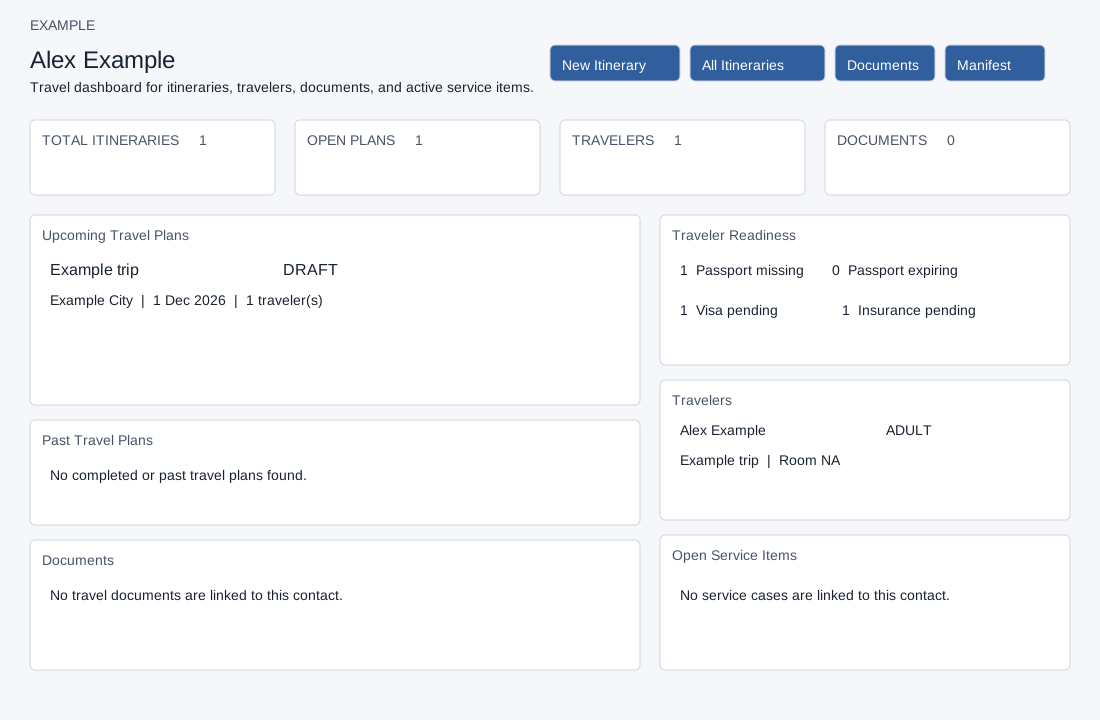
Open a contact’s Travel panel. Travel read access and a valid company contact are required. New Itinerary appears with builder permission and opens a new plan linked to this contact. All Itineraries opens the company-wide list; Documents and Manifest appear when the respective permissions allow. These links and itinerary titles open in new tabs.
The four cards show total itineraries, open plans, travelers and documents. Upcoming and past show title, status, destination and dates; upcoming also shows traveler count. COMPLETED or CANCELLED plans, and plans whose end date (or start date if no end date) is before today, are past. Documents show title/type, itinerary, status, expiry and an available file link. Traveler Readiness counts missing passport expiry, expiry on or before six months ahead, visa other than NOT_REQUIRED or APPROVED, and insurance other than NOT_REQUIRED or ISSUED. Travelers show name/type, itinerary, room, visa and insurance. Open Service Items displays cases with title, status, itinerary and priority, including all statuses despite the heading. The Total Itineraries and Open Plans cards use a separate aggregate over all contact itineraries; Open Plans counts statuses other than COMPLETED and CANCELLED, regardless of dates. The upcoming/past panels use at most 50 returned itineraries. The Travelers and Documents cards and readiness counts use at most 80 returned travelers or documents; service cases are also capped at 80. These list-derived counts can be incomplete. Documents, traveler readiness, traveler details and service cases can appear in the dashboard with Travel read access when the features are ready. Separate Documents and Manifest permissions control their navigation buttons, not these dashboard panels. File links appear when a document URL exists. Treat access to this dashboard accordingly. If there are warnings or empty panels, ask an administrator to check setup.