Mobile call-sync logs
Availability depends on your account configuration and permissions.
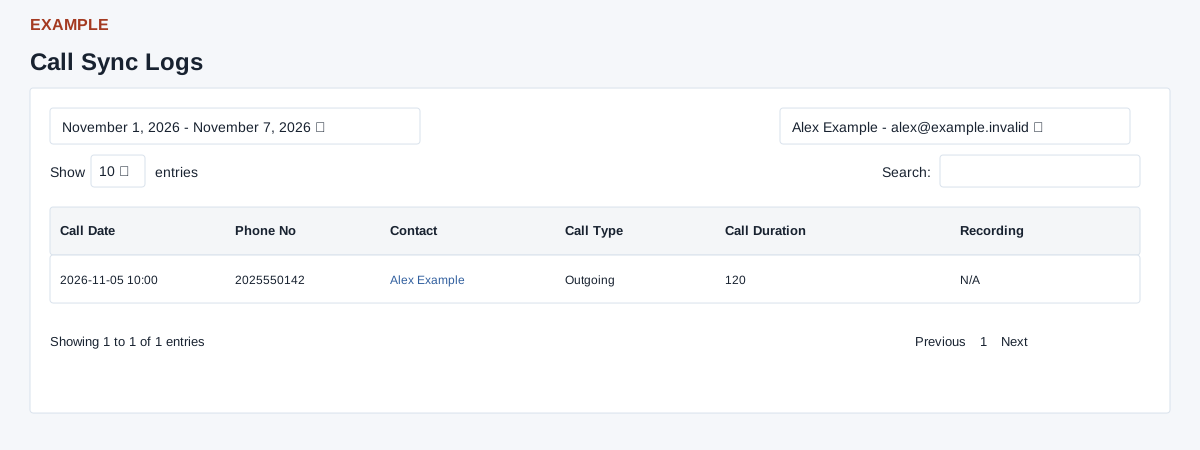
Open the page
Telephony > Mobile Sync. CRM access is checked.
Choose a period and user
- Use the date-range picker; presets include Today, Yesterday, Last 7 Days, Last 30 Days, This Month and Last Month. Apply the range to reload the report. The page defaults to today and the current user.
- Administrators may choose a staff member; department managers can select from their permitted staff, while other users do not see a user selector. None falls back to the current user; submitted users outside a non-admin manager’s scope also fall back to the current user. Select a user to reload the report.
Read synchronized calls
- Use Search, sortable columns, Show entries and Previous / Next. Review Call Date, Phone No, Contact, Call Type, Call Duration and Recording. Select a contact name to open its CRM record; Download is shown when a recording exists, otherwise N/A.
- Example: a call to 2025550142 is associated with Alex Example. The report matches the selected user and includes the selected calendar dates, with newest calls first: calls without a matching contact do not appear. Search and sorting apply to loaded rows; no export control is provided. A missing recording link is not evidence that a call did not happen.