Compose and send SMS
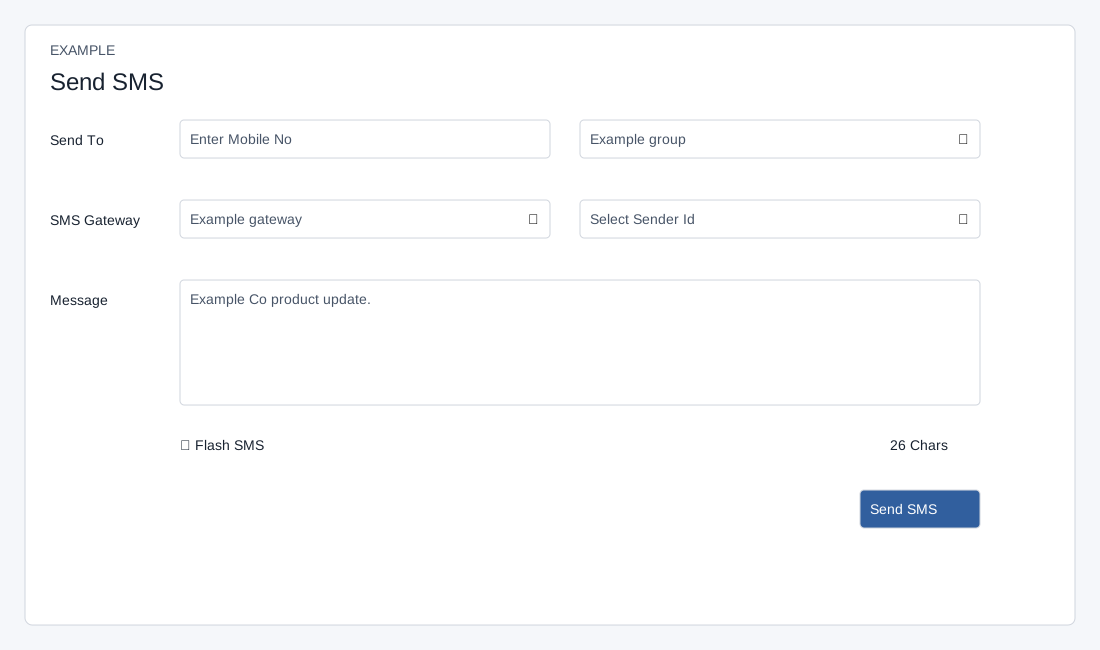
Open the page
SMS → Send SMS. SMS access and Allow SMS Bulk are required.
Prepare the message
This screen provides no scheduled send, template picker, DLT field or campaign name. Gateway and Sender ID choices come from the configured account. If both a valid ten-digit number and a group are supplied, the message is sent to the number. Use only the intended recipient method.
- Enter a mobile number under Send To or choose a group from Or Select Group. Choose an SMS Gateway and, when applicable, a Sender ID. Enter Message and watch the character counter; Flash SMS is an optional checkbox.
- The displayed warning says sender IDs are not allowed for promotional SMS and transactional SMS requires approved templates; promotional content must not be sent on the transactional route. Check current provider and jurisdiction requirements before choosing a route.
- Example only: select the Newsletter group and write “Example Co. product update is available.” Check the group, number, gateway, sender, text and any costs before proceeding.
Confirm the send
Use a ten-digit number for individual sends. The form may display a wider accepted range. The browser checks message length greater than one despite an error saying greater than ten; the form requires more than five Unicode characters. A gateway is required. The client compares gateway value with a text label for its transactional sender check even though options use IDs; do not rely on that check to enforce sender requirements. Flash SMS is queued and uses Unicode handling. The campaign’s estimated SMS count uses 160 characters per standard segment or 70 per Unicode segment, rounded up; provider segmentation and charges may differ. There is no scheduling control.
- Choose Send SMS. A confirmation warns that accepting queues the message for delivery and it cannot be stopped; choose the cancel option if anything is wrong. Confirm only when the recipients and content are correct.
- The interface clears the message on validation failure or after the confirmation flow, including cancellation, so keep a copy before attempting to send if needed. A success notice confirms queueing, not final delivery: check SMS Logs and Campaign Reports.