SMS logs
Availability depends on your account configuration and permissions.
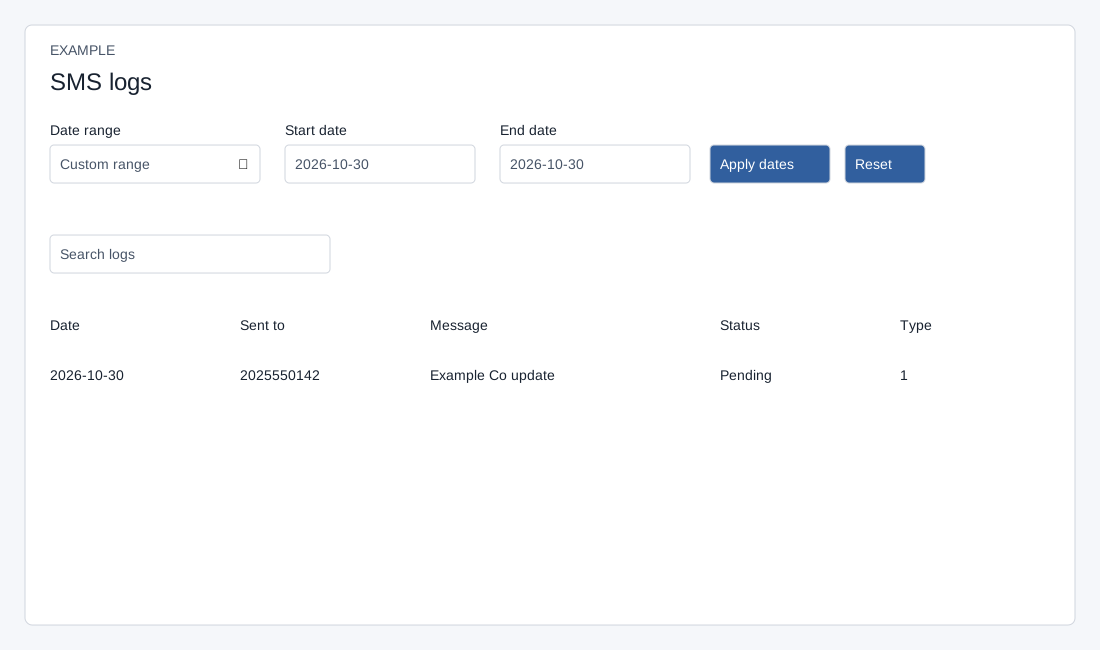
Open the page
SMS → SMS Logs. SMS access is required.
Filter the report
The default and Reset range is today. Invalid dates or an end before the start produce an error and no results. The date filter applies to campaign creation date, not the delivery timestamp.
- Choose Date range: Custom range, Today, Yesterday, Last 7 days, Last 30 days, This month or Last month. Set Start date and End date for a custom range and choose Apply dates. Reset returns to the default report.
- Use Search logs and the table controls to narrow and browse the displayed results. The report shows the latest 500 records in the selected period; an absent record may be outside that limit.
Interpret an entry
- Read Date, Sent to, Message, Status and Type. Delivery status depends on the provider delivery receipt; Pending is used where no status is recorded. Check the provider if a status remains unresolved.
- Example: an SMS to 2025550142 is shown as Pending. Do not treat a pending status as confirmed failure or resend without first investigating; logs contain sensitive recipient and message data.