SMS campaign reports
Availability depends on your account configuration and permissions.
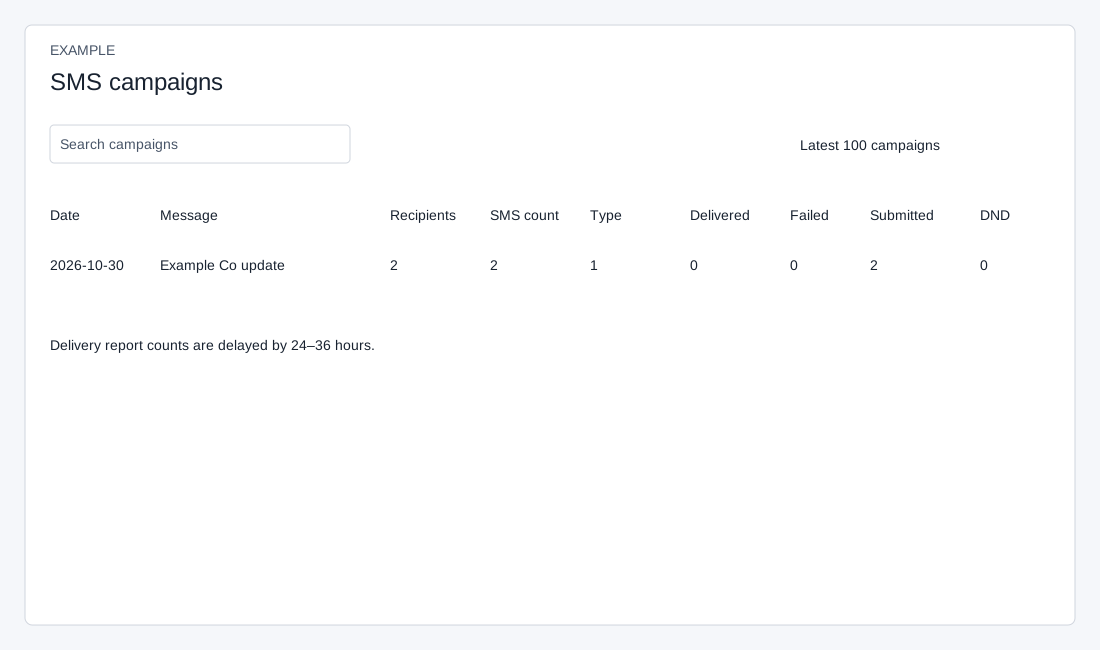
Open the page
SMS → Campaign Reports. SMS access is required.
Read group campaign results
- Search campaigns and use the sortable column headings, rows-per-page selector and Previous / Next controls. The page displays the latest 100 campaigns with more than one recipient; a one-recipient group campaign is omitted.
- Review Date, Message, Recipients, SMS count, Type, Delivered, Failed, Submitted and DND. Recipients is the recorded recipient count. SMS count is the application’s estimated segments per message multiplied by that count: it divides character length by 160 for standard or 70 for Unicode and rounds up. It is not confirmed provider billing or delivery; provider segmentation can differ. Type stores the selected gateway identifier in this path, so do not infer promotional or transactional classification from it.
- The page states delivery-report counts are delayed by 24–36 hours. A recent Submitted value is not proof of delivery; revisit the report after updates arrive.