Tasks list
Open and filter
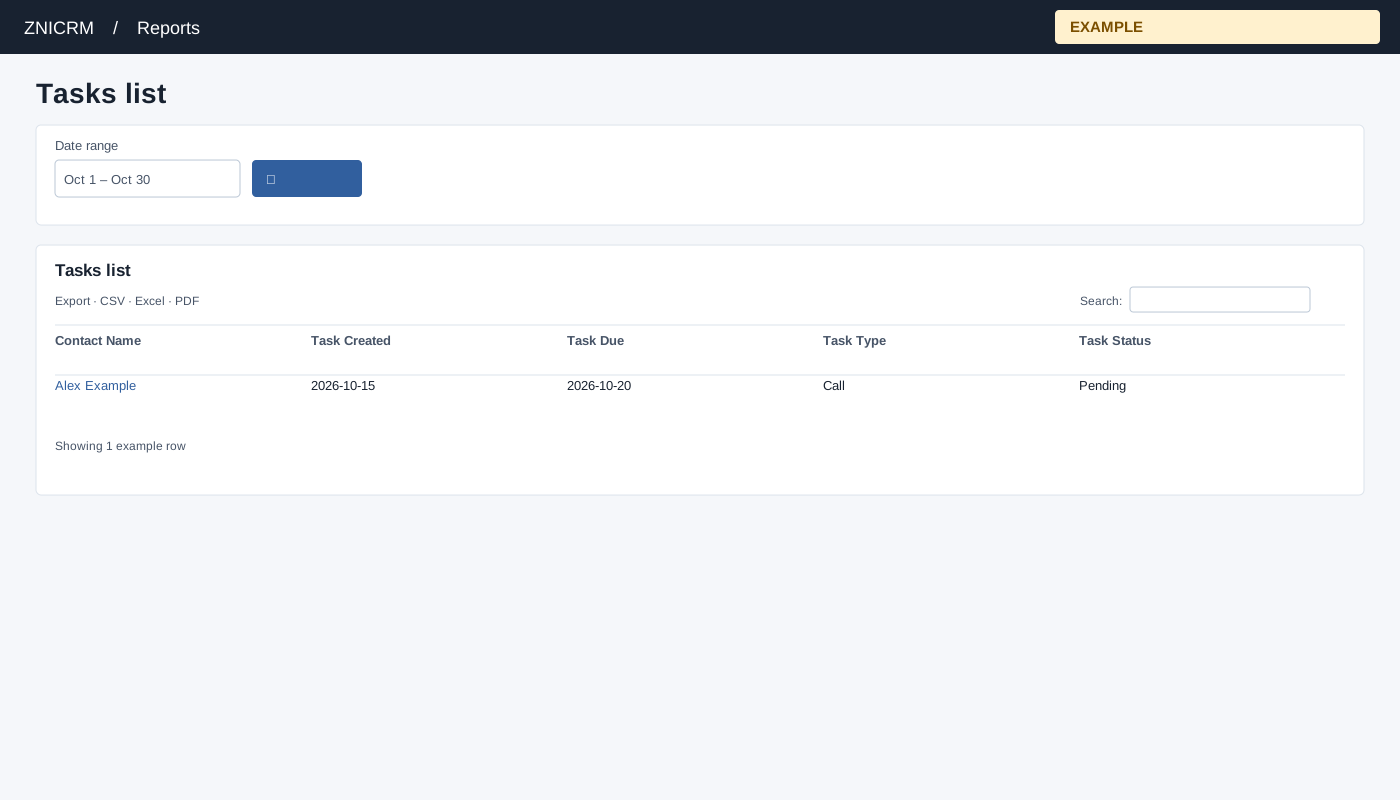
Open Reports → Tasks list. Open a user from the Tasks summary; select Contact Name to open the contact conversation.
Controls: Date range.
Read the results
Columns: Contact Name, Task Created, Task Due, Task Type, Task Status. The list filters by task creation date and selected user, and returns at most 1,000 tasks. Status displays Completed or Pending.
Dates and export
The user is carried from the summary rather than selected on this page. The date picker offers Today, Yesterday, Last 7 Days, Last 30 Days, This Month and Last Month, plus custom dates; select the search icon to apply. The table initially displays 100 rows per page and has export controls. The list is limited to 1,000 rows; a summary count can exceed the list.
Scope and limitations
The selected user must pass the hierarchy check or the page falls back to the viewer. Both date bounds include the full day. Sorting the loaded table cannot recover tasks omitted by the 1,000-row limit. Contact and company joins exclude tasks without matching records. CSV, Excel and PDF export matching loaded rows across pages when the shared table enhancement loads; original controls can differ if it fails.
Example and verification
Open Alex Example from the summary and inspect a pending call created in the selected range. Open its contact to handle it. If a task is missing, check its creation date and the 1,000-row limit.
See charts for this report and shared table and export controls.