Subscriptions
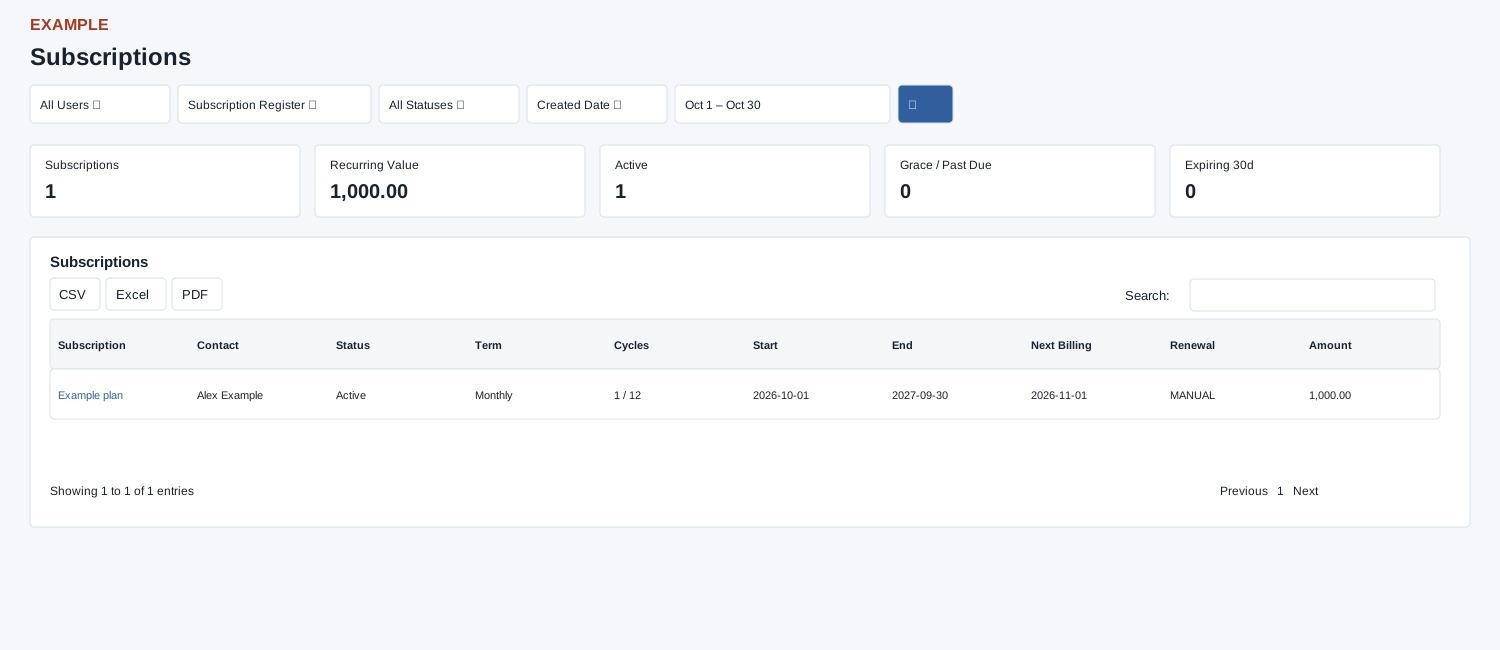
Open and filter
Open Reports → Subscriptions. Invoice access is required. Choose user, mode, status, date field and range and search. Open a subscription to inspect it; verify the selected date field if a record is missing.
Controls: User, Subscription Register, All Statuses, Created Date, Date range. User and department options reflect available scope.
Read the results
Columns: Subscription, Contact, Status, Term, Cycles, Start, End, Next Billing, Renewal, Amount. Modes are Subscription Register and Expiring Soon; status options are All, Active, Paused, Cancelled and Expired. The date field may be Created Date, Start Date, End Date or Next Billing Date. Expiring Soon fetches a 60-day window; each source fetch is capped at 5,000 before page date filtering.
Calculation and scope
The default dates are month-to-date; reversed start and end dates are swapped. Non-admin viewers are restricted to their own user. Expiring Soon uses its 60-day source fetch; the Status filter is applied to the register source, not to the expiring source.
Summary and export
Summary cards show Subscriptions, Recurring Value (sum of recurring snapshot amounts), Active, Grace / Past Due and Expiring 30d for the current result. The picker offers Today, Last 7 Days, Last 30 Days and This Month, plus custom dates. The table offers CSV, Excel and PDF and starts at 100 rows per page.
Interpretation and limits
User selection in these reports uses the contact company’s current owner, not necessarily the subscription creator. Register Active includes qualifying Active and PastDue rows and Grace rows within grace; The Paused filter can return other statuses; check each subscription’s actual status. Expired ultimately retains Completed or Expired and excludes expired Grace in the page’s later filter. Expiring Soon fetches only Active subscriptions with an end date from today through the next 60 days; its status dropdown does not filter that source. The selected date field is then applied to the fetched rows; empty dates are excluded. Expiring 30d counts all returned rows ending today through 30 days ahead, regardless of their status. Next 30 Days is also a date-picker preset. The table displays completed / total cycles; subscription names open management in a new tab. Search and sorting affect loaded rows, while cards remain based on the pre-search result. CSV, Excel and PDF export the loaded rows matching the table search across pages when the enhanced table loads.
Example and verification
Choose Expiring Soon and End Date, then a range covering the next month. Open a renewal due in that window and review the contact. If missing, verify the selected date field, status, user and pre-filter 5,000-record limit.
See charts for this report and shared table and export controls.