Sales Cycle Length
Open and filter
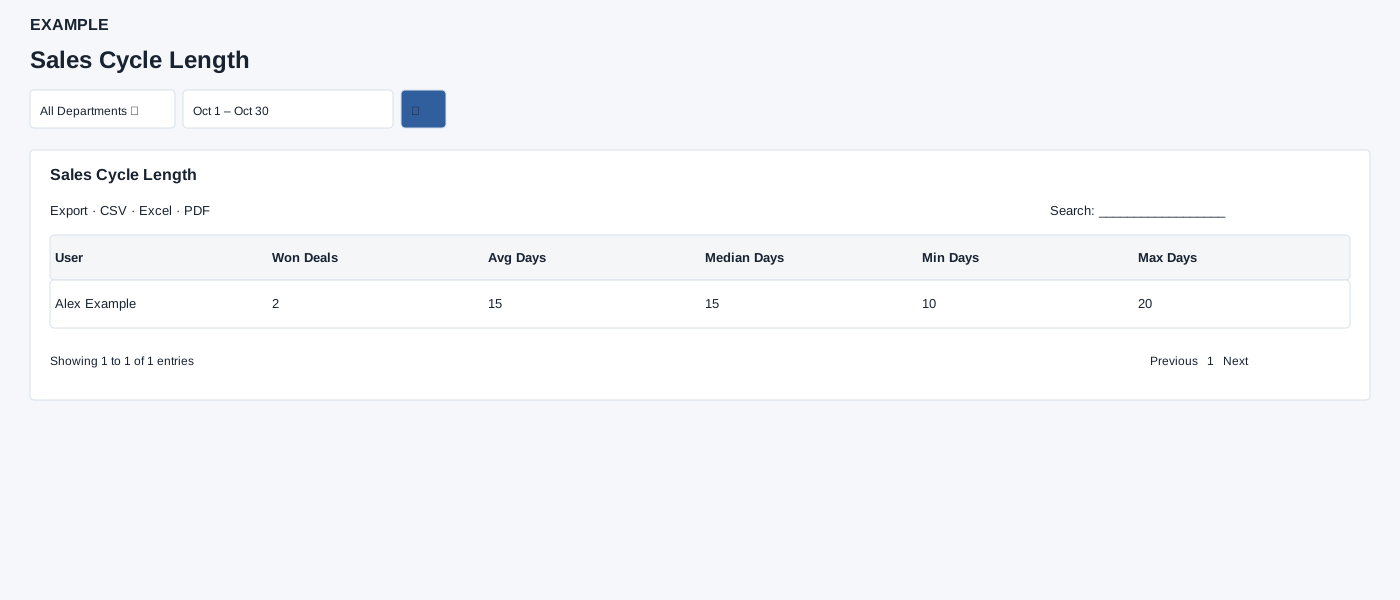
Open Reports → Sales Cycle Length. Results are restricted to the users available to your reporting scope and selected department. Choose Department and Date Range, then select the search button to load results. The initial range runs from one month ago to today.
Read the results
The table columns are User, Won Deals, Avg Days, Median Days, Min Days, Max Days. Won deals are selected by closure date and require creation and closure dates. Cycle days are the difference from creation to closure; timing values are zero when no qualifying deals exist.
Date picker and table controls
The date picker offers Today, Yesterday, Last 7 Days, Last 30 Days, This Month and Last Month, plus a custom range. Apply the range and select the search control to reload the report. The table initially shows 100 rows per page and provides Excel, CSV and PDF export controls.
Interpretation and limits
The report uses whole elapsed days, so partial days are truncated. The scoped user list can show zeros for no qualifying deals; a zero with Won Deals 0 is not an observed cycle length. Date bounds include the full selected end day. Search, sorting and pagination are also available.
When the shared enhancement loads, exports cover loaded rows matching the table search across pages. If enhancement fails, the original table controls may differ.
Example and verification
If two qualifying won deals took 10 and 20 days from creation to closure, their average and median are 15 days. Check closure dates and WON stages if a known deal is absent; deals without either date do not contribute.
See charts for this report and shared table and export controls.