Payment Gateway Orders
Open and filter
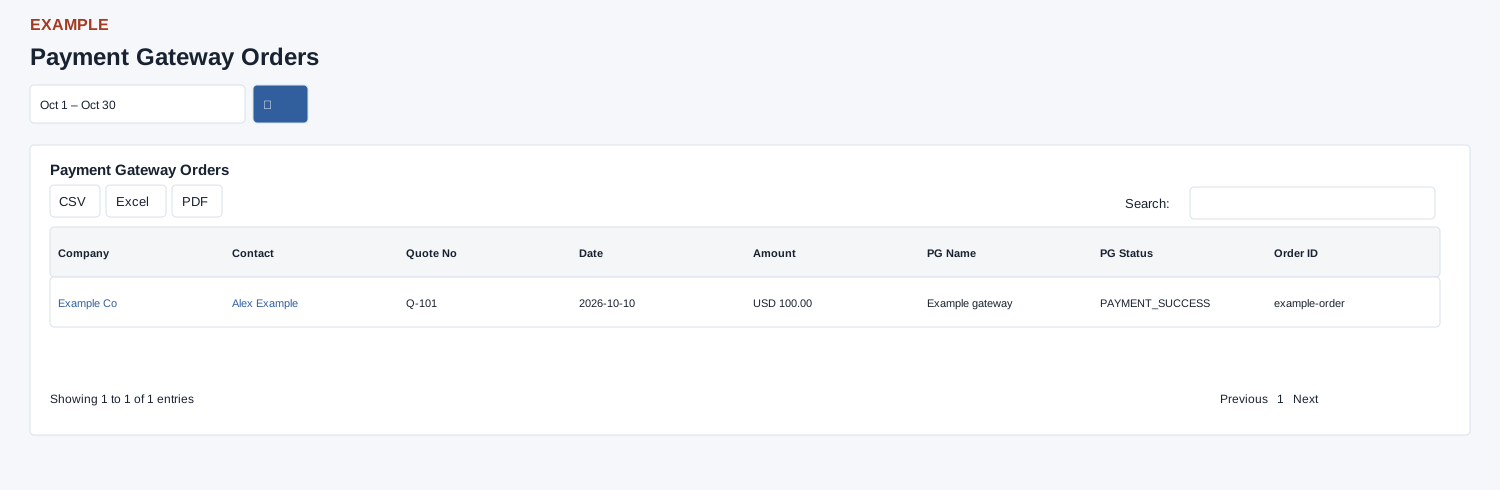
Open Reports → Payment Gateway Orders. Invoice access is required. Choose dates and search; Company and Contact links open CRM records. If an order is absent, check status and the 100-row limit.
Controls: Date range.
Read the results
Columns: Company, Contact, Quote No, Date, Amount, PG Name, PG Status, Order ID. The report requests PAYMENT_SUCCESS orders, newest first, limited to 100; it is not a complete list of failed or pending payments.
Date picker and table controls
The date picker offers Today, Yesterday, Last 7 Days, Last 30 Days, This Month and Last Month, plus a custom range. Apply the range and select the search control to reload the report. The table initially shows 100 rows per page and provides Excel, CSV and PDF export controls.
Interpretation and limits
The page is intended for an administrator or a user with Invoice access. With no dates in the URL, the picker displays today but the report defaults to one month ago through today. Select and apply the intended range, then search. Orders later on the selected end date can be omitted. The enhanced table search and sorting operate on loaded rows; narrow dates when the 100-row source cap is reached. Order status is a recorded gateway state, not proof of settlement.
When the enhanced report loads, CSV, Excel and PDF export all loaded rows matching the table search, not just the current page. If enhancement fails, the original table controls can differ; check the visible controls.
Example and verification
Select a month and open the contact on a successful payment order to reconcile the quote. Failed and pending orders are outside this report’s default status and only 100 successful orders are loaded; narrow dates if necessary.
See charts for this report and shared table and export controls.