Agent Monthly Sales
Open and filter
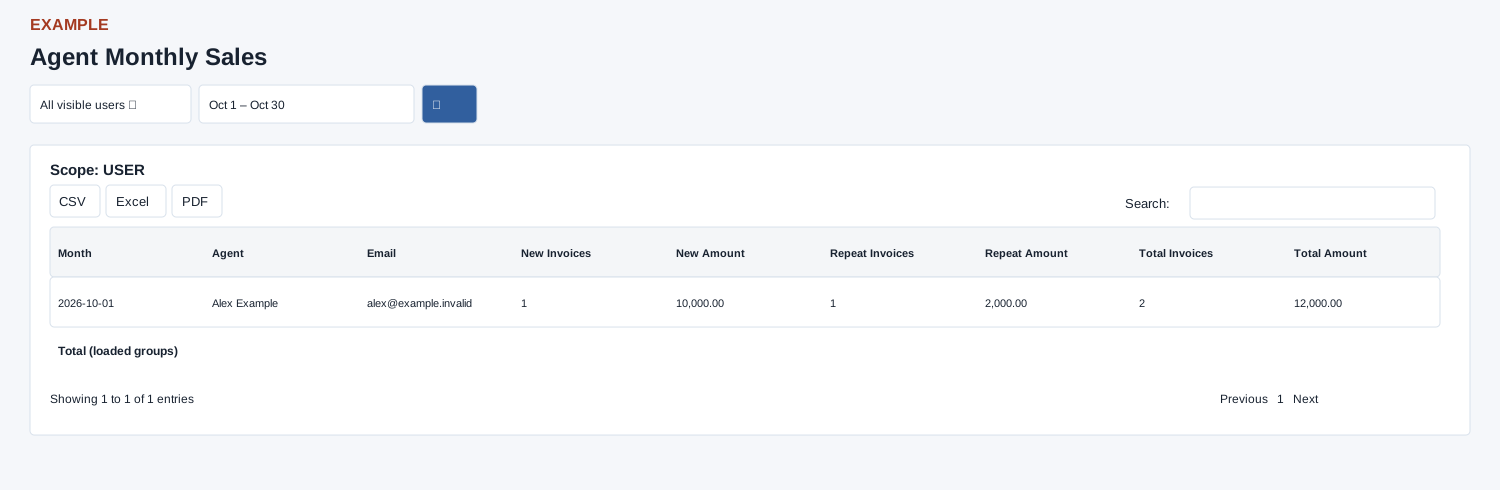
Open Reports → Agent Monthly Sales. Invoice report scope determines accessible users or teams; an access-restricted message appears when unavailable. Choose All visible users and Date Range, then select the search button to load results. The initial range is month-to-date.
Read the results
The table columns are Month, Agent, Email, New Invoices, New Amount, Repeat Invoices, Repeat Amount, Total Invoices, Total Amount. Groups active, non-void invoices by invoice month and current contact owner, splitting new and repeat amounts. Results are limited to 5,000 groups; ownership is current rather than necessarily the owner at invoice creation.
New and repeat invoices
An invoice is repeat when the same contact has an earlier active, non-void invoice in the company. Earlier means an earlier invoice date, or a lower invoice ID on the same date; the earlier invoice can be outside the selected range. Otherwise it is counted as new.
Date picker and table controls
The date picker offers Today, Yesterday, Last 7 Days, Last 30 Days, This Month and Last Month, plus a custom range. Apply the range and select the search control to reload the report. The table initially shows 100 rows per page and provides Excel, CSV and PDF export controls.
Interpretation and limits
Amounts sum invoice gross amounts, not cash collected. Total is New plus Repeat for the loaded groups; footer totals summarize all fetched groups before table search. Month is the first day of the invoice month. Search, sorting and pagination are available alongside exports; rows have no invoice drill-down. If invoice dates have times, the raw end-date bound can omit later times on the selected last day.
When the enhanced report loads, CSV, Excel and PDF export all loaded rows matching the table search, not just the current page. If enhancement fails, the original table controls can differ; check the visible controls.
Example and verification
For Alex Example, compare one month’s new and repeat counts and amounts with the total columns. If an invoice appears under another agent, inspect the contact’s current owner; this report uses current ownership and excludes void invoices.
See charts for this report and shared table and export controls.