Lead Response Time
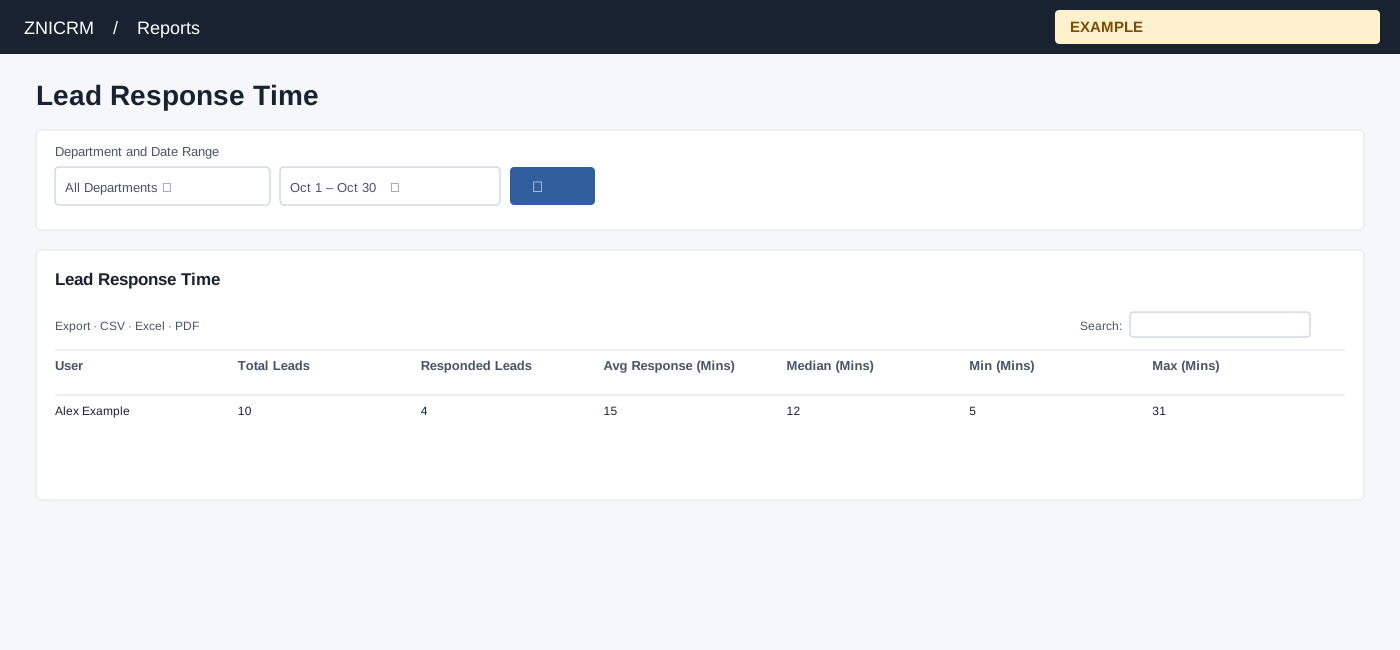
Open and filter
Open Reports → Lead Response Time. Results are restricted to the users available to your reporting scope and selected department. Choose Department and Date Range, then select the search button to load results. The initial range runs from one month ago to today.
Read the results
The table columns are User, Total Leads, Responded Leads, Avg Response (Mins), Median (Mins), Min (Mins), Max (Mins). Contacts are selected by creation date and current owner. A response is the first outbound conversation by that current owner at or after creation. Only leads with a qualifying response contribute to timings; zero is displayed when there are none.
Date picker and table controls
The date picker offers Today, Yesterday, Last 7 Days, Last 30 Days, This Month and Last Month, plus a custom range. Apply the range and select the search control to reload the report. The table initially shows 100 rows per page and provides Excel, CSV and PDF export controls.
Interpretation and limits
The creation range uses full-day boundaries; the qualifying outbound response can occur after the selected end date. Minutes use whole elapsed minutes, so partial minutes truncate. A zero timing with zero Responded Leads is no observed response, not immediate response. Owner changes can change attribution. When the shared enhancement loads, table search and sorting operate on loaded rows and CSV, Excel and PDF export matching loaded rows across pages. Original controls may differ if enhancement fails.
Example and verification
If 10 leads were created for Alex Example and 4 have qualifying outbound responses, timing statistics describe those 4, not all 10. Review missing outbound conversations and current ownership if Responded Leads is unexpectedly low.
See charts for this report and shared table and export controls.