Project task details and actions
Open the page
Projects > open a task card. Project permissions determine access and available actions.
Review and edit the task
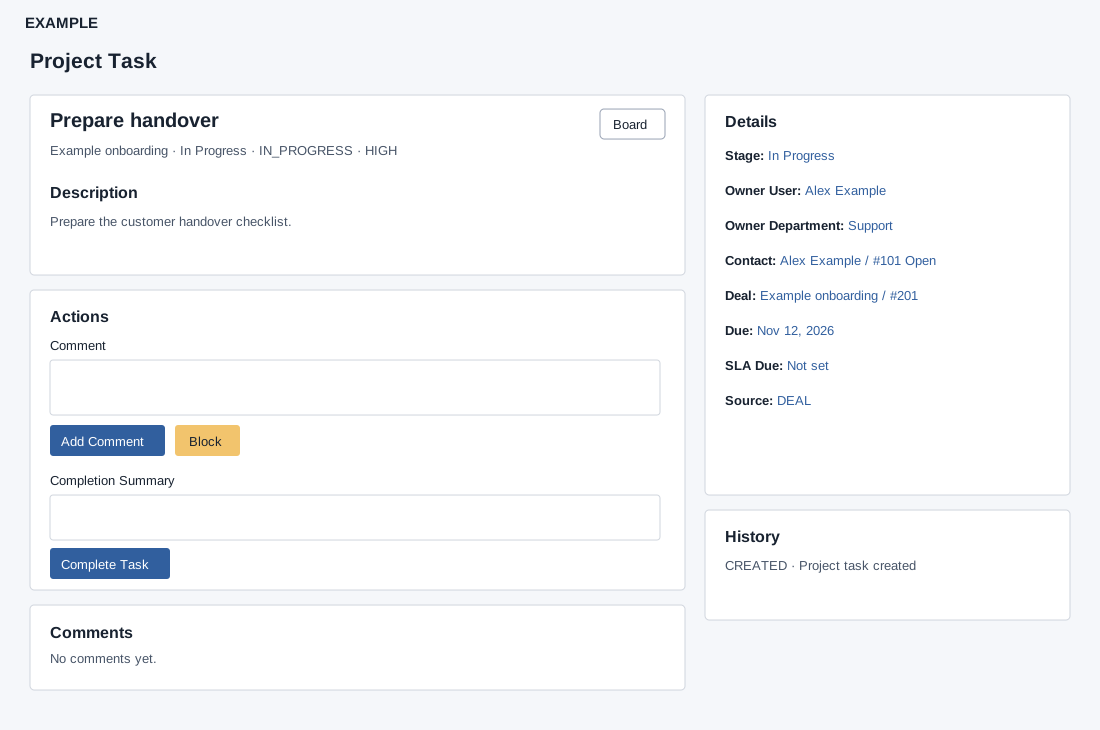
- The header shows task title, project, stage, status, priority and available SLA warning or breach; Board returns to the project board. Description provides the work context.
- Where permitted, edit title and description, and use Details to change Stage, Owner User, Owner Department, Contact and a deal related to that contact. Selecting and saving an inline editor changes the record. Due, SLA Due and Source provide context.
- Moving a stage may change status, due date and SLA: a DONE stage marks the task completed. Check the destination and review the resulting task.
Record progress
- Enter Comment and choose Add Comment. Block uses the comment as a blocker reason; Unblock can record a comment and changes a blocked task to in progress.
- When authorized and the work is complete, enter Completion Summary and choose Complete Task. Comments and History record the discussion and events. These actions change the live task.
- Example: a Requirements review task is blocked while waiting for a sample specification, then unblocked when it arrives.
Permissions, inline editors and actions
Task read access is required. Update permission makes title and description editable; title needs at least two characters. Move-stage permission exposes Stage; assignment permission exposes Owner User and Owner Department; assignment permission exposes Contact and Deal. Each popup editor saves independently using its checkmark; cancel dismisses it. Owner selectors include No user or No department and available records; Deal includes No deal linked. The task detail exposes no direct due-date, priority or communication-channel editor, task timer, attachment control or dependency editor on this screen. Search and select a contact, or enter 0 to clear it; an empty input retains the current contact. The Deal row appears only with a contact and lists related deals. Changing a contact may clear a mismatched deal. Open beside Contact opens its CRM conversation.
Comment permission displays Comment, Add Comment and either Block or Unblock. Add Comment needs text. Block and Unblock use the same optional text as a blocker reason or comment; Block updates only open, in-progress or already blocked tasks, and Unblock updates blocked tasks to IN_PROGRESS. Block/Unblock can record history and supplied text even when the status does not change. Check the task status afterward. A success response alone is not proof that a status changed when the original status was ineligible: verify the status after reload. Completion permission displays Completion Summary and Complete Task except when already completed. Completion sets status COMPLETED, records the optional summary as a completion comment, records history and attempts to mark SLA met; it does not move the stage.
Stage movement can reset status, due date and SLA. Without an explicit due date, a positive destination-stage offset sets a new due time from the move; otherwise it clears the due date. Moving to DONE completes the task. The success response can contain a separate SLA update failure, so inspect SLA status and due time after a change. Comments and History each load up to 100 entries. If an editor or action is missing, check its distinct permission; if a save fails, check the error, contact/deal relationship and active stage.