Project report task lists
Availability depends on your account configuration and permissions.
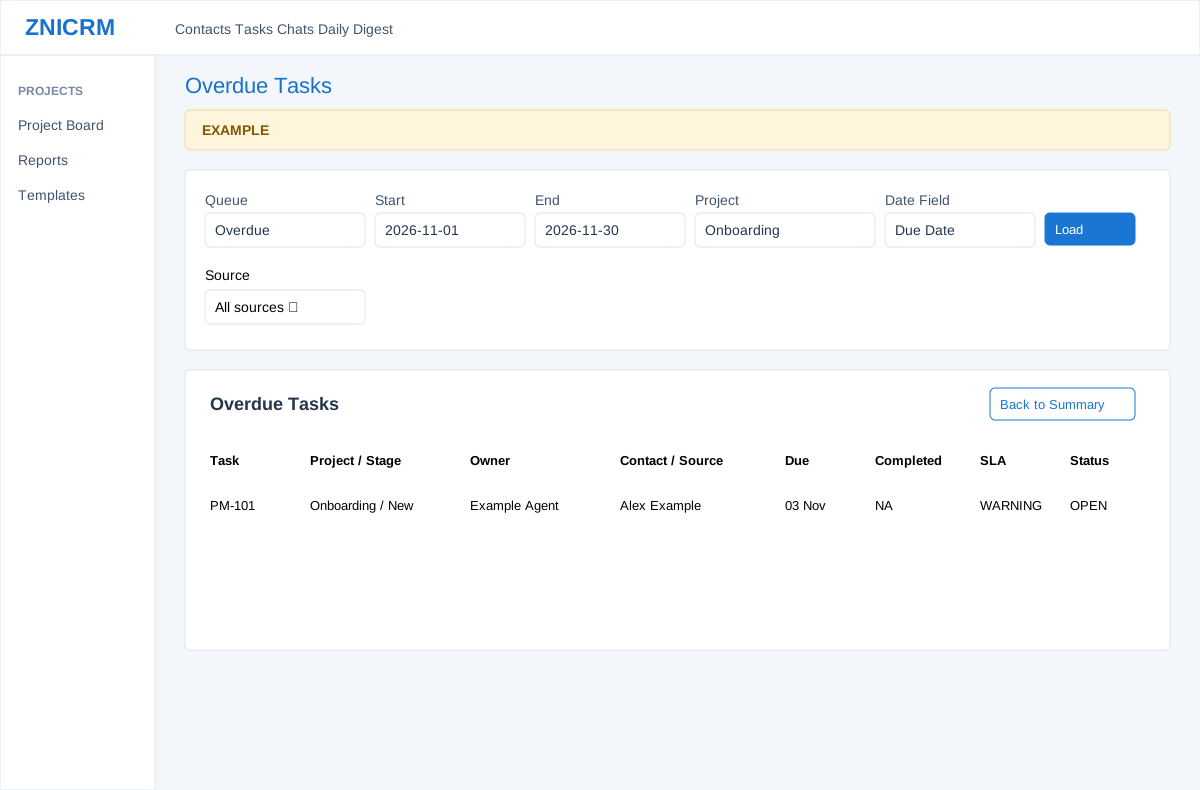
Open the page
Project Management Reports > select a metric or All Tasks. Project Management Reports permission and company feature access are required for the intended entry path.
Refine the task list
- Choose Queue, Start, End, Project, Source and Date Field, then Load. Queues include All, Open, Active, Overdue, Blocked, Completed, SLA Warning, SLA Breached, SLA Met, Subscription Due and Subscription Missed Deadline.
- A drill-down may carry stage, owner, department, SLA or subscription-specific scope. Stage and owner/department parameters are retained by Load but are not exposed as visible controls; SLA and subscription-specific parameters are not retained by the form when Load is submitted. Return to Summary to start a broader view. The report loads at most 1,000 rows, and the displayed matched count reflects those loaded rows.
Inspect a row
- Review Task, Project / Stage, Owner, Contact / Source, Due, Completed, SLA and Status. Open a task number for its detail or a contact name for its CRM workspace; Back to Summary returns to the summary.
- The table supports search, ordering and pages of 100 loaded rows. Before the limit, Created and Completed dates are ordered newest first, and Due and SLA Due dates earliest first; the table can then apply its own sorting. Open Tasks includes OPEN and IN_PROGRESS; Active includes those plus BLOCKED. Subscription Due means active subscription-linked work, not necessarily already due; Missed Deadline requires an active subscription-linked task with a past due time. Example: inspect an overdue Requirements review task and its owner before following up.
Search and export loaded rows
When the shared report enhancement loads, each table provides search, sorting, 100-row pages and CSV, Excel and PDF exports. Exports include all loaded rows matching the table search across pages; they do not retrieve records beyond the limits described above. KPI cards and other tables are not recalculated by searching one table. If enhancement fails, the original controls may differ. See report table controls.