Create a project task
Open the page
Projects > choose Project > Add Task. Project permissions determine access and available actions.
Fill in the task
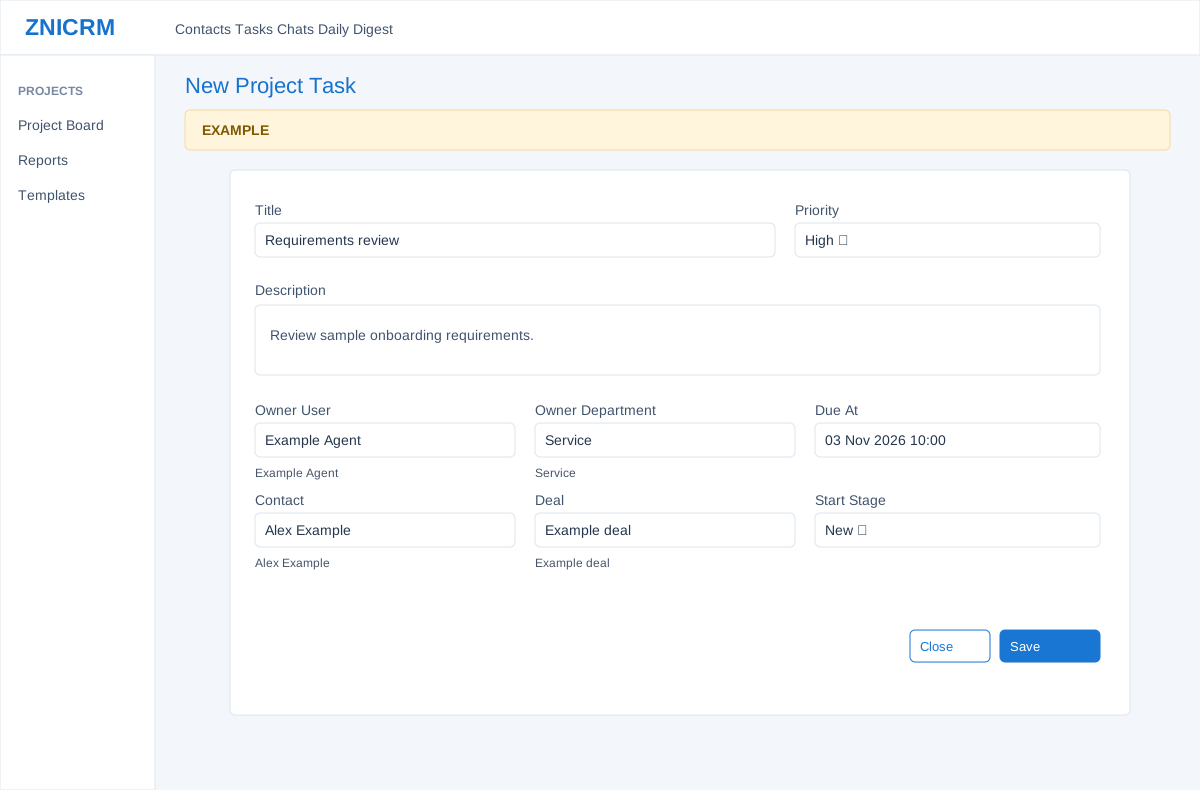
- Enter Title, choose Priority (Normal, Low, High or Urgent), and add Description. Use Owner User and Owner Department search suggestions to select owners; enter Due At when needed.
- Choose a Contact from its search suggestions to associate the work with a CRM record. The Deal selector appears after selecting a contact; choose a related deal if relevant. An unlinked task can be standalone.
- Choose Start Stage or leave Project Default. The form requires a title of at least two characters; task creation and stage availability depend on permissions and configuration.
Save deliberately
- Review the selected values and choose Save to create the task, or Close to dismiss the dialog. Saving changes live data. If the board has no active stages, consult an administrator before creating work that needs a stage.
- Example: create a Requirements review task for Alex Example, assign Example Agent, select High priority and set a due date.
Fields, result and errors
Add Task needs create permission and an active selected template. Title is required, 2–180 characters in the dialog. Priority defaults to Normal and also offers Low, High and Urgent. Description is optional. Owner User and Owner Department are search-and-select lookups; choose a suggestion rather than relying on typed text. Due At is an optional local date and time. If left blank, this manual creation path does not apply the stage due offset; a later stage move may set or clear due date.
Contact is an optional lookup. Selecting it reveals Deal, which searches deals for that contact; clearing or changing the contact clears the selected deal. Start Stage offers Project Default or an active stage; Project Default uses the template’s first active stage. Save creates the task and reloads the board; Close dismisses the dialog. A duplicate result also reloads without creating another task, so check for the existing card before retrying. Invalid contacts, mismatched deals and missing permissions return errors.
Example: create “Prepare handover” for Alex Example, choose a related deal, assign an owner and set a due time. After saving, find the task in the chosen stage and open it to verify the contact and deal. An absent card may be outside the board’s loaded limit or in a stage not currently active.