Subscription register
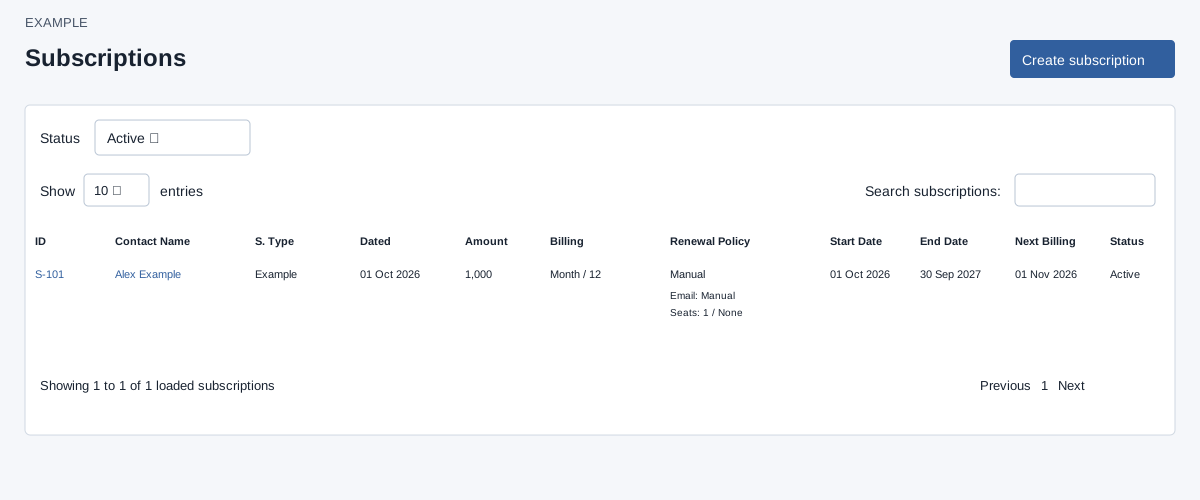
Open the page
Invoicing workspace → Subscriptions. SUBSCRIPTION access is required. Administrators see company subscriptions; other users see subscriptions for accounts they own.
Find a subscription
- Choose Status: Active, Expired or Cancelled; Active is the default. Select Filter resets to Active rather than showing all. Active includes Active or PastDue through end date and Grace through grace date; Expired includes Completed, Expired and elapsed Grace. Cancelled shows Cancelled. Paused subscriptions are not included by these three filters. The list loads at most 1,000 matching rows, newest ID first; Search subscriptions, column sorting and the page-size control affect only those loaded rows.
- Review ID, Contact Name, S. Type, Dated, Amount, Billing, Renewal Policy, Start Date, End Date, Next Billing and Status. Select the subscription number to open its detail and lifecycle controls in a new tab; the contact name opens the contact. Edit subscription opens this same selector with a different heading.
- Choose Create subscription to begin a new recurring agreement. Example: review an annual maintenance subscription before its renewal date.