Ticket status, approvals and ownership
Availability depends on your Helpdesk settings and permissions.
Open the page
Helpdesk → open a captured ticket → Conversation. You need Helpdesk access; each action also depends on your access to this ticket and the configured feature permissions.
Manage ticket state
- Capture assigns an unowned ticket to the acting user when confirmed. For captured tickets, On-Hold and Close are available when approval is not required; a closed ticket may offer Reopen.
- When closing, provide Resolution Code and Closure Reason where prompted or required by configuration, then confirm Close Ticket. Reopening asks for a Reopen Reason. Review the reason and ticket state before confirming.
Handle approval and history
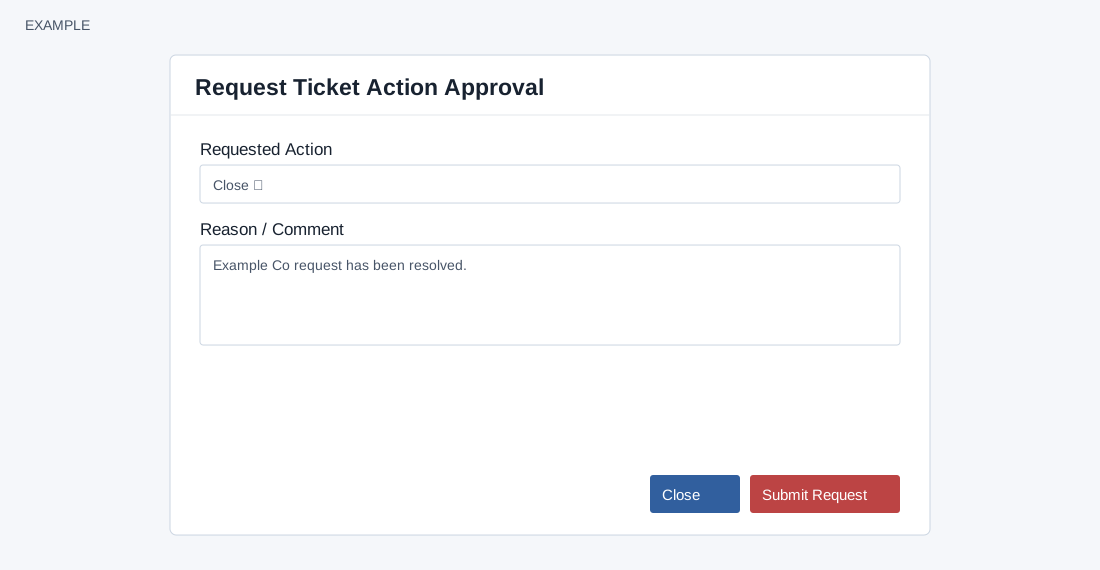
- If configured, Close, On-Hold and Delete require approval. Choose Request Approval, select Requested Action, enter Reason / Comment and Submit Request. Reason / Comment must contain at least two characters and is limited to 1,000 after sanitization. An active matching shared escalation binding is needed, only one request can be pending, and the offered action depends on ticket status. An existing request shows Approval Pending; the ticket displays approval history and decisions where available.
- Spam marks the ticket junk and also marks its linked CRM contact junk; verify both records before using it. Delete changes ticket status to deleted. Status changes cancel pending action requests and synchronize SLA and escalation state; closing also triggers the closure workflow and may create a feedback request. These outcomes depend on configuration and are not proof of notification delivery. In History & links, Lifecycle Outcome and Transfer History show recorded changes and reasons when enabled. Changing an owner can request a transfer reason depending on configuration.