Create a support ticket
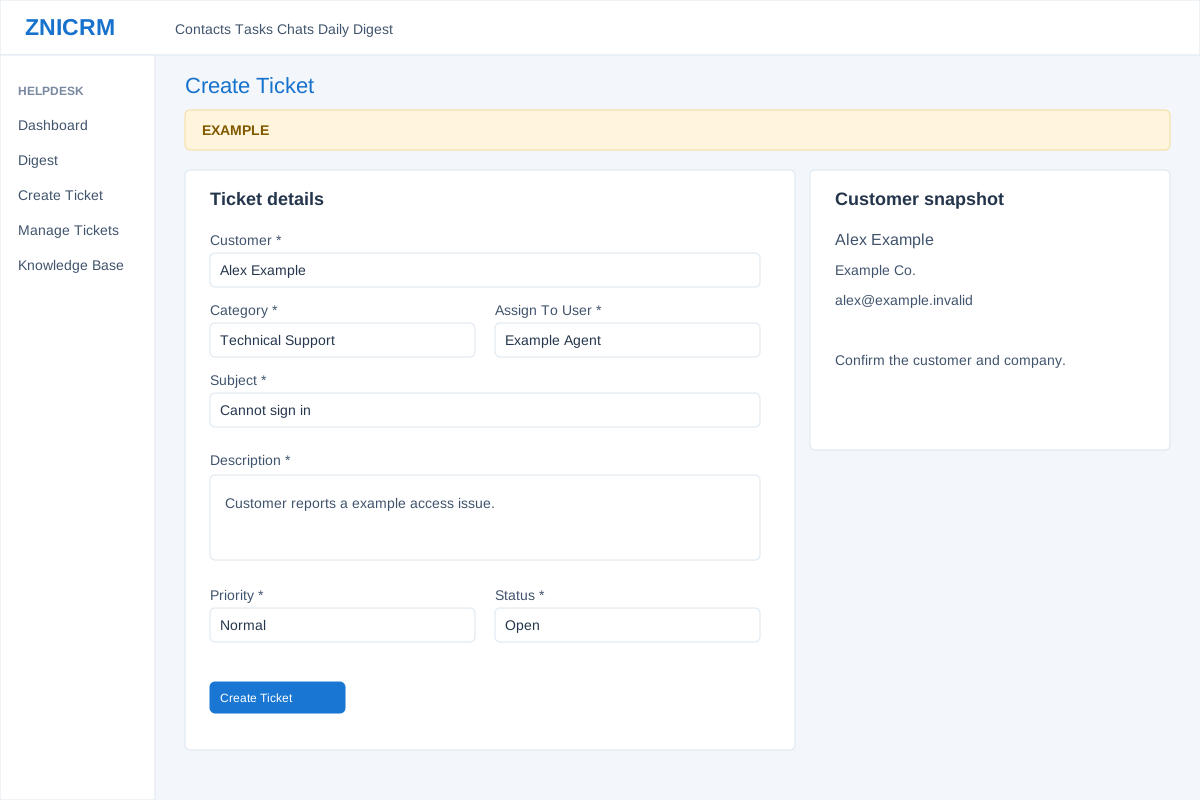
Open the page
Helpdesk → Create Ticket. Helpdesk access and saved Helpdesk configuration are prerequisites.
Select the customer and route
- Search Customer by name, phone, email or company and select an existing CRM contact from the dropdown. The Customer snapshot then shows CRM context, account manager and available quick links; verify the contact and company.
- Choose Category to route the issue and load available Assign To User choices; Self is initially offered. Complete Additional intake fields shown, including fields marked required. These fields are configured by the account and can differ.
Describe and create
- Enter a short searchable Subject and a Description covering symptoms, impact, prior attempts and the expected outcome. Choose Priority: Low, Normal, High or Urgent; choose Status: Open, Closed or On-Hold.
- Review the intake checklist and choose Create Ticket once the valid contact and required fields are complete. Creating a ticket saves a live support record. Example: “Cannot sign in” with a description of the affected workflow.
Validation and result
Helpdesk access and configured Helpdesk settings are prerequisites. Customer suggestions begin after three characters and show up to ten; select a contact rather than typing an unselected name. Clearing the customer search resets the selection. Category starts at Select One; changing it reloads support users and resets Assign To User to Self. Priority defaults to Normal and Status to Open. Additional TEXT fields use configured default text; DROPDOWN fields show configured comma-separated options, with required fields marked. Subject is truncated to 120 characters by the service. This form does not add an attachment.
Self is the initial assignment; an explicit other agent is checked against support membership and the category’s routing department. Verify the actual assigned agent after creation. The page can show a success-style “Your ticket id is” banner even if creation returned an error; check for a valid ticket ID and inspect the ticket list before retrying. Customer snapshot and Open customer timeline help verify context. Opening a ticket can record a viewed event.