Global search
Find a contact or account from the global header.
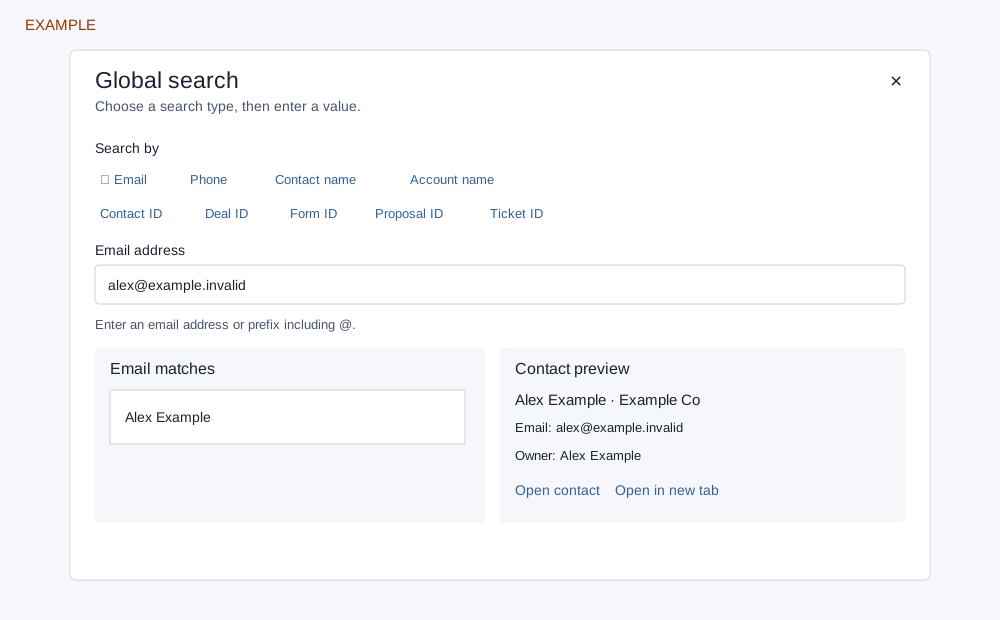
Search and open a result
- Select Search accounts or press Ctrl+K (Command+K on Mac). Choose Email, Phone, Contact name, Account name, Contact ID, Deal ID, Form ID, Proposal ID or Ticket ID. The last used search type is remembered in this browser for the signed-in company and user; the query is cleared on close.
- Email requires an @ in an address or prefix; Phone requires at least eight digits. Other types require at least three characters. Deal, form response, proposal and ticket IDs find the linked contact, not the document itself.
- Select a result for its preview. Open contact/account opens the record; Open in new tab opens it separately. On narrow screens Back to results returns to the list. Clear removes the query; Try again retries failed search or preview. Escape closes. Use arrow keys to move among results and Enter to open the selected preview.
Names and email use prefix matching; phone uses a substring match. The service searches within the company and returns at most 50 rows before the interface removes duplicates. ID lookups require a contact profile row, so an otherwise existing contact without one may not appear. Search results use company scope; the separate contact preview checks access, so a preview can be unavailable even when a result appears. If no match appears, check the value and search type; if loading fails retry or sign in again.