Email logs
Availability depends on your account configuration and permissions.
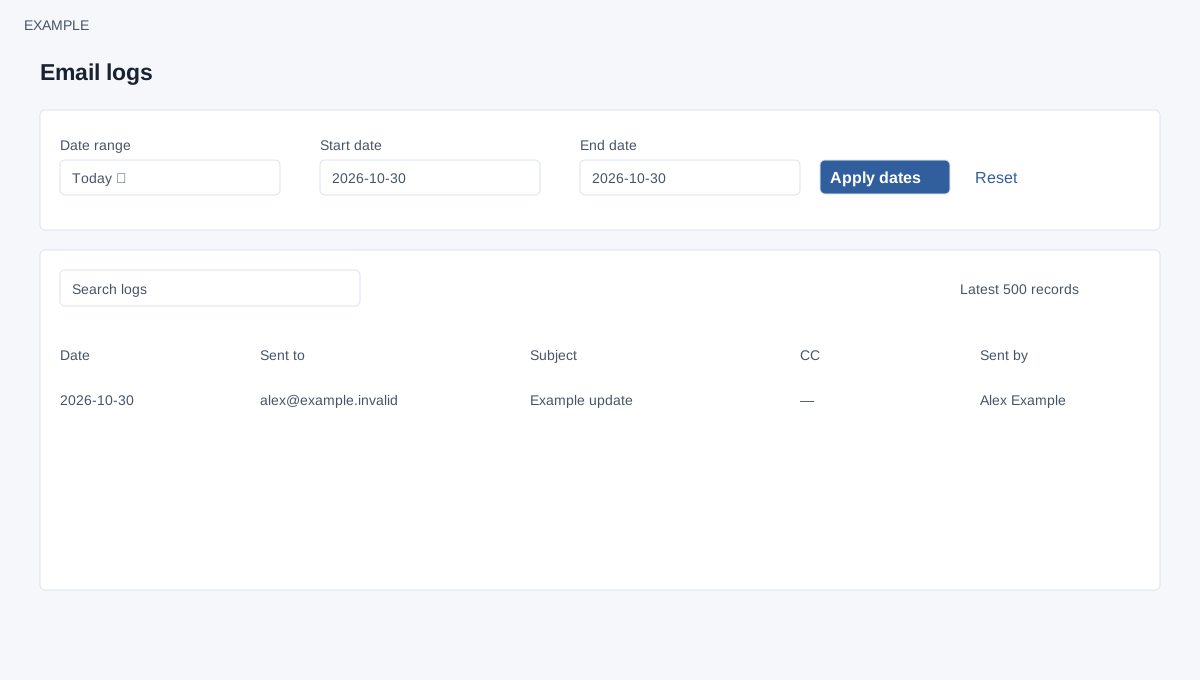
Open the page
Email logs report (/v4/email/reports-logs.php; access depends on permissions). See the access requirements below.
Choose a period
- Choose Date range: Custom range, Today, Yesterday, Last 7 days, Last 30 days, This month or Last month. For a custom range set Start date and End date, then choose Apply dates. Reset returns to the default report.
- Use Search logs to narrow the loaded table. The report shows up to the latest 500 records for the selected period, so absence from that limited list does not by itself prove no activity occurred.
Interpret the table
- Review Date, Sent to, Subject, CC and Sent by to identify a message and sender. These columns contain private contact and message information; restrict access and sanitize any examples.
- Example: search for a subject such as Example product update and compare its timestamp with the campaign. A log row alone does not necessarily establish delivery or reading.
Access and limits
EMAIL access and allow email are required. The default period is today. Both dates are required and the end must not precede the start; invalid ranges show an error and do not load rows. Administrators see company users’ activity; other users see their own. Search and table sorting/pagination apply only to the newest 500 loaded rows. These are general email activity records, not a campaign-recipient delivery or click report; no unsubscribe or tracking control appears here.