Email groups and CRM filters
Open the page
Email → Email Groups. See the access requirements below.
Create a group
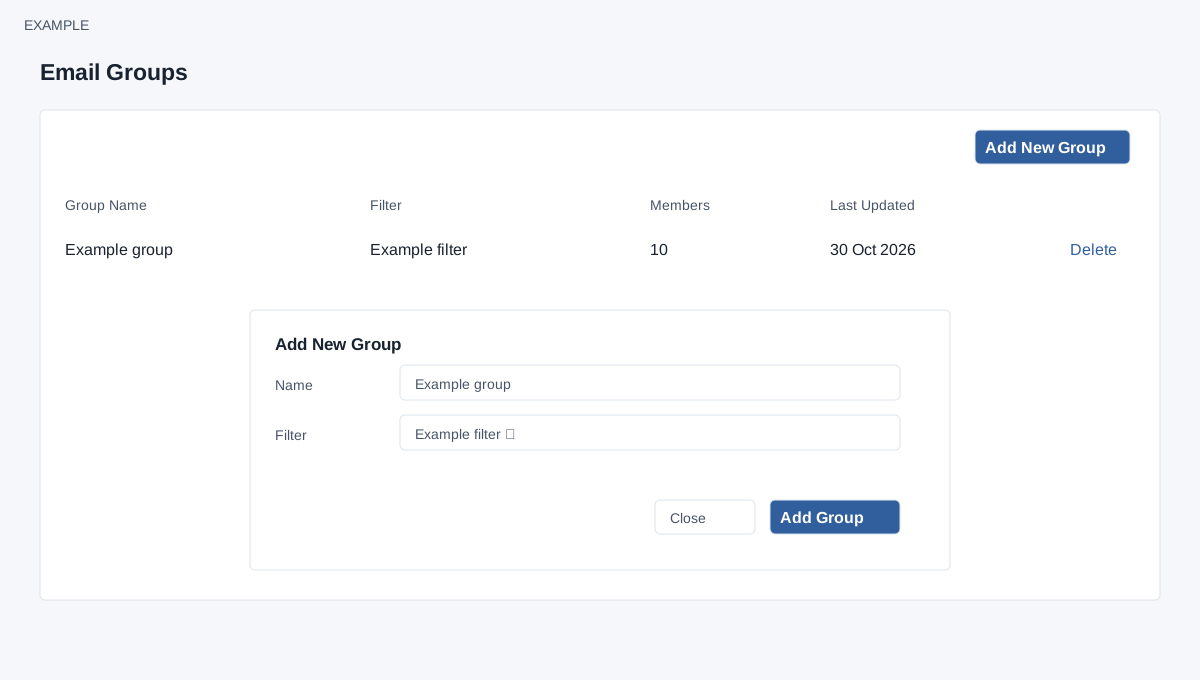
- Choose Add New Group. Enter a descriptive Name and select an existing CRM reporting Filter. If no suitable filter exists, use the link in the dialog to create one in CRM filters, then return to the group dialog.
- Choose Add Group to save. Example: name the group Newsletter and select a newsletter-eligible filter. Inspect the group’s Members count before choosing it for a campaign; check whether the filter reflects the intended audience.
Read and manage groups
- The table shows Group Name, Filter, Members and Last Updated. A row action can remove a group; the confirmation warns that the group and its users will be removed and cannot be recovered. Review the consequences carefully before confirming; do not infer that underlying CRM contact records will be deleted.
- If the group has zero members, inspect its filter and eligible contacts before sending. Membership can change as contact data changes; the stored count is not refreshed by this list. Verify the current filter audience before use.
Access, filter lock and counts
The page checks the Email and Email Groups permission flags. The list contains up to 100 groups owned by the current user. Add New Group opens Name and CRM Filter; choose one of your saved filters and select Add Group. Close or × dismisses the dialog. Creation locks the selected filter and stores a current match count; it does not copy a permanent recipient list. The displayed count is a contact count at group creation, not an eligible-email or delivery count. The campaign evaluates the saved filter again when it is processed.
Delete asks for confirmation. Deleting removes the group and attempts to unlock its filter; it does not delete CRM contacts. Deleting a group can make associated campaigns disappear from campaign lists and details. Check dependent campaigns before deleting a group. Creating a group also locks the filter before inserting the group, so an error can leave it locked: inspect the filter and group before retrying. The displayed group list offers no refresh-members control. See Reporting filters for reviewing the audience.