User Activity Timeline
Use this report
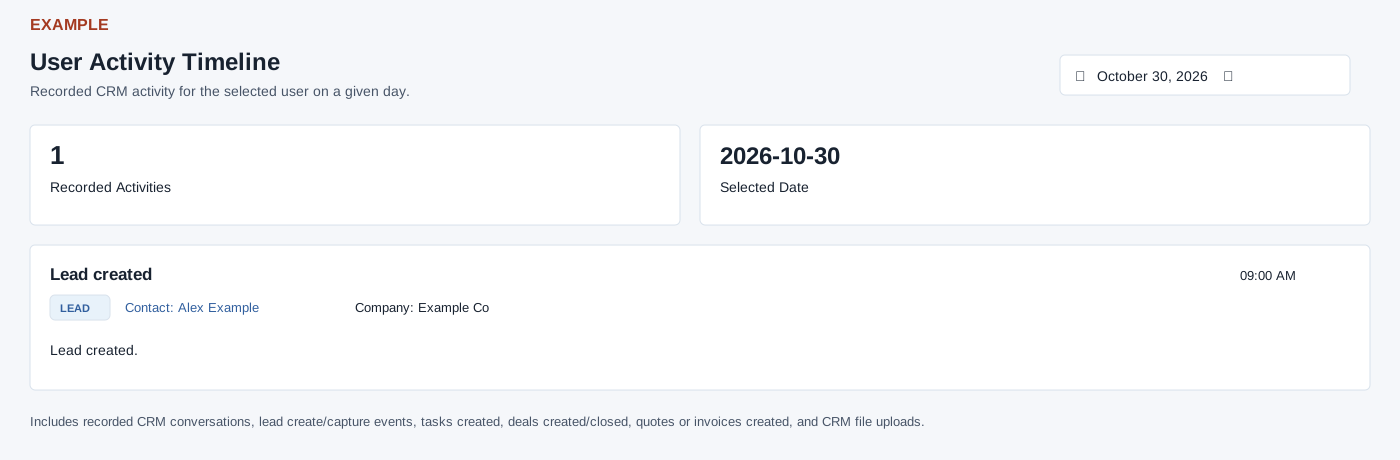
Open User Activity Timeline from New Digest for the selected permitted user. CRM access is required. The single-date picker defaults to today and reloads automatically when a date is chosen. Cards show Recorded Activities and Selected Date; the timeline includes recorded CRM conversations, lead create/capture events, tasks created, deals created/closed, quotes or invoices created and CRM file uploads. Contact links open the CRM conversation in a new tab. A loading, empty or failure message appears as appropriate; retry or check scope and date if loading fails.
Read the timeline
Each event shows its title, optional type badge, Contact, Company, time and activity text. Hovering the time exposes the full timestamp. Events are sorted newest first. The selected calendar day runs from midnight through 23:59:59. The report returns up to 500 events from supported activity sources, so Recorded Activities may not be a complete daily total. A zero after a loading failure is not a verified zero. Select another day or reopen the report to retry; there is no search, export or pagination control here. A missing or unauthorized requested user falls back to the current user.
Verify the result
For Example Co, pick a date and wait for the timeline to reload; Recorded Activities reflects the returned events for that date. Select a contact link to inspect its conversation in a new tab. Changing the date and opening a contact do not create an activity from this report. If loading fails, retry and check CRM access, selected user and date; an empty day is not proof that no activity exists outside this report’s supported types.