Helpdesk Digest Queue
Use this report
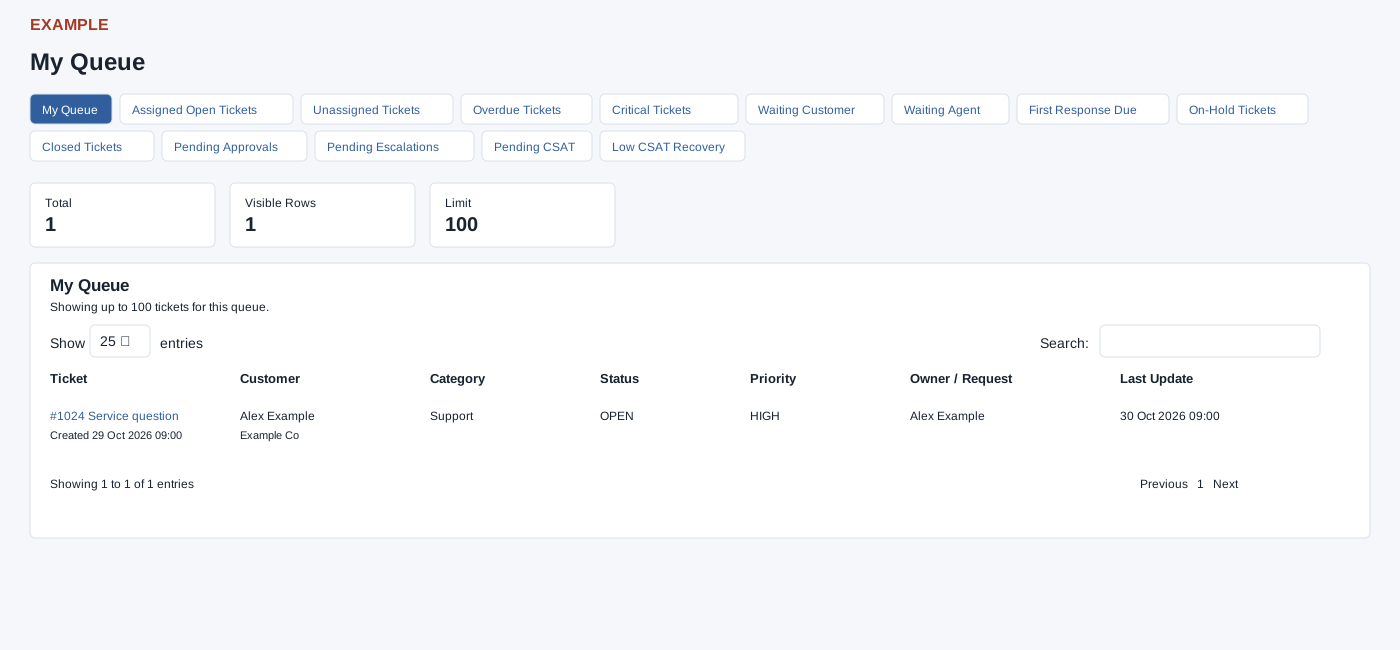
Open a Helpdesk queue from New Digest. Helpdesk access and report scope are required. Tabs include My Queue, Assigned Open, Unassigned, Overdue, Critical, Waiting Customer, Waiting Agent, First Response Due, On-Hold, Closed, Pending Approvals, Pending Escalations, Pending CSAT and Low CSAT Recovery; some depend on digest preferences. The configured row limit is 1–100, so the summary can exceed displayed rows. Select a ticket title to open its workspace; opening it records viewing activity. Check user scope and preferences if a queue is absent.
Read the queue and its table
My Queue is open tickets assigned to the scoped user; Assigned Open requires an assignee, Unassigned has none. Overdue uses the configured resolve hours and the ticket creation date or closure date if present; Critical means open with High, Urgent or Critical priority. Waiting Customer is an open ticket assigned to the user whose last conversation was by a staff user; Waiting Agent is open with a customer or no last conversation. First Response Due means open with no staff-user conversation. On-Hold includes Pending and on-hold variants; Closed includes Close and Closed. Pending Approvals and Pending Escalations use their respective request/assignment records. Pending CSAT includes pending or sent feedback requests; Low CSAT Recovery includes low-score requests with pending or escalated recovery.
Total is a separate count, Visible Rows is the number fetched, and Limit is the configured cap; the table initially shows 25 rows per page. Use Search, column headings, Show entries and Previous / Next on the loaded rows; there is no export or date filter. Ticket contains the subject, reference and Created date; Customer shows contact and company; Category, Status and Priority reflect the returned record. Owner / Request can be the assignee or requester. Last Update falls back from last conversation to due time, send-after time or record date, so it is not always a conversation timestamp. The link is available only for a valid ticket ID and opens a new tab.
Verify the result
For Example Co, choose the relevant queue in New Digest, compare the summary with displayed rows, then select a ticket title to work in the ticket workspace. The queue itself does not resolve tickets. Visible scope and a specifically selected user use different permission filters; unavailable preference-controlled queues fall back to My Queue. If denied or empty, check Helpdesk access, scope, preferences and the configured row limit.