Dialer outcomes, callbacks and CRM promotion
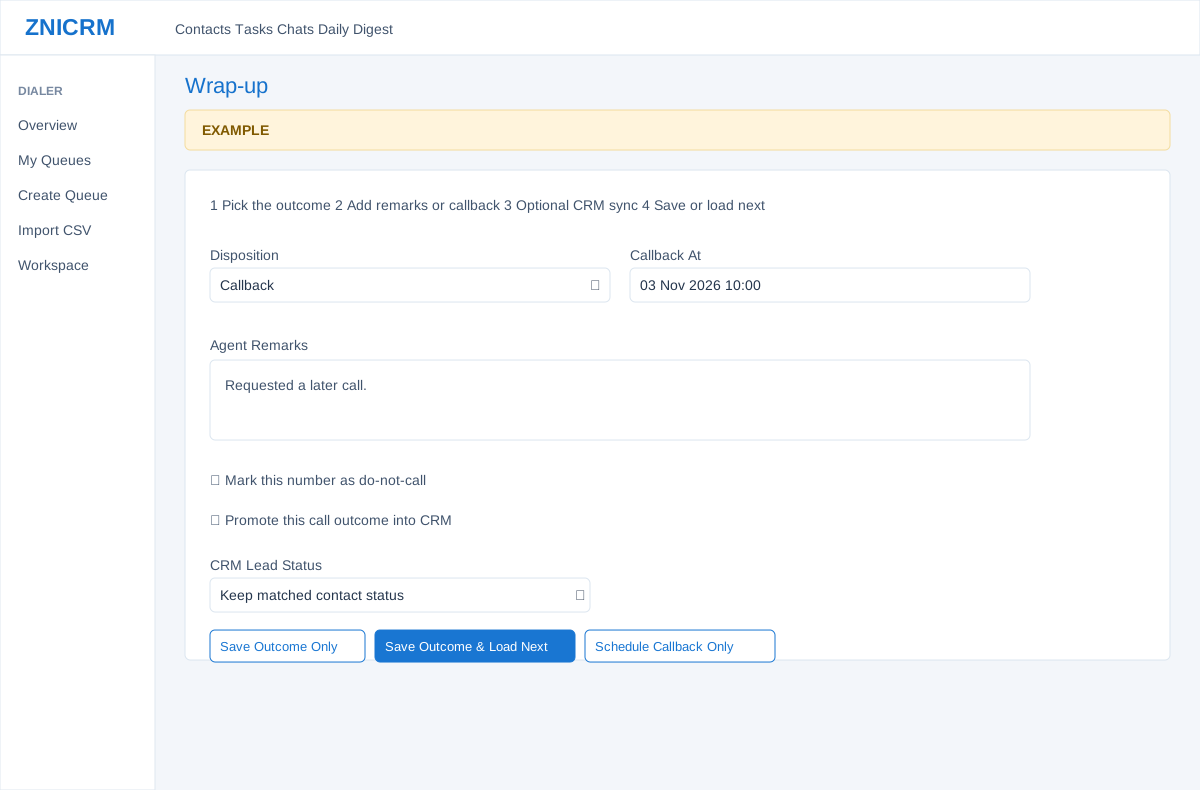
Open the page
Dialer > Workspace > claimed prospect > Wrap-up. Dialer access and the relevant action permissions are required.
Record the result
- Choose Disposition and read its help. The default list can include No Answer, Interested, Callback, Wrong Number, Not Interested and Do Not Call; account-defined sets may differ. Enter Agent Remarks and Callback At when required by the disposition.
- Mark this number as do-not-call when appropriate; a configured disposition can also select that flag. Verify the outcome and number before saving.
Choose how to finish
- Save Outcome Only records the outcome and clears the current prospect. Save Outcome & Load Next saves and requests another item; Schedule Callback Only requires Callback At, records the callback and also requests the next item. In Power mode the next claim can start a call after the after-call interval.
- When enabled and the disposition permits it, Promote this call outcome into CRM and choose CRM Lead Status or keep the matched contact status. Saving may create a CRM contact or link activity to a matched contact. If promotion fails after the disposition is saved, the interface reports that the dialer outcome was already saved; investigate before retrying.
- Example: save a Callback disposition with an agreed callback time and notes, or save only if you do not want to immediately load another prospect.
Outcome effects
A disposition save increments attempts, clears the claim and records a log. DNC takes precedence and suppresses the selected dialed phone where available; WRONG_NUMBER also creates a wrong-number suppression for the selected dialed number (or the primary number if no matching dialed number was supplied). A future callback time or CALLBACK code yields CALLBACK, while other outcomes become COMPLETED. A callback-required flag makes the form require Callback At; Schedule Callback Only separately sets CALLBACK, logs it and releases the claim without the disposition-save path. The form does not require a future date; use the agreed time and check the queue.
CRM promotion is a second operation after the outcome save: it can match or create a contact, update a selected lead status and follow-up, add a follow-up task and call timeline entry, and mark the item promoted. An error can occur after some CRM changes; inspect both contact and queue before retrying. A status choice is optional; Keep matched contact status sends no change. Where the promotion preview exposes Open CRM Contact, it opens the linked or matched contact in a new tab for review; opening it is not a promotion save. Configured promotion and DNC flags influence the form but permissions and account rules still apply.