Work a dialer queue
Open the page
Dialer > Workspace. Dialer access and the relevant action permissions are required.
Claim and review
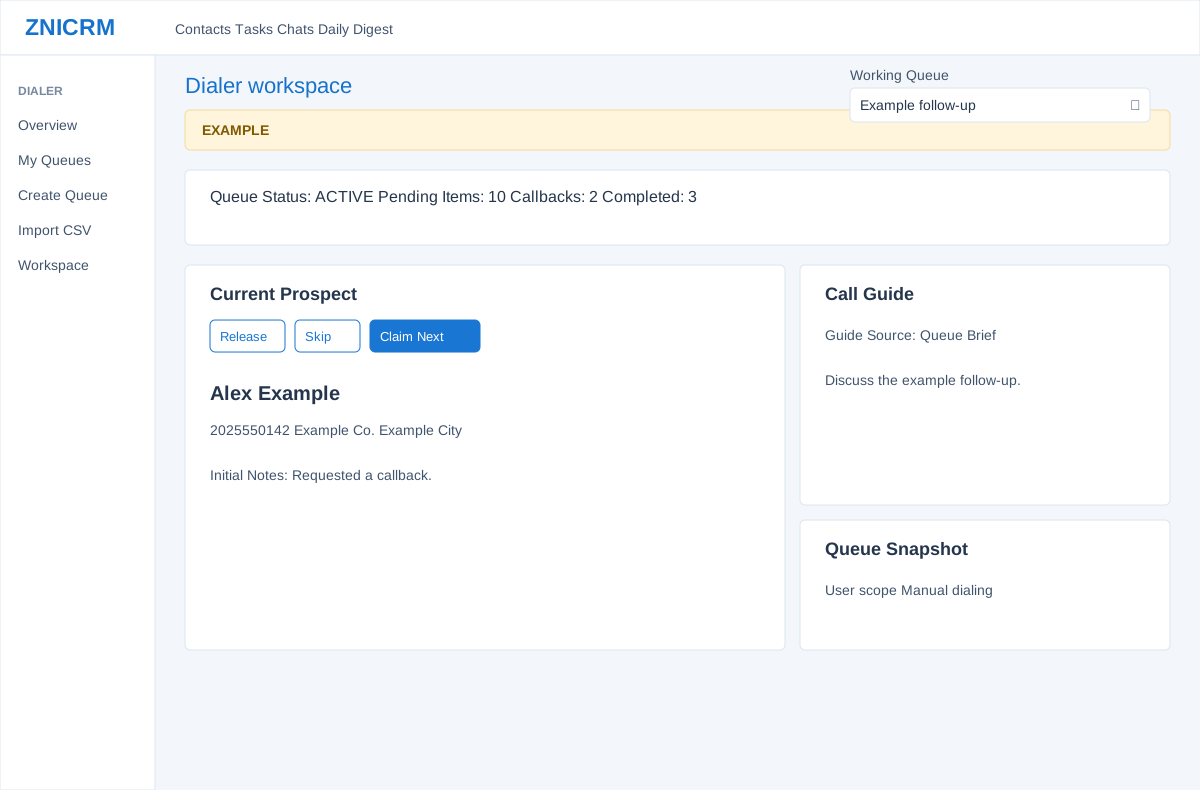
- Choose Working Queue and review Queue Status, Pending Items, Callbacks and Completed. Claim Next reserves an available prospect for the agent; a claim has an expiry and is renewed while the item is being worked.
- Current Prospect shows the name, phone, company, city, source, status and initial notes. Use primary or alternate call links where appropriate. Release gives up the current claim; Skip releases it and requests the next item. These actions change queue state.
- In an AUTO queue with POWER mode enabled, claiming an item can automatically start a telephony session. Confirm the queue and dialing mode before Claim Next or Skip.
Consult context
- Call Guide lets the agent choose Queue Brief or an available script. It provides talking points and does not itself save the outcome. Queue Snapshot shows queue name, scope, dialing type, Auto Workflow and description. Recent Work shows the last 12 outcomes in this browser tab; it is not a complete activity report.
- Example: claim an Alex Example record, read the queue brief, call the appropriate number and then record the outcome in Wrap-up.
Claim and release behavior
Claim Next first returns your existing unexpired claim in that queue if one exists. Otherwise eligible due callbacks are prioritized, followed by other eligible items ordered by callback/item date, sequence and ID. Future callbacks, do-not-call items and actively claimed items are not candidates. Release clears the claim and returns the item to its appropriate pending/callback state. Skip is release followed by another claim; it is not a permanent skip and can return the same eligible item. If no item is available, inspect the queue state and callback times. The workspace requests a 900-second claim and sends heartbeat renewals every 60 seconds while working; an expired or lost claim can make an outcome fail, so reclaim and verify before retrying.
Switch queues and use call links
Release your claim before changing Working Queue when another agent should immediately receive the item. Changing the dropdown clears the local prospect, stops heartbeat/status polling and the after-call countdown, and loads the other queue. It does not send a release for the old claim; that reservation can remain until expiry. A primary or alternate Call link opens your device’s phone app with that number and records the chosen number in the workspace. It is separate from the Custom Telephony Start Dial workflow and is not proof that a call connected.