Contact Engage footprints
Open and scope
In an open contact’s conversation select Footprints. CRM access and a valid company contact are required; the viewer must be an administrator, the contact owner, the owner’s department manager, or have CRM read permission. A standalone view also offers Conversation to return to the contact. The report uses linked Engage websites and up to 100 stored visitor-key relationships for this contact; no relationship or no linked website can produce empty tables.
Choose a visit window
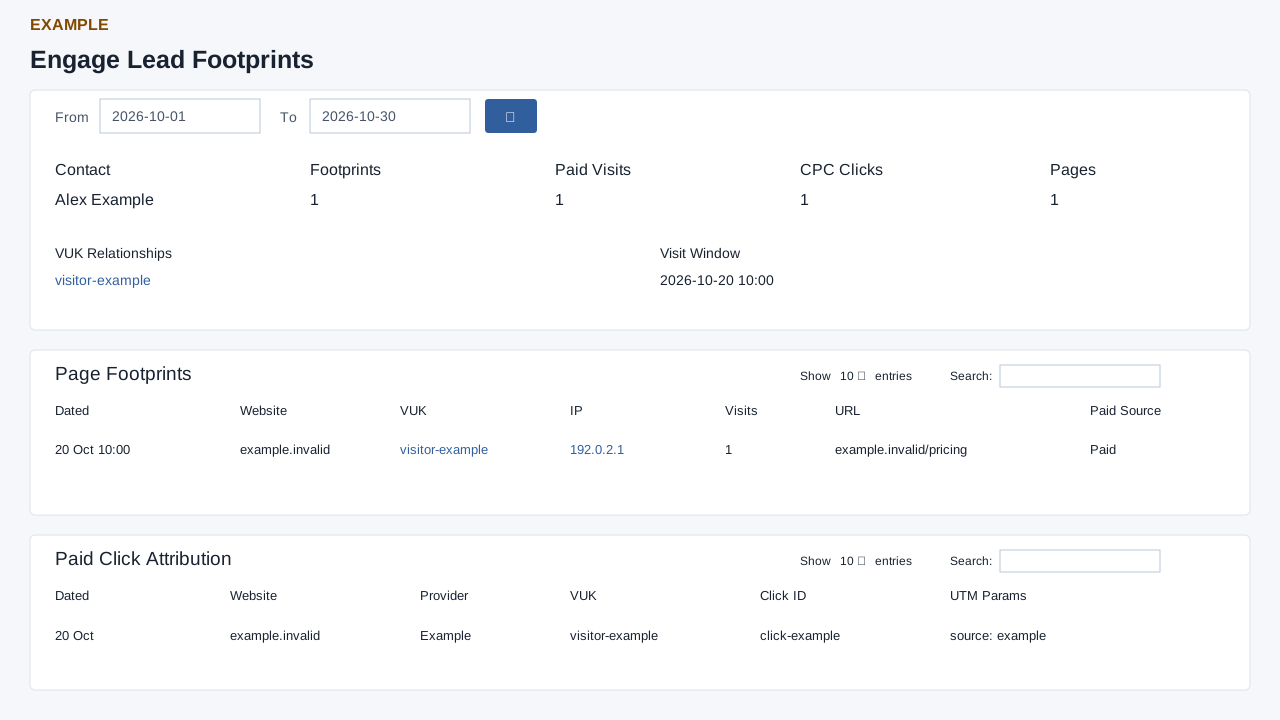
Set From and To, then select the search button. Empty dates default to 30 days before today and today. Page footprints use the full days, while paid clicks are compared using date values directly; compare boundaries carefully before reconciling the tables. The report reads at most 500 most recent page rows and 200 most recent paid-click rows. Narrow the range to inspect older activity that falls beyond those limits.
Read the evidence
Contact identifies the record; Footprints counts returned page rows, Paid Visits counts returned rows marked paid, CPC Clicks counts returned click rows, and Pages counts distinct nonempty URLs among those page rows. These are capped report results, not necessarily lifetime totals. Visit Window shows the earliest and latest returned page-row dates. VUK Relationships lists stored visitor keys; select one for the related visit-details report in a new window.
Page Footprints lists Dated, Website, VUK, IP, Visits, URL and Paid Source. VUK and IP links open visit details for the selected window. Visits is the row’s stored value; it is not the Footprints card count. Paid Source falls back to “Paid” for a paid row without a source. Paid Click Attribution lists Dated, Website, Provider, VUK, Click ID and UTM Params. Each table has its own search, sort and pagination; the default order is newest date first. A link to visit details uses the chosen key and dates and can show other records for that key.
Example and recovery
For Example Co, one returned footprint marked paid and one click suggest where to investigate the lead’s acquisition. Open the visitor key, check the date window and compare the landing URL and UTM details before attributing a sale. Missing results may mean no stored visitor relationship, no linked website, a date boundary mismatch or the row caps; a visitor key is a relationship, not proof of a person’s identity.