Create a customer assignment
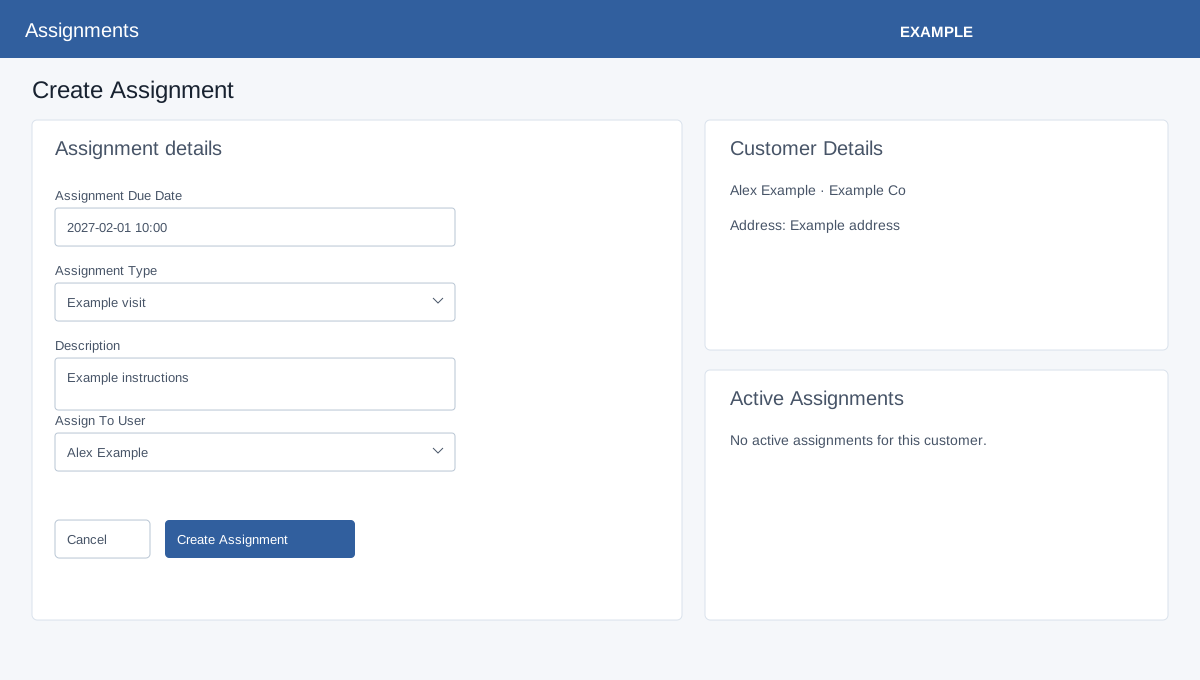
Open Assignments → Create New, or Create Assignment from the report or a contact. Bookings access is required for the create page. Configure at least one assignment type and ensure the CRM contact has an address. A type linked to a department offers that department’s users; a type without a department offers active company users. A subscription-linked type may require an eligible subscription for the service date and enforce its cycle booking limit.
Select the customer
Without a preselected contact, type at least three characters in Customer and select a contact suggestion. Company suggestions are not accepted. The page opens with Customer Details: name, company, manager, address and phone. Change customer returns to search. Active Assignments shows up to ten pending assignments for this contact, including type, date, assignee and instructions; review it for duplicate work.
Schedule and verify
- Enter required Assignment Due Date in
YYYY-MM-DD HH:mmusing the date/time picker. Select required Assignment Type; wait for Assign To User to load and select a user. Description is optional and becomes instructions. - Select Create Assignment. On success the page stays open, shows feedback and adds a row to Active Assignments. It creates a Pending booking, a task and notification for the assignee; the system attempts TeamSpoor beat-plan creation when integrated. The booking success message does not confirm external delivery; check the integration separately. The contact address and phones are copied into the assignment at creation, so later contact changes do not automatically rewrite that stored address. Check the report and assignee’s task. Cancel returns to the contact-filtered report without submitting.
For an Example Co visit, choose Alex Example and a date covered by the subscription, create the assignment, then check the assignee’s task and the report. If the user list cannot load, select the type again. Correct invalid date, type or user messages. Missing contact address, a user outside the linked department, an invalid type, no subscription covering the date or an exceeded cycle limit can prevent creation. If a network response cannot confirm the result, check Active Assignments before retrying.