Developer apps
Register an app that authenticates users through the CRM API.
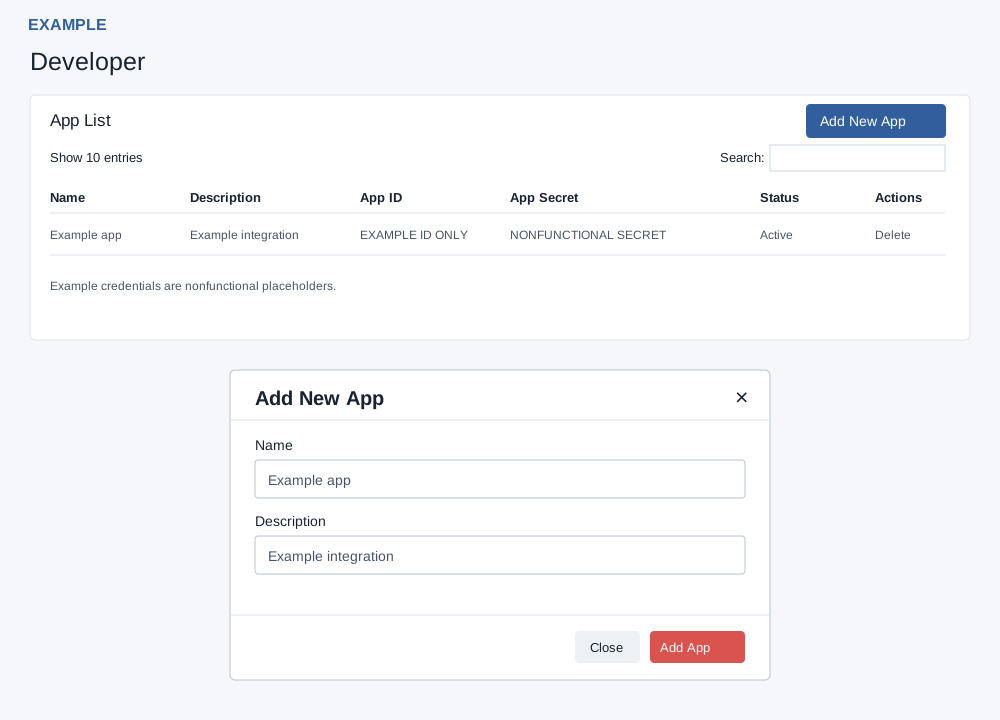
Create and manage apps
Administrators open Account Settings → Developers → Developer. The App List shows Name, Description, App ID, App Secret, Status and Delete. Secrets are displayed in the table; share them only with the authorized integration owner. Use the table search, column headings and pagination to find a loaded row. Close or × dismisses the add dialog without submitting. The page states a ten-app maximum and displays at most ten apps.
- Choose Add New App, enter Name and Description, then choose Add App. An administrator must provide both a valid name and a description. Success reloads the list.
- To remove an app, choose Delete and confirm. Deleting the app also deletes its OAuth tokens; connected clients may lose access. Check the list and integration after an authorized change.
For Example Co, use a descriptive app name and description, then verify the saved row after the reload. If creation fails, check the error and administrator access; because the list is capped at ten rows, an absent additional row alone does not establish that creation failed.