Contact forms list
Create, locate and share public lead intake forms.
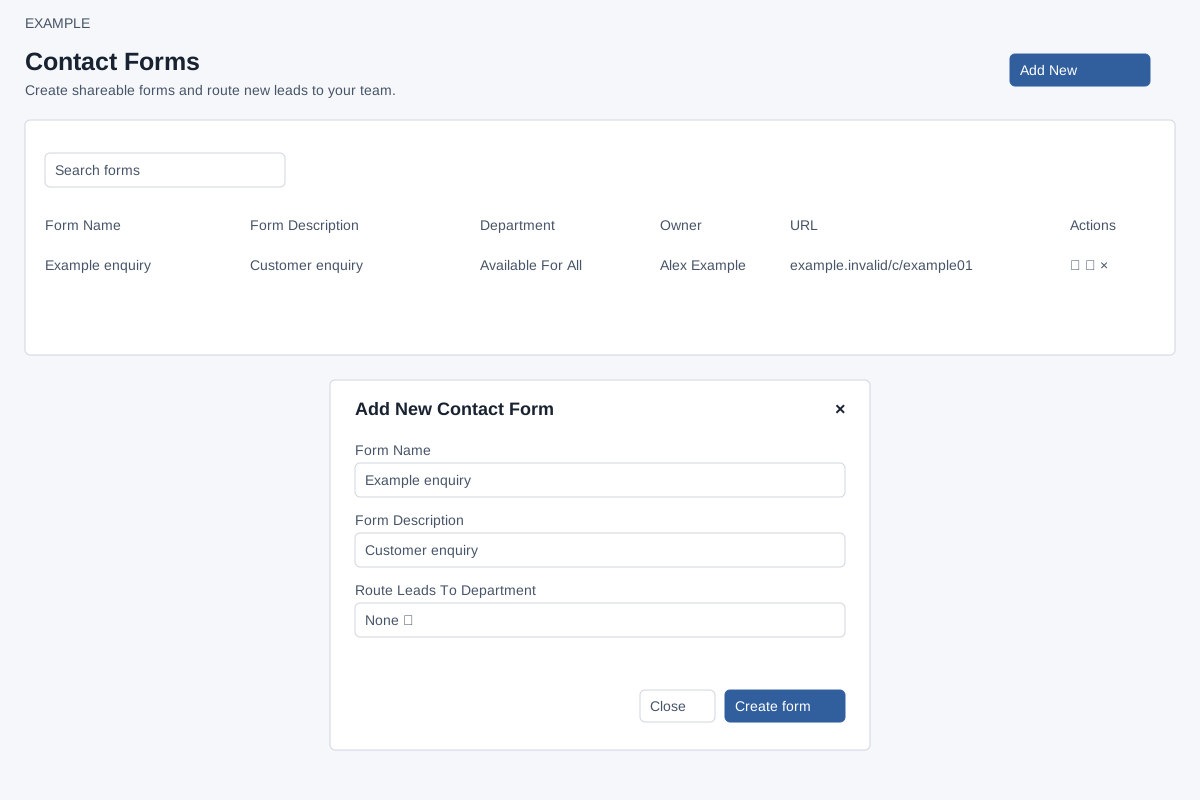
Create and route
Account Settings → Features Settings → Contact Forms requires ADMIN. Add New opens a dialog: Form Name is required, maximum 45 characters; Form Description is required, maximum 90; Route Leads To Department is None or a listed department. Create form creates the record and reloads the list. Close or × cancels. A plan limit can prevent creation; correct required fields or review the plan limit if an error appears.
Find, open, share or delete
Search forms filters loaded rows by their visible text and updates the count. The list shows Form Name, Form Description, Department, Owner, URL and Actions; selecting the name opens the builder. Edit the URL suffix inline and confirm with the checkmark, or cancel. The suffix must contain at least eight characters and is limited to 45 after sanitizing; an unavailable key fails. A changed suffix changes the public address. Copy Link uses clipboard permission; Open URL opens the public page in a new window. Delete displays an irreversible warning and Yes/No confirmation. On success its row is removed. If copying fails, check browser clipboard permission; if a change fails, inspect its error and retry.