API keys
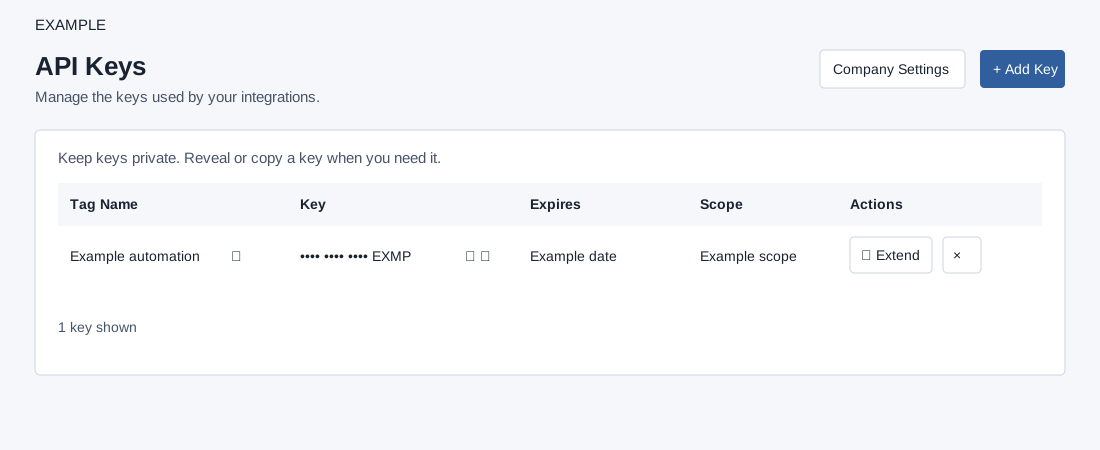
Open the page
Account Settings → Developers → API Keys. The page and its management controls require an administrator. The Company Settings button opens company settings. The list is for the signed-in user’s API client and retrieves at most 100 keys. New keys default to complete scope and an expiry 3,650 days after creation; Extend resets expiry to 3,650 days from the extension, rather than adding to the previous date.
Create and manage keys
- Review Tag Name, masked Key, Expires, Scope and Actions. Choose Add Key and confirm Create key; the create dialog has no tag field. After the list reloads, use the pencil to rename the new key. Enter a nonempty tag of at most 45 bytes and choose Save name. Reveal or copy the key only when needed and keep it in an approved secret store.
- The row controls include reveal, copy, rename, Extend and Delete. Revealing or copying exposes a credential; Extend confirms a new expiry while keeping the key; Delete confirms removal and integrations using it lose access. Refresh and verify the row, expiry or name after making a change. After a failed request, refresh before retrying. Review dependent integrations before deletion or rotation.
- Example: name an integration key Example automation. Never include an actual key in screenshots, examples or support messages.
Choose the correct key action
| Action | Effect and verification |
|---|---|
| Reveal / hide | Show or mask the stored key on screen. This does not create a replacement key. Hide it before sharing your screen. |
| Copy | Copy the key for the intended integration. Clipboard contents are sensitive. |
| Rename | Change the tag used to identify the integration. The credential itself remains the same; reopen the list and check the tag. |
| Extend | Reset expiry to 3,650 days from the extension. Verify the Expires column; this is not credential rotation. |
| Delete | Remove the selected key after confirmation. Verify that the row disappears and that every intended integration has been moved to a replacement before removing its old key. |
There is no scope-selection field in this create dialog. The displayed Scope column describes the key; it is not an editor. An empty list under another administrator does not prove that the company has no other keys, because the list belongs to the current user’s API client.