Launch bulk email campaigns from CRM filters instead of spreadsheet exports.
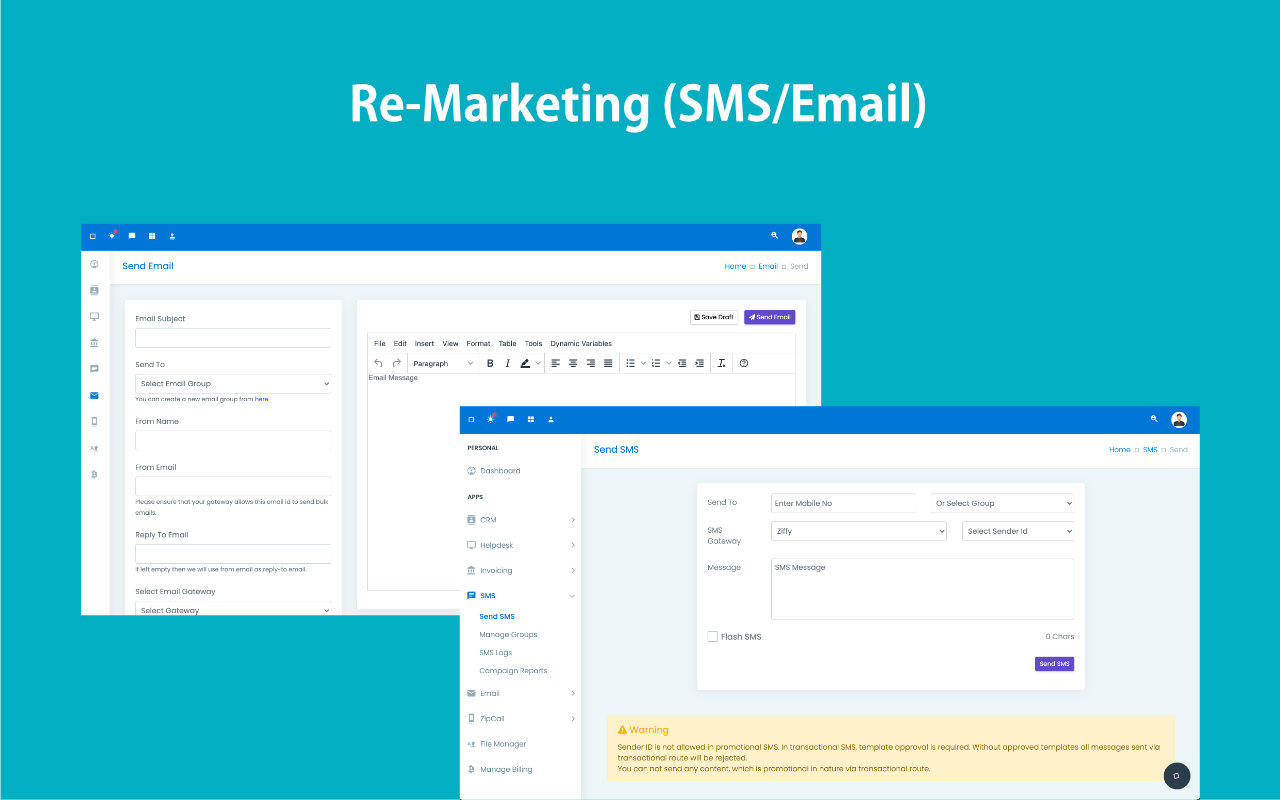
Build campaigns around CRM-based groups, choose your gateway, sender identity, and template content, then send or save the campaign as a draft without leaving ZNICRM.
- Create campaign groups from saved CRM filters so targeting stays tied to live customer data.
- Set campaign name, subject, from name, from email, reply-to, gateway, and message in one send flow.
- Track delivery status later from campaign reports and detailed mail logs.
Email outreach stays targeted, reviewable, and connected to customer context.
Built for teams that want sharper segmentation without rebuilding lists outside the CRM.
Build campaigns from current CRM conditions, not stale exports.
Save drafts before sending broad customer communication.
Use proper bulk gateways and clearer sender setup.
Review sent counts and delivery logs after campaigns.
Keep marketing outreach tied to CRM customer context.
Email campaigns slow down when audience data lives somewhere else.
Marketing teams lose time exporting records, rebuilding lists, and checking whether the campaign audience still matches CRM reality.
Segments go stale
Yesterday’s export is already out of date when sales activity changes the lead status.
Tools fragment context
Marketing actions disconnect from the contact history that sales and service teams rely on.
Campaign setup takes too long
Every send starts with rework instead of simply selecting the right audience and message.
Use CRM filters as the audience source and the email module as the sending workspace.
ZNICRM separates group creation, campaign drafting, and report review so teams can segment precisely, prepare safely, and then audit what was sent.
Filter-backed groups
Email groups can be created from CRM reporting filters, so the audience stays operationally relevant.
Draft-friendly setup
Save the campaign as a draft while subject lines, copy, sender identity, and targeting are still being reviewed.
Gateway-controlled sending
Choose the email gateway configured for your account instead of relying on a fixed built-in sender.
Logs and reports
Review sent counts, status, and detailed logs from the campaign reporting screens after launch.
Everything needed for focused CRM-led email outreach.
The campaign module matches the product flow: groups first, campaign setup second, logs and reports after sending.
Campaign fields that matter
Set campaign name, subject, send-to group, from name, from email, reply-to, gateway, and message in one form.
Email groups from CRM filters
Create reusable groups from saved CRM audience logic instead of exporting and rebuilding lists elsewhere.
Draft and reporting flow
Save drafts, send when ready, then review status and sent counts from campaign reports and logs.
Gateway discipline
Use proper bulk-capable gateways rather than consumer inbox providers that are not suitable for campaigns.
Email becomes faster to launch and easier to audit.
Send to the right audience based on live CRM criteria instead of stale CSV logic.
Keep sender identity, reply-to, gateway, and content settings in one repeatable flow.
Use campaign reports and mail logs to verify what happened after sending.
The product supports campaigns up to 10,000 emails while still encouraging proper gateway selection.
Create the group, set the campaign fields, then review the reports.
The actual send flow in ZNICRM follows the email module structure rather than a generic marketing wizard.
Create the email group
Build the audience from a CRM filter or segment definition so the campaign starts from live data.
Open New Campaign
Set campaign name, subject, send-to group, sender details, reply-to, gateway, and message content.
Draft or send
Save as draft for review or launch through your configured bulk email gateway when ready.
Review reports and logs
Check campaign status, sent counts, and detailed delivery logs after launch.
See campaign setup, targeting, and outreach flow on one page.
Designed for teams that want CRM-backed segmentation with campaign execution that still feels modern and fast.
Walk through filter-based targeting and template launch flow.
Ideal for remarketing, reactivation, and nurture campaigns tied to live CRM data.
Made for teams that want CRM-led remarketing without extra complexity.
Email works best when the audience logic stays connected to the customer journey, not trapped in spreadsheet exports.
"Using CRM filters for campaigns keeps our targeting honest. We are no longer sending to static exports that stopped matching reality."
"The biggest win is operational. Sales, marketing, and support see the same customer state when a campaign goes out."
Launch smarter email campaigns from live CRM data.
Use saved filters, reusable templates, and your own gateway to run targeted outreach without leaving ZNICRM.