Travel CRM for agencies that build, sell, and manage complete trips
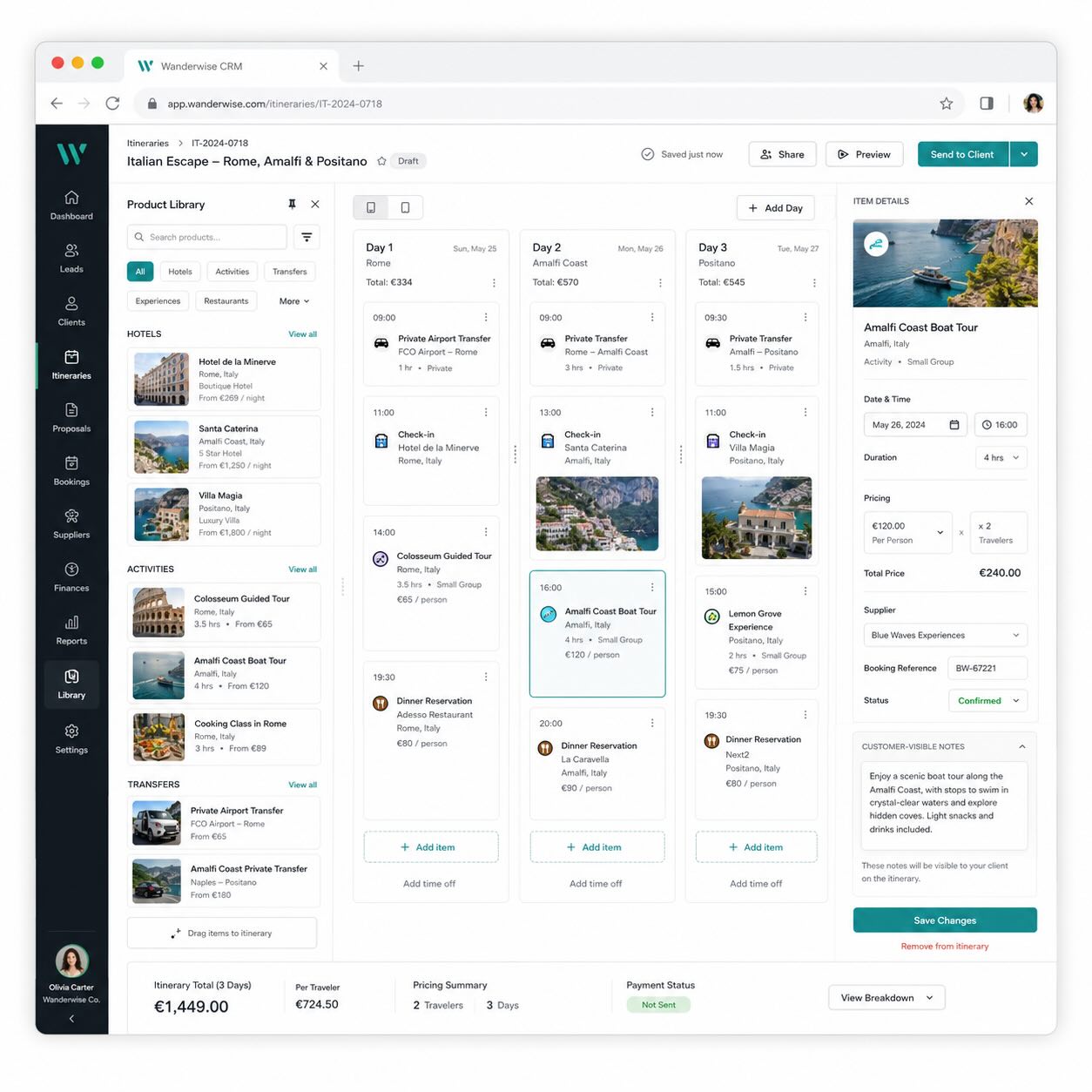
A travel CRM for agency teams that turns trip inquiries into day-by-day itineraries, customer-ready proposals, quote drafts, supplier work, document packs, and post-trip follow-ups from one CRM workspace.
- Day-by-day itinerary builder
- CRM contact and deal links
- Customer approval links
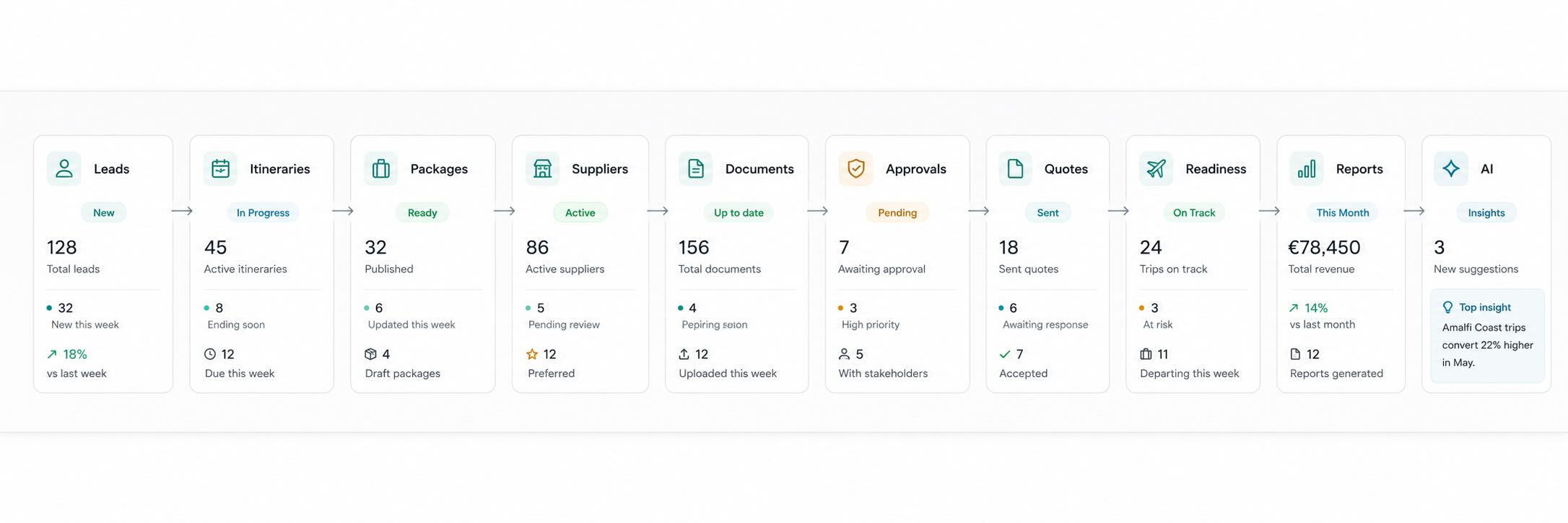
- Supplier, document, and readiness tracking
- Quote drafts from approved trips
- Travel AI and live offer search options
For custom trips, group tours, holiday packages, corporate travel, cruises, pilgrimages, luxury itineraries, and destination management workflows.
Generic CRMs stop where travel work begins
A normal CRM can store a lead and a follow-up. A travel agency also has to manage destinations, package components, rooming, suppliers, visas, documents, approvals, pricing visibility, service cases, and departure deadlines. That work needs a travel CRM built around trips, not only contacts.
Itineraries live outside the CRM
Agents build plans in documents, then manually copy details into proposals, quotes, and messages.
Packages are rebuilt from scratch
Hotels, transfers, activities, inclusions, exclusions, cancellation terms, and supplier notes are repeated every time.
Customer approvals are hard to track
Approvals, requested changes, versions, and visible pricing often disappear into email threads.
Operations are disconnected
Supplier payments, documents, rooming lists, visa status, and service cases sit in separate spreadsheets.
Managers lack trip-level visibility
Pipeline, departures, product performance, readiness risks, and supplier issues are difficult to review in one place.
Customers keep asking for updates
Without shared previews and clear status, teams spend time resending the same details instead of closing trips.
Build polished itineraries without leaving the CRM
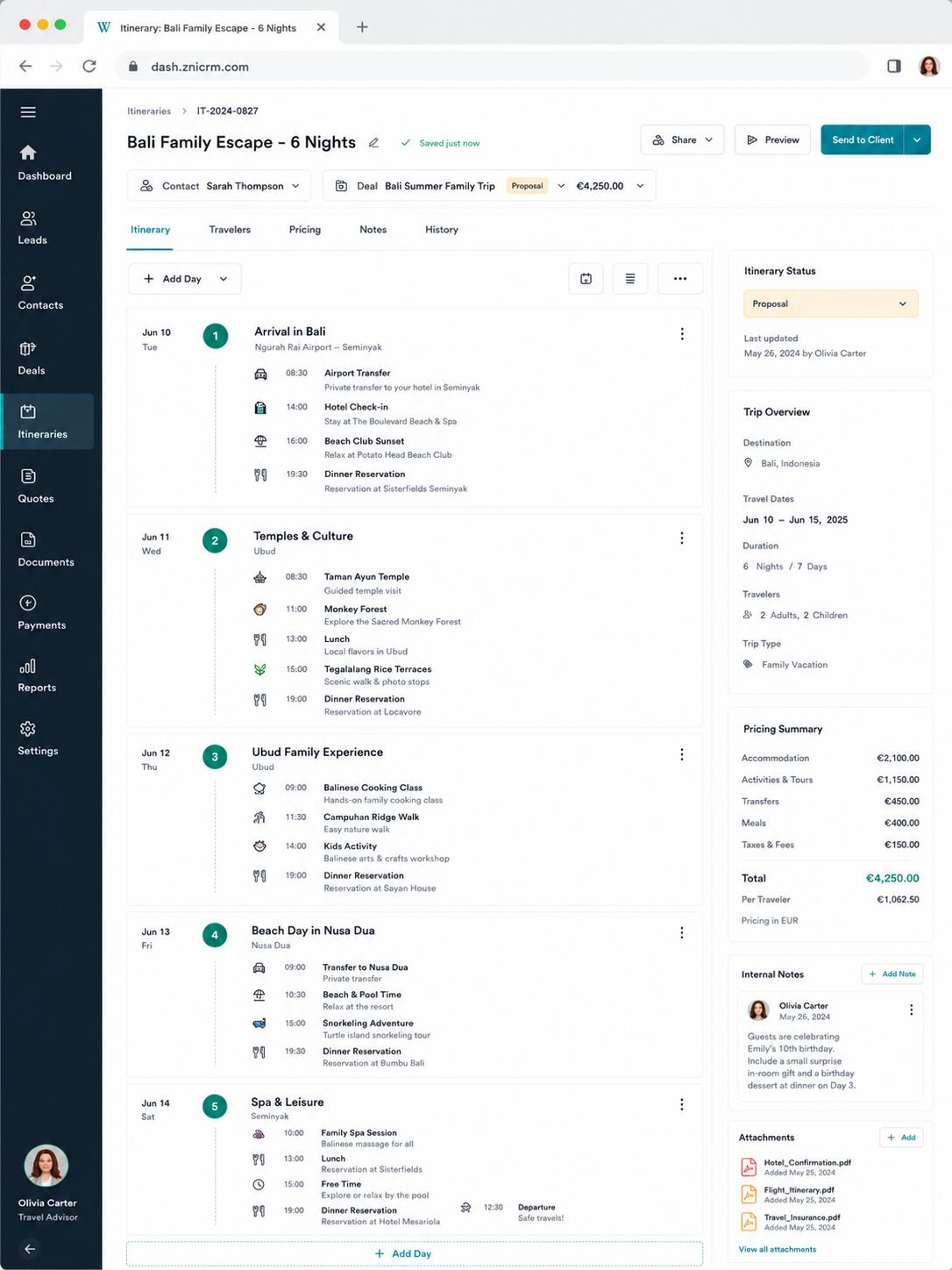
Turn a travel inquiry into a structured day-by-day itinerary with flights, hotels, transfers, activities, meals, rail, cruise, insurance, visa, and custom items.
- Create the trip header with destination, date range, travelers, budget, currency, contact, and deal.
- Build days with customer-visible summaries and ordered itinerary items.
- Separate client notes from internal operations notes.
- Control pricing visibility: hidden, total only, category total, or detailed.
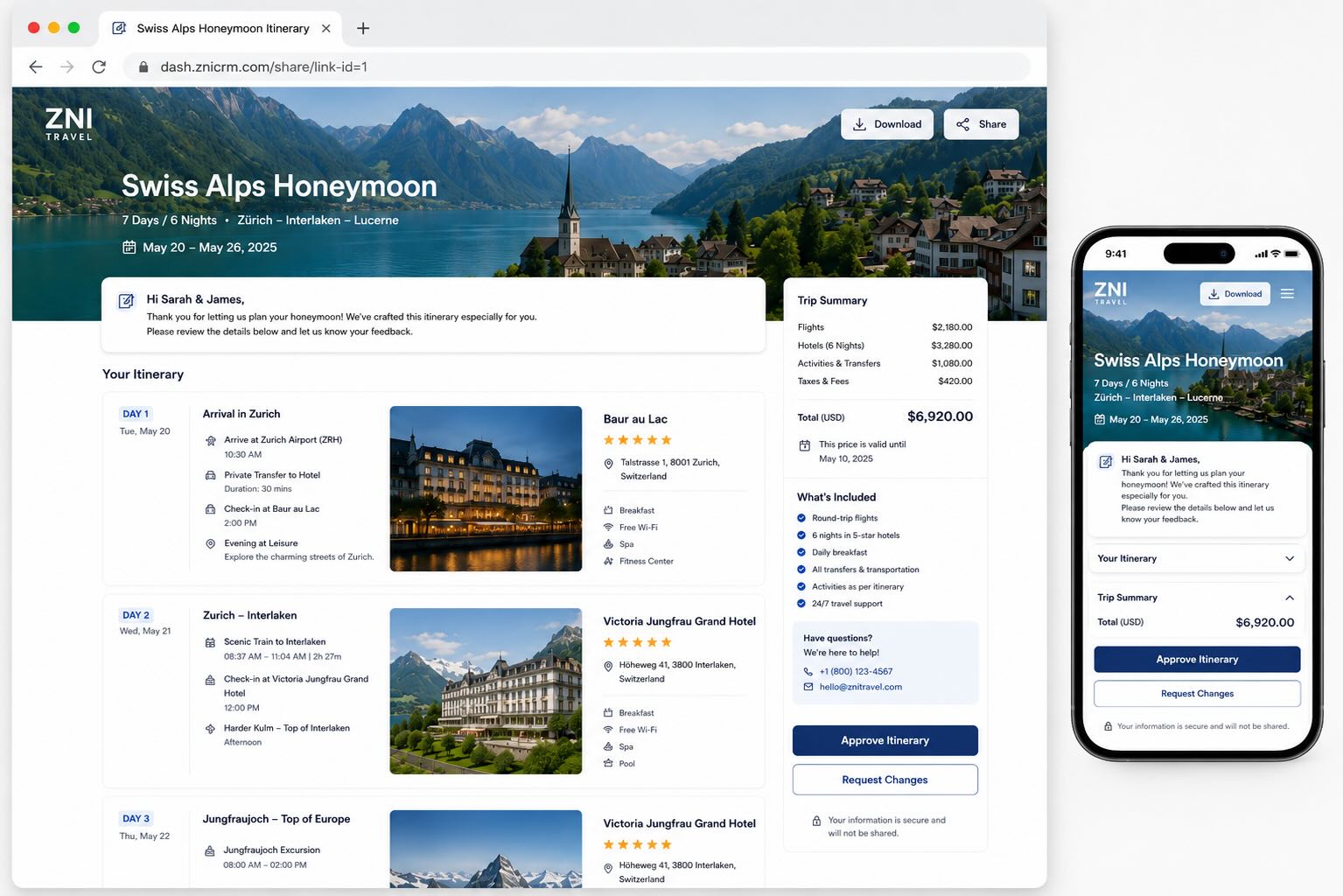
- Preview the customer-facing itinerary before publishing.
Use your product library as a travel package planner
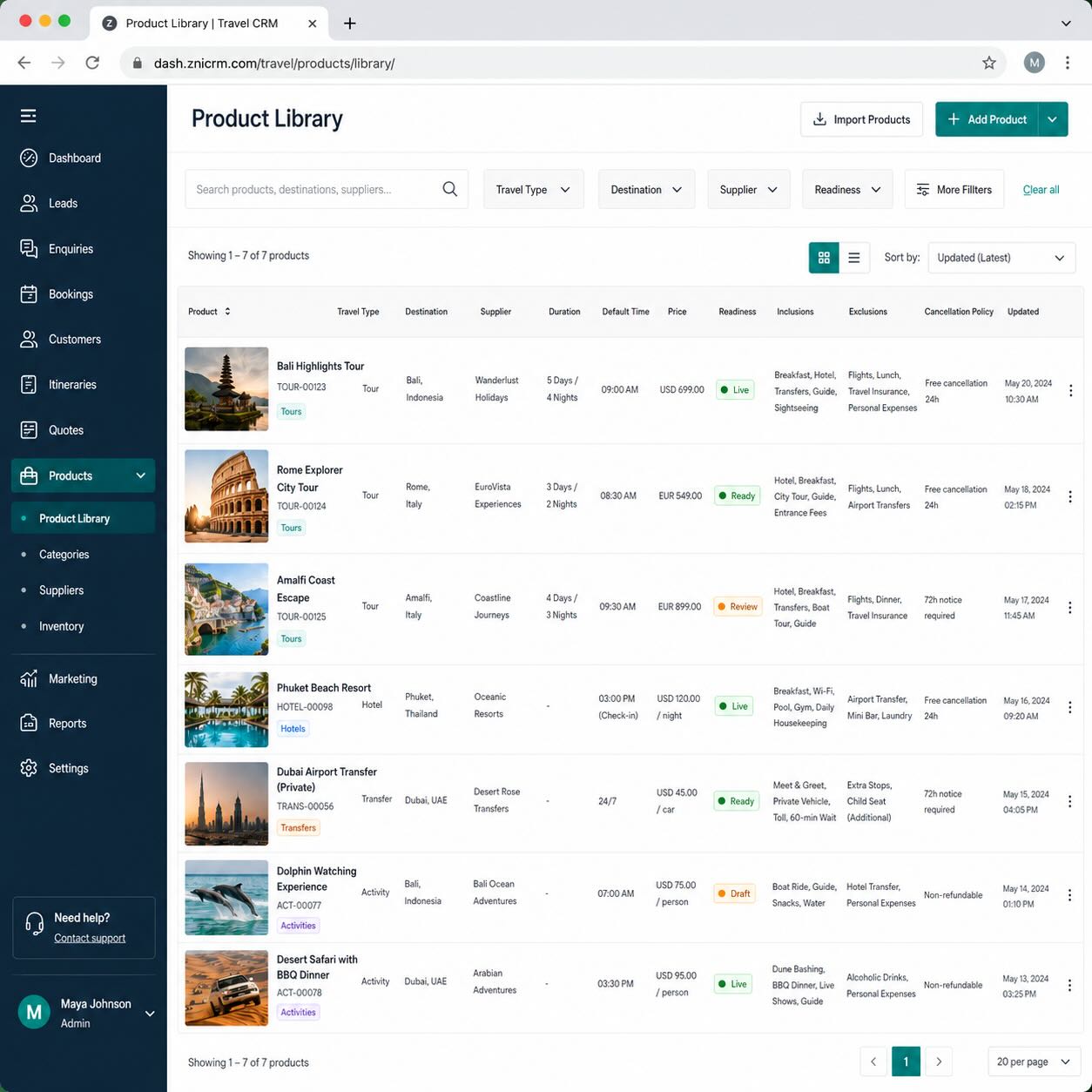
Store reusable hotels, activities, transfers, insurance, visa services, cruises, rail, meals, and custom services as travel-ready product items.
- Add destination, location, duration, default time, supplier, room type, meal plan, pickup, dropoff, inclusions, exclusions, terms, and cancellation policy.
- Use product images in itinerary cards and customer previews.
- Search product items by type, destination, supplier, and readiness.
- Drag product-backed items into itinerary days and preserve price and content snapshots.
Share customer-ready itineraries and capture decisions faster
Publish a branded itinerary link where customers can review the trip, approve it, or request changes. Generate an offline travel pack before departure with itinerary, visible documents, rooming, and traveler preferences.
- Customer share links generated from itinerary preview.
- Customers can approve or request changes from the shared page.
- Internal itinerary status updates after customer decisions.
- Client-visible documents can be included while internal documents stay hidden.
Turn approved itineraries into quote drafts
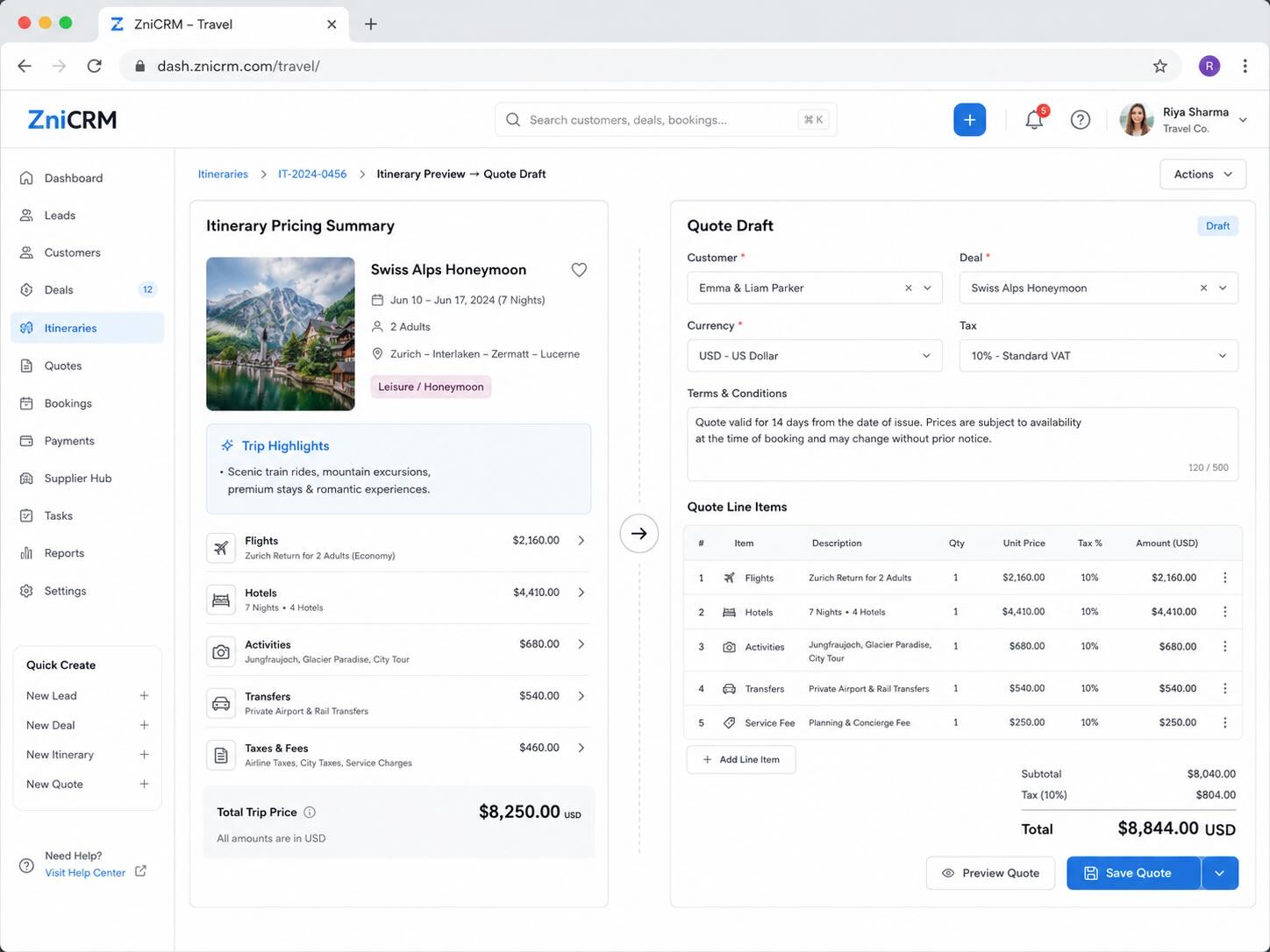
When the itinerary is ready, create a quote draft through the existing invoicing workflow while preserving itinerary item snapshots and pricing visibility.
- Support no pricing, total-only pricing, category totals, detailed customer line items, and internal margin views.
- Create quote drafts from itinerary preview.
- Keep commercial documents linked to the CRM contact and deal.
Keep supplier, document, and deadline work tied to the trip
Travel sales can look complete while operations are still missing supplier confirmations, payment deadlines, documents, or rooming details. Keep the operational layer on the itinerary record.
Supplier and operations tracking
Track supplier confirmations, payment tasks, ticketing deadlines, document work, customer follow-ups, booking status, confirmation numbers, payables, commissions, due dates, and reconciliation.
Group manifest and readiness
Manage traveler manifests, rooming lists, visible documents, passport expiry, visa status, insurance status, preferences, emergency contacts, and readiness risks.
Search live flight and hotel options with your own provider keys
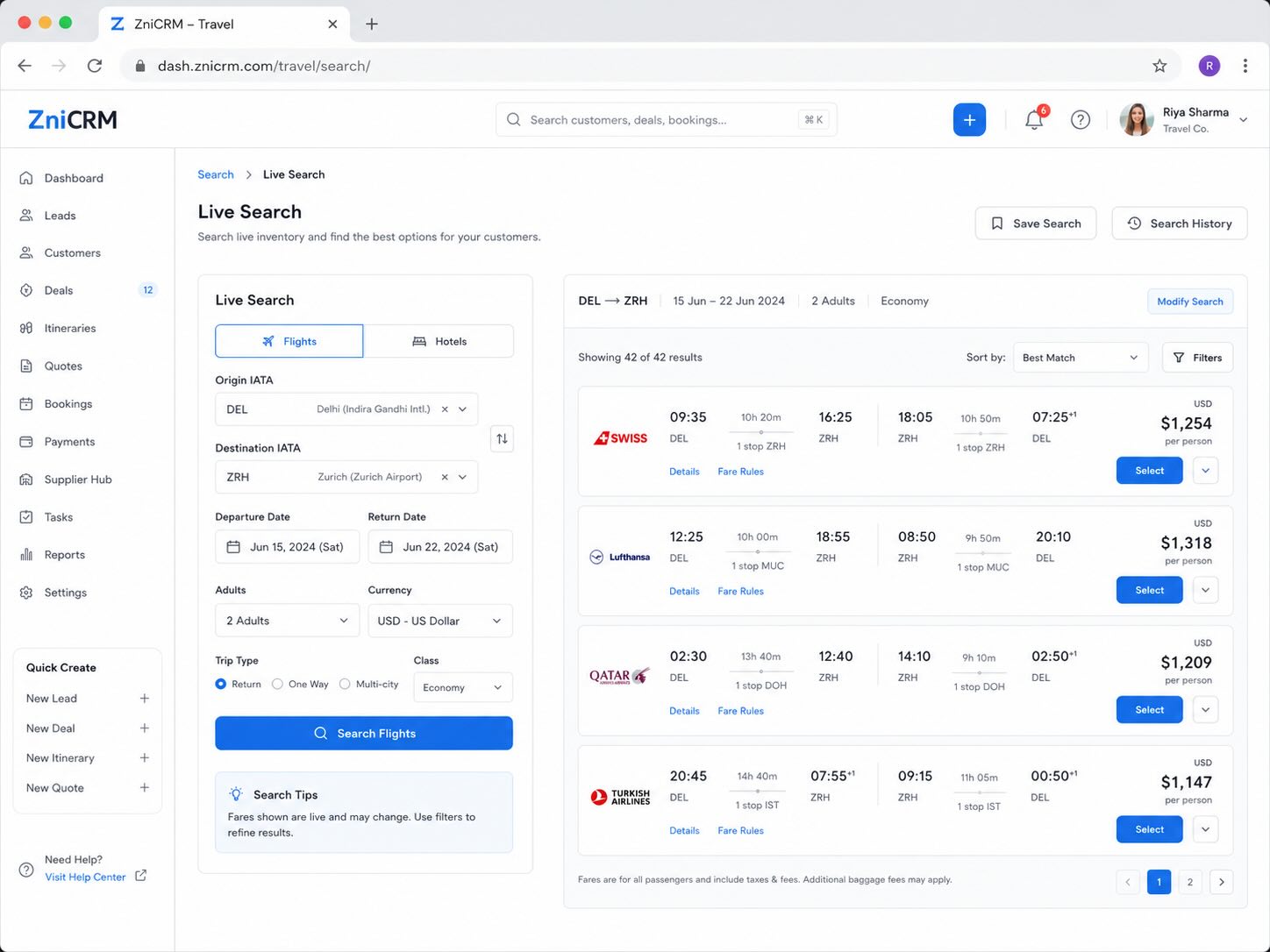
Connect company-owned aggregator credentials, search flights and hotels from the builder, cache results briefly, and recheck prices before quote or booking decisions.
- Available when configured with supported provider credentials.
- Admin-controlled provider credentials, scopes, environment, rate limits, and cache TTL.
- Normalized offer summaries for agents.
- No scraping; only customer-provided API keys and provider-approved access.
Use Travel AI to draft, revise, validate, and summarize trips
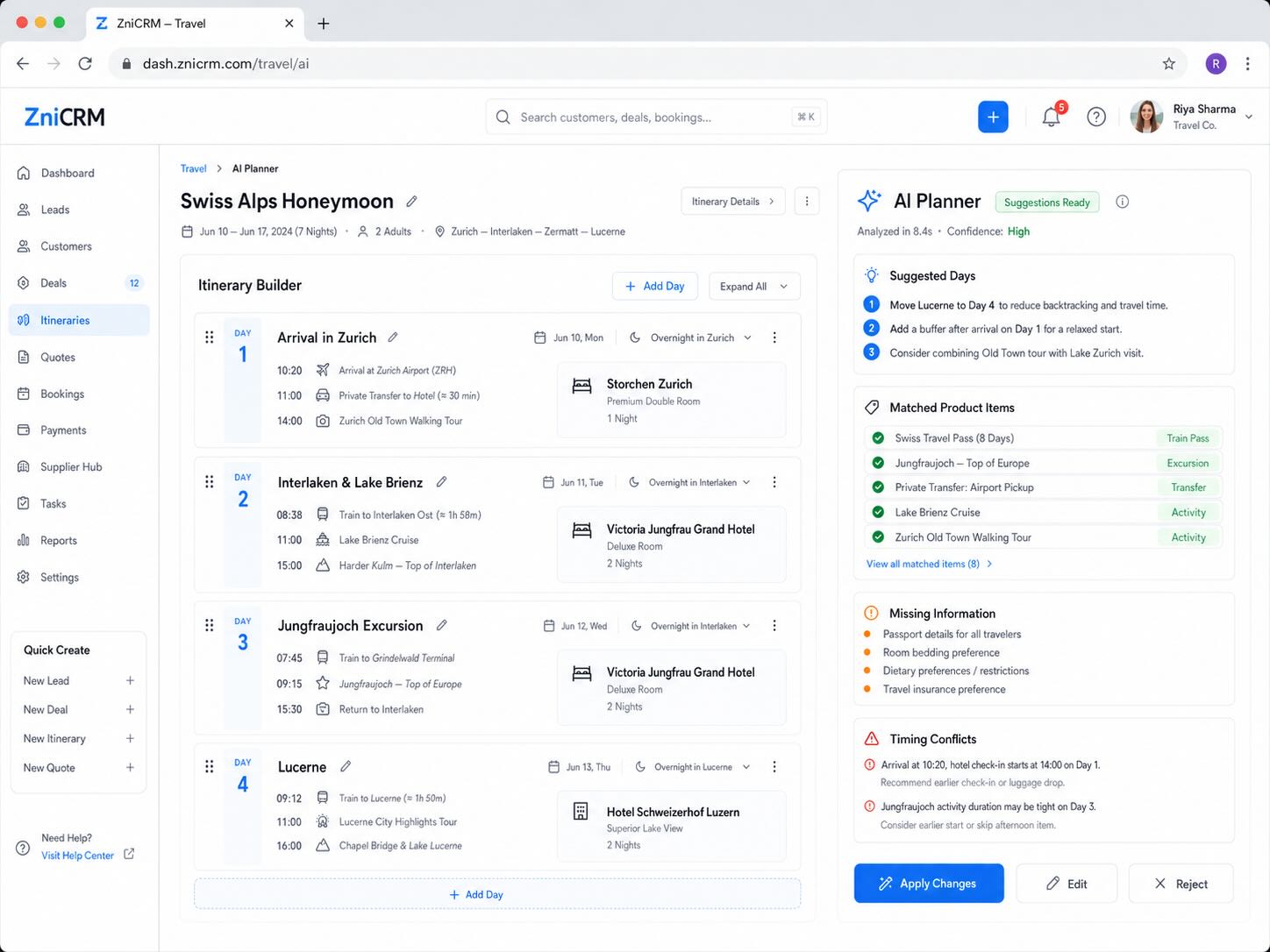
Give agents an AI assistant for itinerary drafts, timing checks, destination content, customer summaries, supplier messages, and live option summaries.
- AI draft from a trip brief.
- Revise an existing itinerary after customer feedback.
- Validate timing gaps, missing transfers, and conflicts.
- Draft supplier and customer messages for staff review.
Made for the way travel teams actually work
Whether your agency sells custom holidays, group tours, corporate travel, luxury itineraries, pilgrimages, or destination management services, the workflow stays connected from inquiry to departure.
Custom holiday planning
Create tailored FIT itineraries, package pricing, and customer approval links.
Group tours
Manage rooming, manifests, passport and visa readiness, documents, and departure tasks.
Corporate travel
Track traveler preferences, approvals, documents, service cases, and reporting.
Luxury and honeymoon trips
Use polished previews, client-visible notes, private internal notes, and detailed supplier coordination.
Pilgrimage and religious tours
Track group travelers, rooming, documents, insurance, special assistance, and follow-up.
Destination management
Coordinate suppliers, transfers, activities, confirmations, reconciliation, and service issues.
A practical rollout path for your travel agency
Start with your existing CRM foundation, then bring package content, supplier records, approvals, documents, operations, and reports into the Travel workspace.
Import or connect your CRM contacts and deals.
Create reusable travel products for hotels, transfers, activities, insurance, visa, cruise, rail, meals, and services.
Add suppliers and product metadata such as destination, duration, inclusions, exclusions, terms, and cancellation policy.
Create itinerary templates and playbook tasks for repeatable packages.
Start building itineraries, previews, customer approval links, and quote drafts.
Add operations, documents, manifests, readiness, reconciliation, and reports.
Enable aggregator live search or Travel AI when your team is ready.
One workspace where an inquiry becomes an approved, operational trip
Capture demand, build the travel story, collect customer approval, create quote drafts, track supplier and document work, support travelers in-trip, and report on the entire operation.
Sales
Leads, contacts, deals, proposals, quote drafts, and follow-ups stay linked.
Planning
Itinerary days, product-backed packages, templates, visibility rules, and AI drafts.
Operations
Suppliers, confirmations, documents, payables, rooming, manifests, and readiness.
Management
Pipeline, departures, product performance, usage, risks, cases, and reconciliation reports.
Travel CRM questions agencies ask before switching
What is a travel CRM?
A travel CRM is a customer relationship management system adapted for travel sales and operations. It should manage leads, contacts, deals, itineraries, package products, suppliers, documents, customer approvals, quotes, departures, service cases, and reports.
How is this different from a generic CRM for travel agents?
A generic CRM usually tracks contacts and follow-ups. This travel CRM adds trip-specific workflows such as itinerary building, product-backed package planning, customer share links, traveler manifest, readiness checks, supplier reconciliation, offline packs, and travel reports.
Can agents build itineraries inside the CRM?
Yes. Agents can create day-by-day itineraries with hotels, flights, transfers, activities, meals, rail, cruise, insurance, visa, and custom items, then preview and share the customer-facing version.
Can we reuse package components?
Yes. Travel products can store metadata such as destination, supplier, duration, default timing, room type, meal plan, pickup and dropoff details, inclusions, exclusions, booking terms, cancellation policy, and customer-facing descriptions.
Can an itinerary become a quote?
Yes. A completed itinerary preview can create a quote draft through the existing invoicing workflow.
What reports are available for travel agencies?
Reports should include itinerary pipeline, agent activity, upcoming departures, product performance, aggregator usage, flight monitoring, Travel AI usage, readiness risks, supplier payments, service cases, and operations summaries.
Build your travel CRM workflow
Bring inquiries, itineraries, suppliers, documents, approvals, quotes, and departures into one travel CRM workspace. Give agents a faster way to build trips and managers a clearer way to run the agency.