Send bulk SMS campaigns from CRM groups with the controls real teams need.
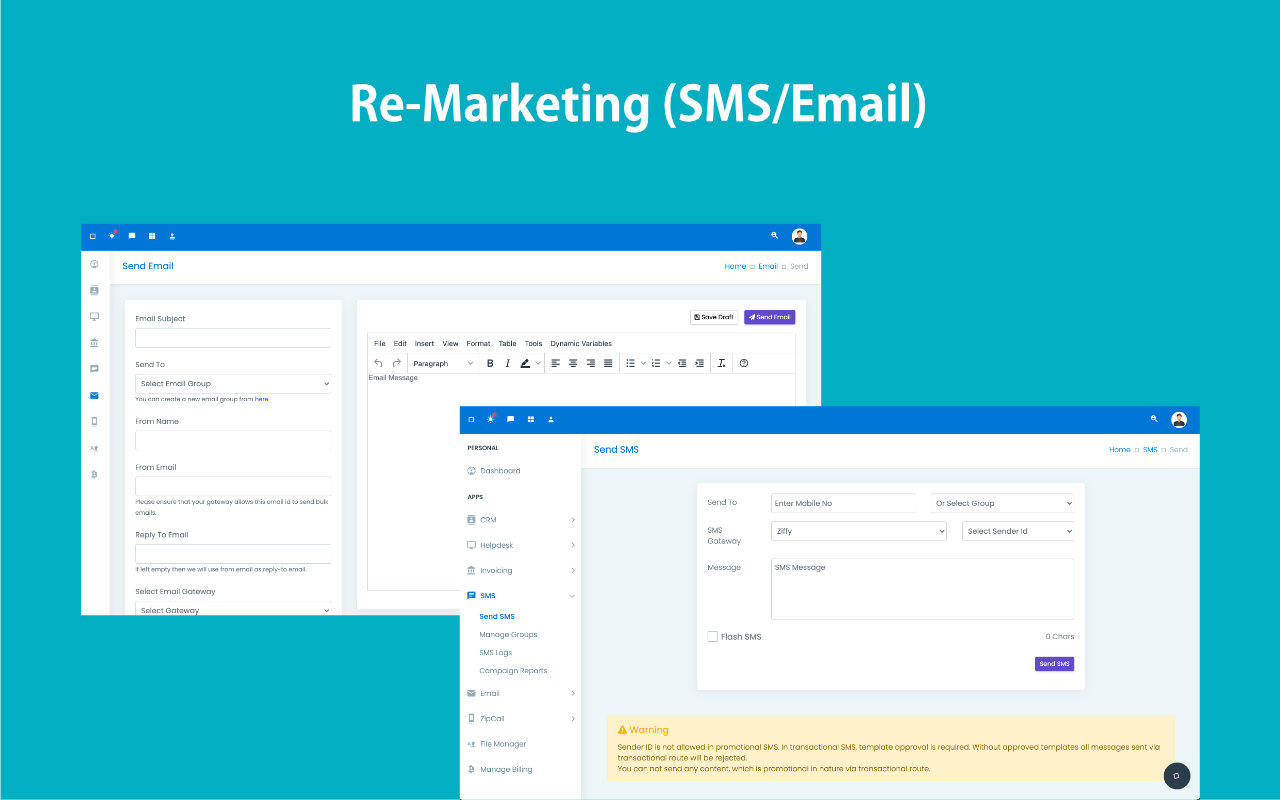
Choose a direct number or a saved group, select the gateway and sender ID, monitor live character count, and send promotional or transactional campaigns from the same CRM stack.
- Create SMS groups as Regular lists or CRM Query based segments from the SMS module.
- Send to one number or to a group while controlling gateway, sender ID, message body, and flash SMS.
- Review logs and campaign reports, with delivery reports typically settling after 24 to 36 hours.
Short-form campaigns designed for speed, control, and precise targeting.
Useful when customer attention windows are small and timing matters immediately.
Reach customers quickly with direct, short campaign messages.
Use curated groups or CRM-query audiences with ease.
Watch character count before sending high-volume SMS.
Choose sender settings that fit campaign requirements.
Review logs while delivery reports continue settling.
Fast-reach campaigns fail when targeting and execution are disconnected.
SMS works because it is immediate, but that advantage disappears if teams still need exports, manual list cleanup, and separate campaign tools to send it.
Lists go stale fast
Campaign recipients stop matching reality as soon as lead status and ownership change in the CRM.
Attention windows are short
If the message is late or mistargeted, the advantage of SMS disappears quickly.
Operational context breaks
Teams lose visibility when SMS activity happens outside the CRM and away from the customer record.
Use groups, gateway settings, and message controls built for actual SMS operations.
ZNICRM supports both simple list sends and CRM-query targeting, while keeping the compliance-sensitive details like sender ID and transactional setup visible during campaign preparation.
Two group models
Use Regular groups for curated lists and CRM Query groups for rule-based recipient targeting.
Live message controls
See character count while composing and choose whether the send should behave as flash SMS.
Gateway and sender control
Choose the SMS gateway and sender ID that fit the campaign and regulatory setup.
Report visibility
Use SMS logs and campaign reports for send review, while accounting for DLR timing on the provider side.

Built for short-form campaigns that need speed and precision.
The product flow covers recipient selection, message composition, provider settings, and campaign reporting inside one module.
Direct or grouped sending
Send to a single phone number or to a Regular or CRM Query group from the same screen.
Sender ID rules
Control sender ID where allowed, with clear limits for promotional traffic and template rules for transactional SMS.
Flash SMS option
Choose flash SMS when the message format should appear with higher immediacy on supported channels.
Logs and report views
Use SMS Logs and Campaign Reports to review campaign activity after launch.
Keep campaign speed high without losing provider and compliance visibility.
SMS works best when timing, targeting, sender rules, and delivery expectations are handled explicitly during setup.
- Reach customers quickly with direct sends or saved Regular and CRM Query groups.
- Use live character count before launching short-form communication at scale.
- Handle promotional and transactional use cases with clearer gateway and sender setup.
- Review reports later with the expected 24 to 36 hour DLR lag in mind.
SMS is ideal when the message should be noticed immediately.
Gateway, sender ID, flash SMS, and character count stay visible before sending.
Regular and CRM Query groups keep the recipient logic closer to the CRM.
Logs and reports make it easier to audit campaign activity after launch.
Select the recipient mode, compose the message, then review logs and reports.
The SMS module is operationally simple but still exposes the important setup fields teams need before sending.
Pick direct send or group
Choose one phone number or a Regular or CRM Query group, depending on how the campaign should be targeted.
Set gateway options
Select the SMS gateway, sender ID, and flash SMS setting while watching the live character count.
Send the campaign
Launch promotional or transactional communication using the provider configuration already approved for your account.
Review logs and reports
Check SMS logs and campaign reports, allowing time for delivery report settlement from the provider.
See how direct CRM-led messaging feels in practice.
Built for speed, urgency, and campaign control without making the team leave the CRM workflow.
Walk through a filter-based SMS send and follow-up flow.
Use it for quick reminders, urgent offers, and high-attention campaign moments.
Useful when attention speed matters more than long-form communication.
SMS gives teams a fast channel for reminders, campaign nudges, and quick re-engagement when timing is everything.
"SMS works for the moments when we need the customer to notice us now, not later. Keeping it tied to CRM filters makes that speed far more useful."
"The win is precision. We can send urgent messages without compromising who gets them because the targeting still comes from the CRM."
Send SMS campaigns from the CRM that already knows your audience.
Use ZNICRM filters and your own SMS gateway to launch fast, relevant campaigns without breaking customer context.