Plan follow-ups from the same CRM views where the work already happens.
Use the main scheduler, create tasks inside contact records, and review execution from task reports so overdue, due-today, upcoming, and completed history stay visible in one operating loop.
- Create tasks from the calendar view or from the contact-level task workspace.
- Use quick actions like +1 Hour, Tomorrow, Complete, Edit Due, and Delete to keep momentum moving.
- Review progress from task reports and detail views without leaving the CRM process.
Follow-up discipline improves when daily work stays visible and movable.
Useful for teams balancing callbacks, demos, and customer commitments daily.
Keep overdue and due-today tasks visible always.
Move tasks forward with fast reschedule actions.
Work tasks from the record already holding history.
Review execution trends without extra coordination.
Plan days around actual customer commitments.
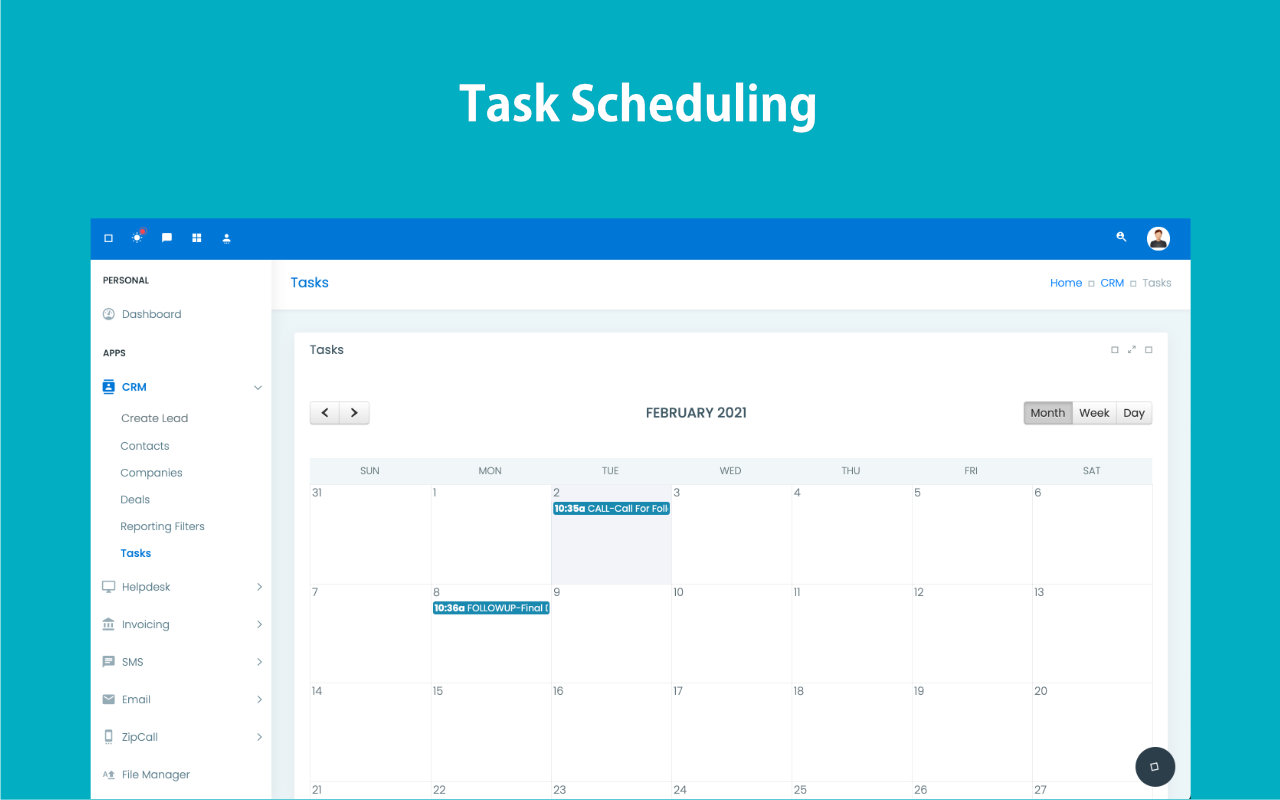
Structure the day before the day starts.
Block the most important conversations first, fit in reminders around them, and keep every task connected to the right lead or customer.
Good intent is not the same as a reliable schedule.
Without a clear planning layer, teams miss follow-ups, overlap tasks, and lose the context behind what needs to happen next.
Follow-ups slip
Important callbacks disappear under new leads, inbox noise, and unrelated day-to-day work.
Conflicts pile up
Calls, demos, and internal tasks get booked too close together, leaving no buffer to prepare properly.
Context gets lost
When reminders live outside the CRM, nobody knows why a task exists or what happened before it.
Schedule tasks where customer context already exists.
ZNICRM keeps follow-ups, reminders, and assigned work attached to the contact, deal, or account so your team can act with full context instead of switching between tools.
Task-to-contact linking
Every reminder sits next to the conversation history, ownership, and next action.
Reminder discipline
Keep the team accountable with due dates that are visible before they become overdue.
Conflict reduction
Plan work with clearer spacing so meetings and callbacks stop crashing into each other.
Progress visibility
See what is due today, what slipped, and what needs to be rescheduled fast.
Scheduling tools that support everyday execution.
The scheduler is designed around the actual task groups and quick actions teams use under pressure.
Grouped task views
Work from Overdue, Due Today, Upcoming, and Completed History instead of one long undifferentiated queue.
Contact-linked tasks
Create and review tasks directly from the contact-level task workspace.
Quick rescheduling
Use built-in actions like +1 Hour or Tomorrow to recover timing without reopening the full edit flow.
Report visibility
Track execution from the main scheduler and from task reporting when managers need broader oversight.
Keep the team organized without overcomplicating the day.
Prepare for every meeting with the right customer history in front of you.
Keep the day structured instead of reacting to whatever shows up first.
Track missed, pending, and completed tasks from a single schedule layer.
Give managers a simple way to see whether follow-up discipline is holding.
Create the task, act on it fast, then update the next due step.
The scheduler is most useful when teams can adjust timing from the live queue instead of treating task updates as admin overhead.
Create it from the right place
Add the task from the main scheduler or from the contact-level task workspace where the customer context already exists.
Work the grouped queue
Review Overdue, Due Today, Upcoming, and Completed History so the team knows what deserves attention first.
Use quick actions
Complete, edit due time, delete, or push the task by +1 Hour or Tomorrow directly from the task flow.
Review in reports
Use task reports and detail pages to spot execution gaps and follow-up discipline issues over time.
Use one planning layer for tasks, reminders, and daily pacing.
From due-time reminders to follow-up queues, the scheduler helps the team stay proactive instead of reactive.
Preview how reminders and due tasks surface during the day.
Make task planning part of your execution rhythm, not an afterthought.
Ideal for teams that rely on timely follow-up discipline.
Scheduling becomes valuable when it protects pipeline momentum, not just when it fills a calendar.
"The schedule is finally visible inside the CRM, which means our team is preparing for calls instead of scrambling to remember what was due."
"We stopped treating reminders as separate admin work. They now live right next to the customer history where they belong."
Make every follow-up feel planned, not improvised.
Use ZNICRM task scheduling to build a cleaner day, reduce missed actions, and keep every contact step on time.