Create reusable forms around your process, then report on every submission.
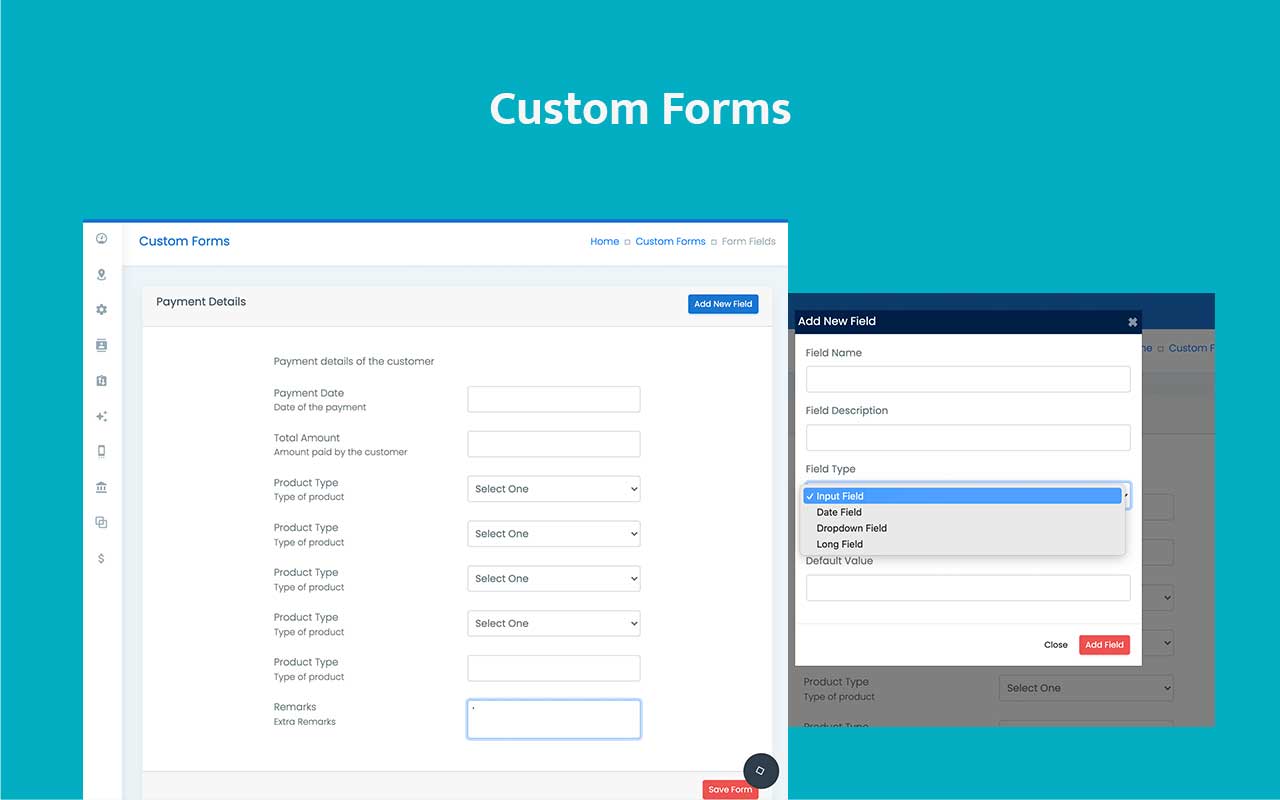
Define shell details like form name, description, department, and escalation, then build field sets with drag-and-drop ordering from the form management workspace.
- Use form-level settings for ownership and routing before any field is added.
- Build with input, date, dropdown, long field, product name, and product item field types.
- Review submitted data later from the submitted forms reporting view.
Capture process-specific data without making records feel improvised.
Built for teams that need custom inputs, cleaner routing, and dependable submission visibility.
Turn business-specific inputs into consistent CRM data.
Connect submissions to departments and escalation logic.
Capture dates, dropdowns, products, and long notes cleanly.
Reorder fields until the submission flow feels natural.
Review submitted data without leaving the CRM.
Service onboarding capture
Default CRM fields cannot represent every service, compliance, or onboarding workflow.
Teams fall back to notes, spreadsheets, and side tools when process-specific data cannot be captured in a structured way inside the CRM.
Business fields go missing
Operational details never get a proper input model, so records become inconsistent.
Teams improvise layouts
Without a builder, every user collects the same data in a slightly different way.
Submissions are hard to review
When data capture lives outside the CRM, reporting and escalation lose context fast.

Use admin-managed forms with reusable field types and visible submission reporting.
The custom forms module separates form shell setup, field management, and downstream reporting so teams can capture process-specific information without breaking CRM structure.
Form shell first
Set the form name, description, department, and escalation path before configuring the field list.
Purpose-built field types
Use input, date, dropdown, long field, product name, and product item fields where the workflow demands them.
Drag-and-drop ordering
Control how the form is experienced by reordering fields directly in the management screen.
Submission reports
Review form data later from the submitted forms report instead of chasing entries across tools.
Built for structured capture, not one-off custom field hacks.
The forms product flow keeps configuration, field editing, and reporting clearly separated.
Admin setup pages
Create and manage forms from dedicated settings screens instead of burying the setup inside unrelated record pages.
Operational routing
Department and escalation settings keep submissions connected to the team that should own them.
Field variety
Support both simple text capture and product-linked entries without flattening everything into one generic input type.
Reportable outcomes
Use the submitted forms report to monitor what was captured and how the process is performing.
Capture process-specific data without sacrificing CRM structure.
Adapt forms to the exact steps your business already follows.
Keep custom inputs reportable instead of letting them dissolve into unsearchable notes.
Department and escalation settings make submissions operational instead of decorative.
Once the form model is correct, the team can use it repeatedly without redesigning the process.
Create the form shell, manage the fields, then review submissions.
The setup sequence follows the product structure in the admin rather than forcing everything into one overloaded editor.
Create the form shell
Use the custom forms settings page to define form name, description, department, and escalation.
Manage the fields
Open the form management page and add input, date, dropdown, long field, product name, or product item fields.
Order the experience
Drag and reorder fields until the form matches the actual capture flow your team follows.
Track the submissions
Use the submitted forms report to review captured records and downstream process quality.
See structured form building, field ordering, and reporting in one flow.
Designed for teams that need custom capture without losing the visual discipline of the broader CRM.
Walk through form setup, field ordering, and submission review.
Useful for onboarding, service, approvals, and any process where generic CRM fields are not enough.
Build forms that match the work your team actually performs.
Use ZNICRM custom forms to capture structured process data, route it correctly, and review submissions from one coherent CRM flow.