Create reporting filters once, then reuse them across CRM views and campaigns.
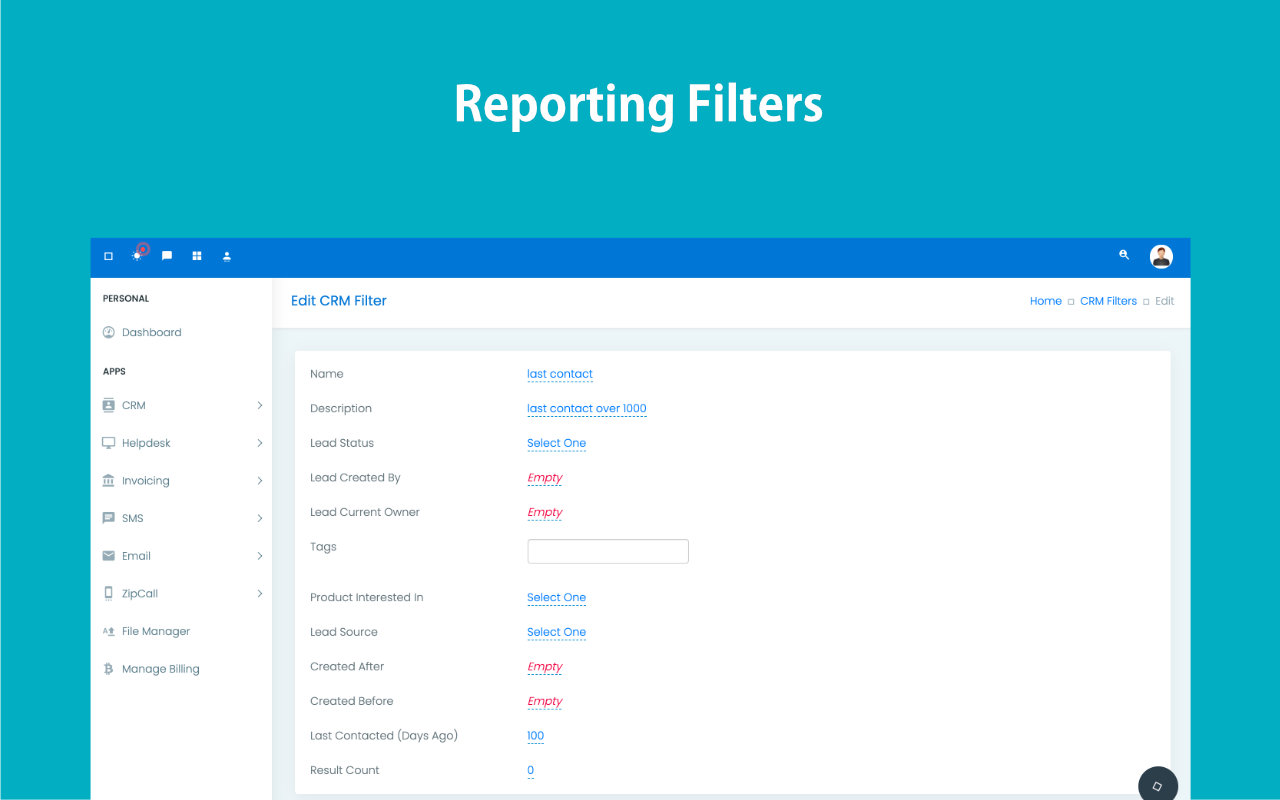
Use reporting filters to save search logic around owner, source, product, dates, tags, country, account type, submitted forms, and more, then reuse that logic in contacts, campaigns, and bulk actions.
- Start with base fields like name, description, owner, created by, status, product, last contacted, and created-between logic.
- Refine later with edit-page fields such as tags, lead source, country, account type, submitted form, and created-within rules.
- Reuse the same filter across contact views and email group creation.
Saved audience logic becomes a reusable operational asset.
Built for teams tired of rebuilding the same segments repeatedly.
Save complex audience rules once and apply anywhere.
Use the same segment for reports and campaigns.
Reduce mistakes during large list operations.
Build reporting views around your real business questions.
Stop rebuilding the same search every week.
Inactive leads with no follow-up in the last 20 days.
Searching the same data pattern over and over wastes time and weakens consistency.
Teams often know what they want to pull from the CRM, but rebuilding the criteria for every campaign, report, or transfer slows everything down.
Repeated search work
The same audience logic gets rebuilt every time someone needs a report or campaign list.
Different people pull different data
Without saved logic, teams interpret search criteria differently and produce inconsistent outputs.
Bulk operations become risky
Transfers, cleanup work, and campaign sends are less reliable when audience criteria are assembled in a rush.

Save the logic once and use it everywhere the CRM needs a precise audience or report.
Filters become reusable building blocks for reporting, campaigns, reassignment, cleanup actions, and daily operational decision making.
Create once
Build the logic once, then stop recreating the same audience from scratch.
Use anywhere
Apply filters across reports, campaigns, and bulk operations without changing the criteria.
Improve consistency
Make sure every team pulls the same data when the business question is the same.
Support action
Turn a saved filter into a working segment for communication or operations instantly.
Flexible enough for reports, campaigns, and bulk data actions.
Filters are useful because the same saved search can become a report, a list, or a trigger for the next operational step.
Base and advanced criteria
Start with core fields and extend later with tags, country, account type, form history, and relative date logic.
Reporting filter workspace
Save logic centrally from the reporting filters area instead of rebuilding the same search on every screen.
Contacts runtime usage
Apply saved filters directly in contact views for day-to-day list operations.
Email group reuse
Turn filters into bulk email groups so campaign segmentation stays tied to the same CRM logic.
Turn complex search logic into a reusable operating asset.
Use one saved segment across multiple teams and tasks.
Keep data pulls aligned with the exact business conditions you care about.
Move from search to campaign, transfer, or report without rebuilding the audience.
Save time for teams that work with the same CRM slices repeatedly.
Create the filter, avoid conflicting date logic, then reuse it across the product.
Reporting filters are powerful because the saved logic survives beyond the page where it was first created.
Create the base filter
Start with fields like owner, status, product, and created date range.
Add advanced conditions
Extend the logic with tags, lead source, country, account type, having form, or relative date rules as needed.
Avoid conflicting date fields
Do not mix Lead Created Within with Created After or Created Before in the same filter.
Reuse the filter
Apply it in contact lists, reports, and email group creation without rebuilding the audience logic.
See how one saved filter can power multiple workflows.
Filters are useful because they do more than search. They become the reusable audience layer behind reporting, outreach, and operational actions.
Walk through how one filter can power reports, campaigns, and bulk actions.
Useful for teams that want accuracy without rebuilding logic each time.
Ideal for teams that depend on recurring segments and custom views.
Saved filters reduce repeated search work and make reporting and targeting much easier to standardize.
"Filters turned into one of the most practical parts of our workflow because the same segment can support campaigns, reports, and cleanup work."
"The time savings are real. Once the logic is saved, we stop re-explaining or rebuilding the same audience every week."
Create saved CRM filters your team can actually reuse.
Use ZNICRM filters to power reports, campaigns, and bulk operational actions from one precise audience layer.