Every sales team talks about pipeline, lead quality, conversion, and revenue. But in real-world CRM operations, one of the biggest reasons opportunities stall is much simpler: poor followup.
A lead shows interest. A rep plans to respond later. Another task comes in. A high-value opportunity sits untouched. A manager notices the gap only when the deal has already cooled. By then, the problem is no longer just a missed activity. It is lost momentum, lower trust, weaker conversion rates, and revenue leakage that could have been prevented.
That is exactly why followup intelligence is becoming a critical CRM capability for growing businesses.
Instead of relying only on manual discipline, memory, spreadsheets, or occasional manager reviews, businesses now need CRM systems that can actively monitor followup behavior, identify risk early, group notifications in a meaningful way, apply signal rules, and escalate when action is overdue. In other words, businesses need a smarter way to ensure that leads and opportunities do not go cold because of inconsistent followup.
This is where AI Followup Intelligence in CRM becomes valuable.
Follow-up Intelligence is not just another alerting tool. It is a structured monitoring framework inside CRM that uses activity history, follow-up timing, user scope, and signal configuration to identify where followup risk exists and help teams act before delays hurt the pipeline. It gives individual contributors better discipline, gives managers earlier visibility, and gives leadership more confidence that important opportunities are not being neglected.
For companies using ZNICRM, the good news is that this is not a complex technical rollout. The feature can be configured in a few clicks through the admin settings area, where teams can define scope, SLA windows, notifications, escalation behavior, AI-related behavior where applicable, and exclusions. Once enabled, the system monitors CRM activity and surfaces follow-up signals through CRM digest views and reports.
In this guide, we will break down:
- what followup intelligence means in a CRM context
- why businesses need AI Followup Intelligence now more than ever
- the business benefits of implementing followup intelligence
- common use cases across sales and revenue teams
- how Follow-up Intelligence works in practice
- how to configure it in ZNICRM in a few clicks
- how to verify that it is working correctly
- best practices for getting long-term value from the feature
If your business depends on timely sales engagement, account movement, opportunity hygiene, or SLA adherence, then understanding followup as a system, not just a task, is the next step toward a healthier pipeline.
What Is Followup Intelligence in CRM?
At its core, Follow-up Intelligence is a CRM monitoring feature designed to detect follow-up risk before it becomes a bigger business problem.
Rather than waiting for someone to manually spot inactive leads or delayed rep action, the system continuously evaluates CRM activity against configured follow-up expectations. It looks at things like:
- CRM activity history
- follow-up timing
- user scope
- signal rules and thresholds
- notification settings
- escalation behavior
- exclusions and cleanup rules
Based on that logic, the system identifies records that may need attention and generates follow-up signals. Those signals can then be surfaced through alerts, grouped notifications, CRM digests, and follow-up reports.
This matters because followup issues rarely happen in a dramatic, obvious way. More often, they happen quietly. A lead that should have received a touchpoint in 24 hours waits 72 hours. A high-value opportunity receives no action after a key meeting. A stalled opportunity remains untouched because nobody notices the inactivity pattern soon enough.
AI Followup Intelligence in CRM helps solve this by turning scattered activity data into actionable followup monitoring.
Instead of asking, “Did someone remember to follow up?” the better question becomes, “Has the CRM already detected where followup risk exists and alerted the right people?”
That shift is important.
Traditional CRM usage often assumes that reps will maintain discipline manually and managers will catch exceptions through periodic reviews. But as teams scale, manual monitoring becomes unreliable. Different users have different work styles. Some business segments may require tighter SLAs than others. Some leads deserve stricter monitoring. Some opportunities should trigger escalation faster than standard records.
Follow-up Intelligence creates a framework for handling that complexity in a consistent way.
It helps answer questions like:
- Which users or teams should be monitored for followup discipline?
- Which records are at risk of neglect?
- What follow-up window should count as overdue?
- Who should receive the alert?
- When should grouped notifications be sent?
- When should the matter be escalated?
- Which cases should be excluded to reduce noise?
In that sense, followup intelligence is not only about reminders. It is about creating operational guardrails around the most fragile part of CRM execution: timely next action.
Why Followup Matters More Than Most Teams Realize
Most businesses already know that speed matters. But many underestimate how often weak followup undermines otherwise strong sales efforts.
A CRM can have clean data, strong lead sources, and a capable team, yet still underperform because followup happens too late or too inconsistently.
Here is why followup is so central to revenue performance.
1. Interest decays faster than teams expect
A prospect’s intent is highest close to the moment of engagement. Whether that engagement comes from an inquiry, form fill, call, reply, product demo, or qualification step, the value of that moment is time-sensitive.
Delayed followup does not just postpone progress. It reduces the odds of progress.
When businesses fail to respond within expected time windows, competitors gain room to step in, urgency fades, and the buyer’s mental priority shifts elsewhere.
2. Pipeline health depends on activity discipline
A healthy pipeline is not built only on generating leads. It is built on moving leads forward through timely and relevant action.
Without strong followup discipline, the pipeline becomes inflated with stale records, inactive deals, and opportunities that look alive in CRM but are functionally dormant. This creates false confidence in forecasting and makes coaching harder.
3. Manual followup systems break at scale
A small team can sometimes get away with memory, personal reminders, or manager check-ins. A growing team cannot.
As lead volume rises, so does the risk of:
- missed followups
- inconsistent SLA handling
- rep-by-rep variability
- delayed manager intervention
- poor prioritization
- alert fatigue from unstructured notifications
This is where followup intelligence becomes necessary. It transforms followup from an individual habit into a monitored operating system.
4. Missed followup is expensive even when it is invisible
One of the hardest things about followup problems is that they often do not appear in reports as a direct loss reason.
A lead may never reply again. An opportunity may remain inactive. A prospect may choose another vendor. The CRM might show inactivity, but unless the business tracks follow-up risk, the root cause can remain hidden.
That makes missed followup especially dangerous. It silently drains performance.
5. High-value opportunities need stricter protection
Not every record in CRM carries the same strategic value. High-value leads, fast-moving opportunities, critical segments, and SLA-bound workflows require tighter handling.
A business cannot treat all followup equally. It needs monitoring that can adapt by scope, threshold, and escalation logic. That is exactly the type of control that a structured Follow-up Intelligence feature supports.
What Is AI Followup Intelligence in CRM?
The phrase AI Followup Intelligence refers to the use of intelligent monitoring, signal evaluation, and action-oriented workflow logic inside the CRM to identify follow-up risk and guide timely intervention.
In a practical business sense, AI Followup Intelligence in CRM is not about replacing salespeople. It is about supporting them with better operational awareness.
It helps the system do what humans are bad at doing consistently at scale:
- monitor large volumes of follow-up timing
- detect inactivity patterns
- evaluate risk against SLA windows
- group notifications intelligently
- surface exceptions early
- escalate when behavior falls outside defined expectations
In the context of Follow-up Intelligence, AI-related behavior may be part of the escalation and settings framework depending on the business process. That means teams can go beyond generic alerts and create smarter monitoring workflows that align with how their CRM operation actually runs.
The real value of AI Followup Intelligence is not complexity. It is clarity.
It helps answer:
- What needs attention now?
- Which followups are at risk?
- Which user or segment needs intervention?
- Which alerts matter most?
- Where should a manager step in?
The more leads, users, business segments, and SLAs a company handles, the more valuable this intelligence becomes.
Why Businesses Need Followup Intelligence in CRM
Many companies still treat followup as a training problem. They assume the answer is to remind reps to be faster, coach them harder, or hold more review meetings.
Training matters, but it is not enough.
Businesses need a repeatable system that supports discipline in the flow of work. That is why implementing followup intelligence in CRM is increasingly a necessity rather than an optional enhancement.
It reduces lead neglect
One of the clearest benefits of Follow-up Intelligence is that it helps reduce lead neglect.
Leads do not always get ignored because teams do not care. They get ignored because workloads are high, priorities compete, and CRM noise makes it hard to spot which records are becoming risky. Follow-up Intelligence solves that by flagging records once SLA windows are crossed or signal conditions are met.
That gives teams a way to catch neglect before it becomes irreversible.
It improves response discipline
A CRM should reinforce behavior, not just record history.
When follow-up timing is monitored against defined thresholds, the system helps teams maintain consistent response discipline. Reps become more aware of expectations. Managers can coach based on signals, not assumptions. The organization moves from reactive cleanup to proactive execution.
It gives managers early visibility into follow-up risk
Managers often discover followup issues too late, usually during pipeline review, forecast review, or after a conversion problem has already appeared.
Follow-up Intelligence changes that. It gives managers earlier visibility into risk through alerts, digest views, and related reports. Instead of manually hunting for inactivity, they can focus on the records and users that need action now.
It supports sales SLA monitoring
For teams that operate with service-level expectations, such as first response windows, opportunity re-engagement windows, or segment-specific touchpoint rules, Follow-up Intelligence becomes a practical enforcement mechanism.
It helps translate SLA definitions into CRM behavior.
It helps protect high-value opportunities
Not all opportunities deserve equal monitoring. When businesses can define scope and thresholds carefully, they can apply stricter followup control to high-value opportunities or priority accounts.
This is especially important for enterprise sales, strategic accounts, and high-intent inbound leads.
It strengthens operational consistency across users and segments
Because settings can be scoped by user or business segment depending on configuration, businesses can avoid a one-size-fits-all model.
Different teams often need different followup rules. A new-business team may require tighter SLAs than a long-cycle enterprise team. A high-value segment may justify more aggressive escalation than a lower-value segment. Follow-up Intelligence supports that structured flexibility.
Key Benefits of Followup Intelligence for Businesses
Let us look more closely at the business benefits.
1. Better lead conversion potential
Fast, consistent followup directly supports better conversion potential. When the system helps teams stay ahead of delays, more leads remain active, engaged, and reachable during peak interest windows.
Even modest improvements in response discipline can create meaningful improvements in downstream performance.
2. Reduced revenue leakage
Revenue leakage often occurs in the gaps between intent and action. A missed callback, a delayed next step, an inactive opportunity after a meeting, or an unaddressed high-value lead can all weaken revenue outcomes.
Follow-up Intelligence reduces those gaps by detecting follow-up risk earlier.
3. Stronger accountability
Without monitored followup logic, accountability is often anecdotal. Managers rely on rep explanations or scattered record checks. With followup intelligence, accountability becomes more objective because the business can align activity with SLA thresholds and signal triggers.
4. Cleaner pipeline management
Inactive opportunities distort the pipeline. Follow-up alerts and exception reporting help teams identify records that need engagement, escalation, or cleanup. That leads to a more reliable view of pipeline health.
5. Better manager efficiency
Managers should spend time coaching, removing blockers, and improving strategy, not manually auditing CRM inactivity all day. Follow-up Intelligence gives them a filtered view of where attention is needed most.
6. Improved team discipline without micromanagement
One of the strongest advantages of intelligent monitoring is that it reduces the need for constant manual oversight. Teams can operate with clearer expectations while still receiving timely nudges and escalation support when needed.
7. More effective exception reporting
A strong CRM operation does not only track the happy path. It also identifies exceptions. Follow-up Intelligence supports exception reporting for inactive opportunities and other risk scenarios, making it easier to focus on records that need intervention.
8. Flexible enforcement by scope
Since scope can be defined by users or business segments, businesses can apply followup rules where they matter most. This avoids overly broad alerting and improves relevance.
9. More usable CRM digests
When follow-up signals appear in CRM digest views and related reports, teams get a centralized way to review risk rather than piecing together insights across multiple disconnected views.
10. Better operational maturity
Ultimately, followup intelligence helps a business move from informal habits to a mature followup system. That is a significant operational advantage, especially as the organization scales.
Common Use Cases for Followup Intelligence in CRM
The value of followup intelligence becomes even clearer when you look at real operational use cases.
Sales team SLA monitoring
This is one of the most straightforward and valuable applications.
If a sales team has defined expectations for how quickly leads must be followed up, Follow-up Intelligence can monitor activity against those windows. When the followup falls behind, the system generates signals so the team can act.
This is especially useful for inbound sales, SDR workflows, inside sales teams, and any environment where responsiveness matters.
High-value lead follow-up enforcement
Some leads are too valuable to risk losing due to delay.
Businesses can use Follow-up Intelligence to ensure tighter monitoring around high-value leads or strategic segments. This gives revenue teams greater confidence that critical records will not slip through the cracks.
Exception reporting for inactive opportunities
Sometimes the biggest problem is not first followup but momentum loss during the opportunity lifecycle.
If an opportunity becomes inactive beyond the expected window, Follow-up Intelligence can surface that as an exception. Managers can then intervene before the deal becomes unrecoverable.
Manager dashboards and review workflows
Because output can be reviewed through CRM digest follow-up alert views and follow-up reports, managers can build smarter review routines around actual risk signals rather than manually checking every record.
Escalation workflows for delayed action
Where escalation settings are enabled, businesses can define how overdue followup situations should be elevated. This creates a more structured path for intervention when normal followup expectations are missed.
Segment-based enforcement
Different business segments often justify different followup treatment. A business can configure scope so that follow-up monitoring aligns with the structure of the sales organization rather than applying one generic model to everyone.
What Makes Followup Intelligence More Effective Than Basic Reminders?
A common question is whether followup intelligence is really different from setting reminders or tasks inside CRM.
It is.
Basic reminders are usually record-level and user-dependent. They are helpful, but they rely heavily on the user to create, track, and respect them consistently.
Follow-up Intelligence is broader and more systemic.
Here is how it differs:
It is monitoring-based, not memory-based
Instead of depending entirely on manual reminders, the system evaluates actual CRM activity against configured timing and signal logic.
It can be scoped strategically
You can define which users or scopes should be monitored, which means the feature supports business structure rather than acting as a generic one-off reminder engine.
It supports SLA thinking
Follow-up Intelligence is aligned with service-level expectations. That is critical for businesses that need repeatable responsiveness, not just ad hoc followup.
It includes notifications and escalation logic
Notification behavior and escalation behavior determine how alerts are delivered and who is pulled in when risk increases. This creates a fuller operational loop.
It supports grouped alerts and digest review
Rather than creating noise through isolated reminders, the system can group notifications and surface follow-up alerts through digest views and reports.
It includes exclusions and cleanup
A strong system does not only alert. It also defines what should be excluded and how cleanup should work, reducing noise and keeping the signal meaningful.
This is why AI Followup Intelligence in CRM is far more powerful than simple reminder-based workflows.
How Follow-up Intelligence Works in ZNICRM
For businesses using ZNICRM, Follow-up Intelligence is designed as an admin-configurable CRM monitoring capability.
The core idea is simple: define the monitoring rules once, let the system evaluate CRM activity continuously, and then review the resulting follow-up signals through digest views and reports.
What the feature uses
Follow-up Intelligence uses:
- CRM activity
- follow-up timing
- user scope
- signal configuration
Depending on configuration, settings can be scoped by user or business segment. Notification and escalation settings determine how alerts are delivered.
What the settings page includes
The settings page is grouped into:
- scope
- signal SLAs
- notifications
- escalation and AI settings
- cleanup and exclusion rules
This structure is useful because it mirrors how businesses actually think about followup operations:
- who should be monitored
- what timing counts as risky
- who should know about it
- when escalation should happen
- what should be excluded
Where the output appears
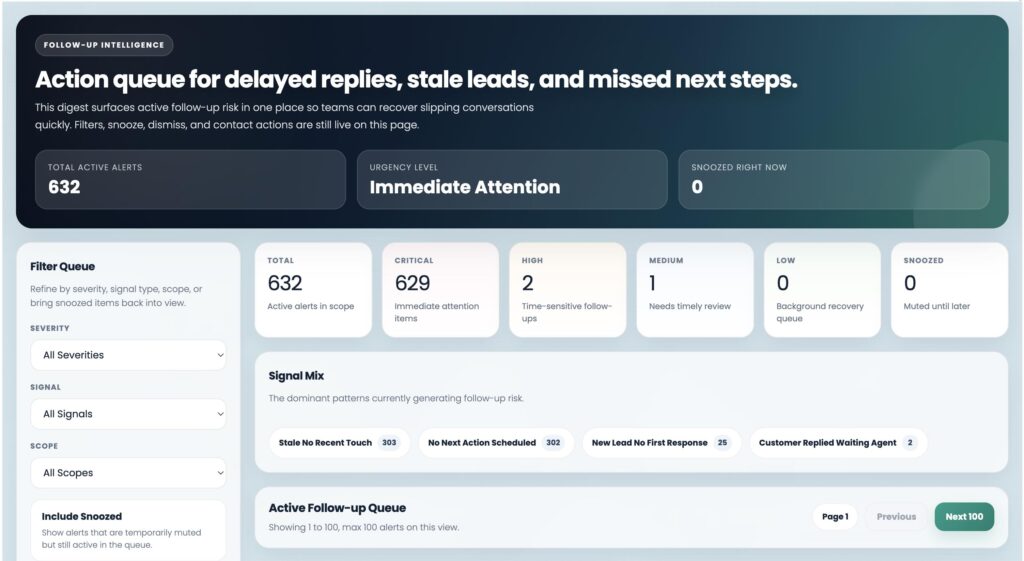
Once configured, output can be reviewed in:
- CRM > Follow-up Alerts
- CRM digest follow-up-related cards and reports
That means teams are not just configuring a setting in isolation. They are enabling an ongoing visibility layer for followup risk.
How to Configure Follow-up Intelligence in ZNICRM in a Few Clicks
One of the biggest advantages of this feature is that it does not require a complicated rollout. The configuration process in ZNICRM is direct and admin-friendly.
Here is the step-by-step process.
Step 1: Open the Follow-up Intelligence settings
Go to:
Admin > CRM Data > Follow-up Intelligence
This is the main settings area where you configure the feature.
If your business wants to improve followup discipline, reduce lead neglect, or create SLA-based monitoring, this is the place to start.
Step 2: Choose the scope you want to manage
The first important setup decision is scope.
Define which users or scopes should be monitored. Depending on your configuration model, this may be user-based or business-segment-based.
This is a crucial step because good followup monitoring starts with focus. You do not need to force the exact same logic across every workflow. You can align the system to the part of the business where followup risk matters most.
For example, you may want to monitor:
- a specific sales team
- a revenue segment
- a priority business unit
- users handling high-value leads
- a workflow where SLA compliance is critical
Choosing the right scope ensures that alerts remain relevant and actionable.
Step 3: Configure the signal SLA thresholds
Next, configure the signal SLA thresholds.
This is where you define the follow-up timing windows that determine when a record becomes risky. These thresholds tell the system what “late” or “overdue” means in your business context.
This is one of the most important parts of the setup because it directly affects how sensitive the system will be.
Ask practical questions such as:
- How long can a lead remain without followup before it becomes a risk?
- Should different segments have different expectations?
- Which inactivity window should trigger a signal?
- How strict should the system be for high-priority workflows?
Well-defined SLA thresholds turn vague followup expectations into measurable CRM logic.
Step 4: Configure who should be notified and how alerts should be grouped
The next settings area is notifications.
Configure:
- who should receive alerts
- how alerts should be grouped
- how notifications should behave overall
This part is important because the best alert system is not the loudest one. It is the one that delivers the right signal to the right person in the right format.
Grouped notifications are especially useful because they help reduce noise. Instead of overwhelming teams with fragmented alerts, grouped follow-up notifications make the signal easier to review and act on.
Think of this step as signal design, not just alert delivery.
Step 5: Configure escalation and AI-related behavior if your process uses it
The next settings block is escalation and AI settings.
If your business process uses escalation logic, configure how delayed followup situations should be elevated. This helps ensure that unresolved risk does not remain hidden at the individual user level.
AI-related behavior, where applicable in your process, can further strengthen the monitoring framework by supporting smarter signal handling and action prioritization.
This step is especially useful for teams that need:
- manager visibility into prolonged delays
- stricter control over high-value followup
- better escalation handling for inactive opportunities
- more structure in complex sales operations
Step 6: Review cleanup and exclusion rules
Next, review cleanup and exclusion rules before enabling the feature fully.
This is a highly practical step that businesses should not skip.
Why? Because a good followup monitoring system must also know what not to flag.
Exclusions and cleanup rules help prevent unnecessary noise by filtering out records or scenarios that should not trigger signals. This keeps the system more accurate and makes the alerts more trustworthy.
Before finalizing the setup, ask:
- Are there records that should be excluded from follow-up monitoring?
- Are there conditions where a signal should not be generated?
- Are cleanup rules defined to keep the alert system meaningful over time?
A cleaner signal system drives stronger adoption.
Step 7: Save each settings block from its page controls
Once each section has been configured, save each settings block using the controls on its page.
This matters because the configuration is organized into separate settings groups, and each block should be saved appropriately.
The main areas to save are:
- scope
- signal SLAs
- notifications
- escalation and AI settings
- cleanup and exclusion rules
At this point, the feature is ready to begin monitoring CRM activity and generating follow-up signals based on your settings.
How to Verify That Follow-up Intelligence Is Working
A good CRM configuration is not complete until it is verified.
After enabling Follow-up Intelligence in ZNICRM, use this process to confirm that the system is working as expected.
1. Confirm the selected scope reloads with saved values
First, reopen the Follow-up Intelligence page and confirm that the selected scope reloads correctly with the values you saved.
This ensures that your configuration was stored properly and that the intended users or business segments are covered.
2. Create or identify a CRM record that should trigger a signal
Next, create or identify a CRM record that matches your follow-up signal conditions.
Choose a test case that should reasonably cross the configured SLA window. This helps validate whether the followup monitoring logic is behaving correctly.
3. Wait until the SLA window is crossed
The system monitors based on follow-up timing and thresholds. Once the defined SLA window is crossed, the record should become eligible for a signal if all relevant conditions are met.
4. Check follow-up alert views
Go to:
CRM > Follow-up Alerts
Check whether the record appears in the follow-up alert views after the SLA window is crossed.
5. Review CRM digest follow-up cards and reports
Also review the CRM digest follow-up-related cards and reports. This confirms that the output is not only being generated but also being surfaced through the expected reporting and digest channels.
Verification is important because it helps you confirm:
- scope selection is correct
- SLA thresholds are behaving as expected
- notifications and grouping work properly
- escalation logic is aligned
- exclusions are not filtering too broadly
- the reporting output is visible to teams and managers
Why ZNICRM Users Should Enable Follow-up Intelligence Early
Businesses often wait to implement systems like this until followup problems become visible. That is usually too late.
The smarter move is to enable followup intelligence before missed followup becomes a pattern.
Here is why early adoption matters in ZNICRM:
It prevents bad habits from scaling
As teams grow, operational behavior hardens. If followup discipline is weak early on, growth often amplifies the problem. Enabling monitoring sooner helps establish clearer expectations from the beginning.
It helps managers lead with evidence
Instead of relying on anecdotal concerns such as “I think followups are slipping,” managers can review actual follow-up signals and reports.
It makes CRM more proactive
A CRM should not just record what happened yesterday. It should help teams protect what needs attention today. Follow-up Intelligence moves ZNICRM in that direction.
It supports process maturity
Businesses that implement structured followup monitoring tend to make better decisions about SLAs, ownership, escalation, and priority management. In that sense, the feature also strengthens overall CRM maturity.
Best Practices for Getting the Most Value from Followup Intelligence
A feature like this creates the most value when it is configured thoughtfully. Here are some best practices.
Start with a meaningful scope
Do not try to monitor everything at once unless that is genuinely appropriate. Begin with a high-impact scope such as a critical team, a key segment, or high-value leads.
Set realistic SLA thresholds
If thresholds are too aggressive, the system can become noisy. If they are too loose, risk may be surfaced too late. Choose thresholds that reflect actual business expectations.
Design notifications for action, not volume
Notifications should drive timely action. Grouping behavior should help reduce clutter and improve usability.
Use escalation deliberately
Escalation is powerful, but it should be used with clear intent. Reserve it for scenarios where delayed followup truly needs broader visibility.
Keep exclusions clean
Review exclusions and cleanup rules carefully. Too many exclusions can hide real risk. Too few can create noise.
Verify with real scenarios
Test the system using actual CRM conditions, not just configuration review. A real or simulated record crossing an SLA threshold is one of the best ways to validate the setup.
Review reports regularly
Do not treat Follow-up Intelligence as a set-and-forget feature. Regular review of follow-up alert views and CRM digest cards helps managers learn where followup patterns need coaching or process change.
Align the feature with business priorities
The strongest results come when followup monitoring is linked to real business priorities such as conversion speed, segment importance, opportunity value, or SLA compliance.
Followup Intelligence and the Future of CRM Operations
CRM systems are evolving. They are no longer just systems of record. The best ones are becoming systems of guidance.
That shift matters because modern revenue teams do not just need places to store data. They need tools that help them act on time, focus on the right records, and catch risk before it damages outcomes.
AI Followup Intelligence in CRM fits directly into that evolution.
It helps turn activity history into operational awareness. It helps transform missed followup from a hidden weakness into a visible, manageable process. It helps businesses move from reactive follow-up cleanup to proactive follow-up control.
And as teams become more distributed, volumes increase, and response expectations rise, this kind of intelligence becomes even more important.
The future of CRM is not only about better dashboards. It is about smarter intervention.
Follow-up Intelligence is one of the clearest examples of that shift.
Frequently Asked Questions About Followup Intelligence in CRM
What is followup intelligence in CRM?
Followup intelligence in CRM is a monitoring capability that identifies follow-up risk by using CRM activity, timing, scope, and signal configuration. It helps teams catch neglected records before leads or opportunities go cold.
What is AI Followup Intelligence?
AI Followup Intelligence refers to intelligent CRM-based monitoring and signal handling that helps teams detect follow-up risk, organize alerts, and support escalation or action before delays hurt sales outcomes.
Why is followup important for businesses?
Followup is important because delayed or missed action can reduce lead engagement, lower conversion potential, create inactive opportunities, and cause preventable revenue leakage.
What are the benefits of Follow-up Intelligence?
The main benefits include reduced lead neglect, improved response discipline, earlier manager visibility into follow-up risk, better SLA monitoring, stronger exception reporting, and cleaner pipeline oversight.
Where do I configure Follow-up Intelligence in ZNICRM?
Open:
Admin > CRM Data > Follow-up Intelligence
That is where you configure scope, signal SLAs, notifications, escalation behavior, AI-related behavior, and exclusions.
How do I check follow-up alerts in ZNICRM?
You can review output in:
CRM > Follow-up Alerts
You can also review CRM digest follow-up-related cards and reports.
What should I configure first?
Start with scope and signal SLA thresholds. Then configure notifications, escalation and AI settings, and cleanup or exclusion rules.
How do I verify the setup?
Confirm the saved scope reloads correctly, create or identify a CRM record that should trigger a signal, let the SLA window pass, and check whether the record appears in the follow-up alert views and CRM digest output.
Final Thoughts: Why Every Growing CRM Needs Followup Intelligence
Followup is one of the simplest concepts in sales, but one of the hardest to execute consistently at scale.
That is why businesses should stop treating followup as a personal habit alone and start treating it as a monitored operating system inside CRM.
Follow-up Intelligence gives teams that system.
It helps reduce lead neglect. It improves response discipline. It gives managers earlier visibility into follow-up risk. It supports SLA monitoring, protects high-value opportunities, and strengthens exception reporting for inactive opportunities.
Most importantly, it helps businesses act before leads go cold.
For teams using ZNICRM, implementing this is straightforward. In just a few clicks, you can open Admin > CRM Data > Follow-up Intelligence, define scope, configure SLAs, set notification and escalation behavior, review exclusions, save the settings, and begin monitoring CRM activity through alerts and reports.
That is the real value of AI Followup Intelligence in CRM.
It does not just tell you what happened. It helps you catch what needs action next.
And in a competitive sales environment, that difference can be the difference between a neglected lead and a converted customer.