Route every exception, discount, and approval through a clear CRM workflow.
ZNICRM gives you structured escalation paths, multi-step approvals, rejection logic, and queue visibility so decisions move faster without losing context or accountability.
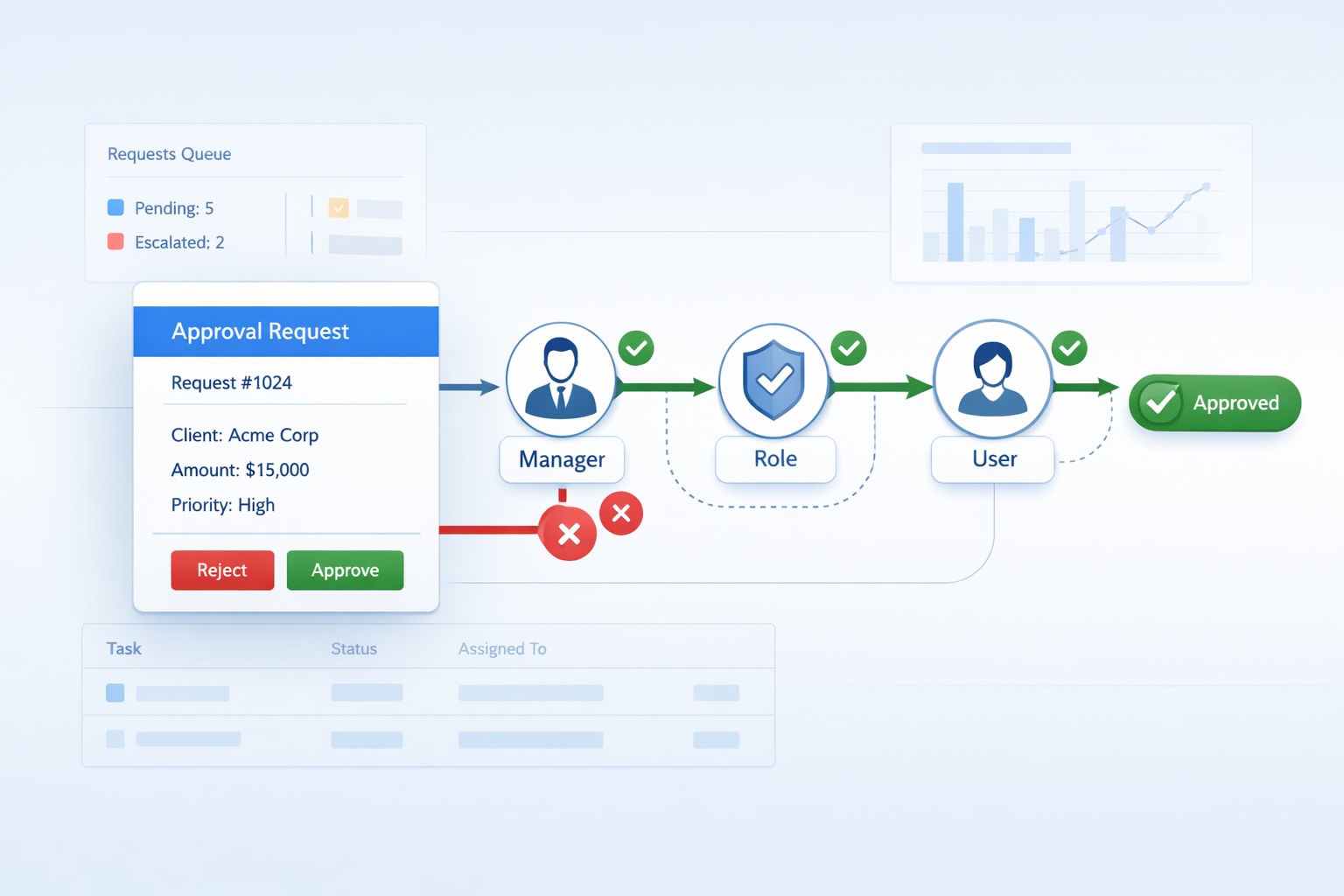
Manual approvals slow down work and make ownership unclear
When escalations happen over email, chat, or memory, teams lose speed, managers lose visibility, and the business loses confidence in the process.
Requests sit between teams
Urgent decisions wait because nobody can see the next owner, the current blocker, or the expected response path.
Context gets fragmented
Decision notes, approvals, and exceptions get scattered across inboxes and chats instead of staying attached to the CRM record.
Leaders cannot see queue health
Without one visible approval queue, slow-moving escalations and missed handoffs stay hidden until they become a bigger issue.
Build approval logic once and let the CRM route every decision clearly
ZNICRM turns approval handling into a structured operating layer. You define who should review, what should happen next, and how every decision should be tracked from request to final outcome.
- Route to roles, department managers, or specific users based on the workflow need.
- Design approval and rejection branches so outcomes do not depend on manual handoffs.
- Keep queue status, ownership, and decision history visible in one place.
The core features teams need to run approvals without friction
Every capability is built to improve clarity, reduce manual coordination, and keep important business decisions moving.
Flexible routing
Send each approval step to a role, a manager, or a named user based on how your process actually works.
Multi-step approvals
Build sequential approval chains for discounts, exceptions, compliance checks, or internal escalations.
Approval and rejection logic
Define exactly where the record should go after each outcome so the next step is never left to guesswork.
Queue visibility
See active requests, pending decisions, and aging escalations in one approval queue your managers can actually use.
Connected workflow bindings
Tie approval logic to related CRM processes like checklists, service flows, or support operations where needed.
Simple admin control
Create the escalation, define steps, assign owners, and activate the workflow without adding process overhead.
You get faster decisions and stronger control over operational exceptions
Approval workflows should improve outcomes immediately, not just document the mess more neatly.
- Approvals tracked in email and chat
- Managers chase status updates manually
- Rejection handling changes case by case
- No clean view of the pending queue
- Decision history stays on the CRM record
- Owners are visible at every stage
- Approval and rejection routes are predefined
- Queues reveal delays before they spread
Move approvals faster
Route requests instantly instead of depending on reminders and manual coordination to reach the right reviewer.
Create real accountability
Every step has a visible owner, so your team always knows who needs to act and what is still pending.
Reduce risk as you scale
Standardize exception handling across teams while keeping decision context, status, and outcomes connected to the CRM record.
Launch a working approval flow in four practical steps
The setup stays simple for admins while still giving operations teams the control they need.
Create the escalation
Start in Admin > Escalations and define the workflow name, description, and business use case.
Assign action owners
Add one or more approval steps and route each stage to a role, department manager, or specific user.
Define the next path
Set what should happen on approval, on rejection, or when the workflow should end.
Watch the queue
Track pending approvals and aging requests so managers can keep decisions moving without guesswork.
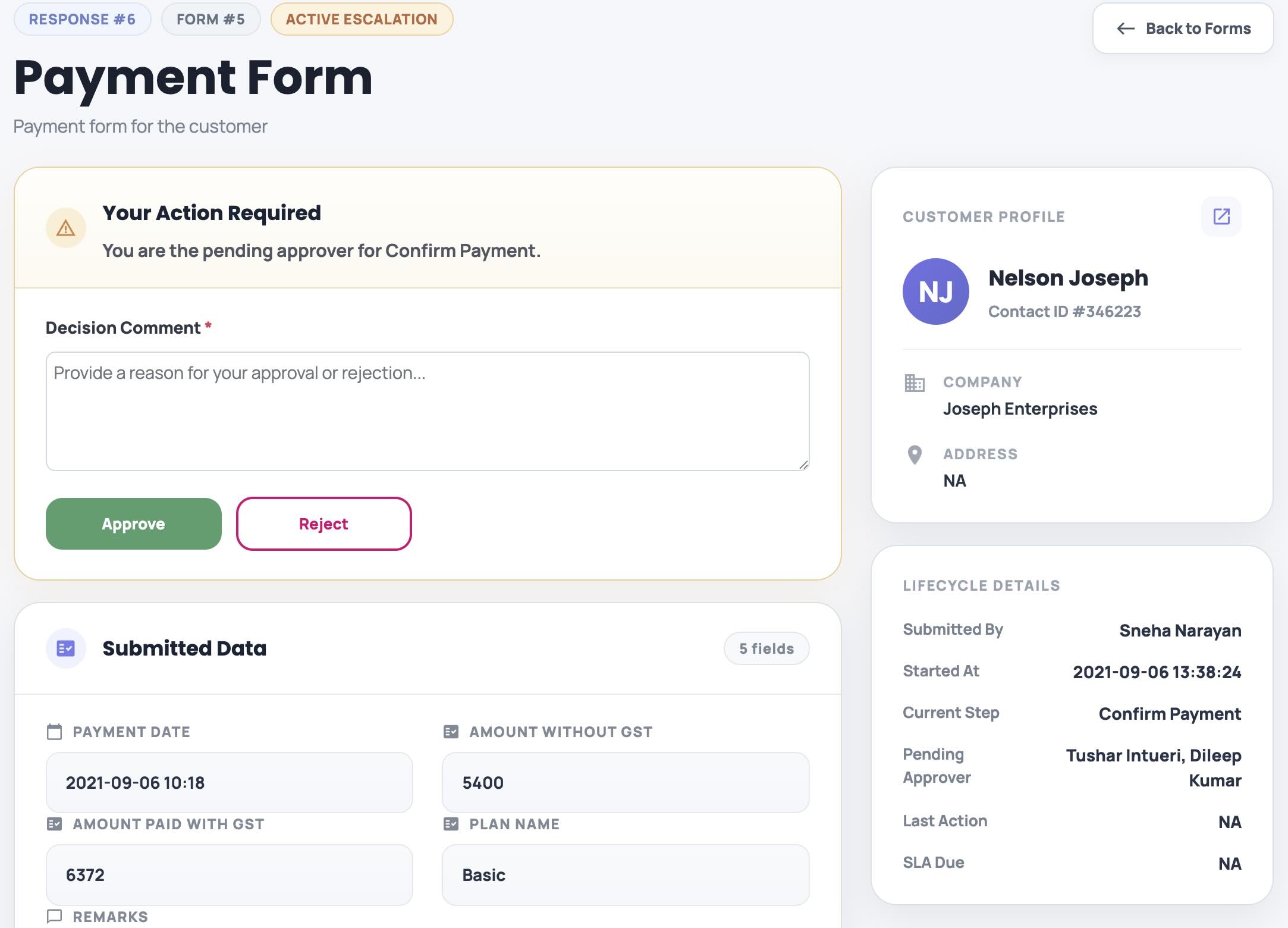
Simple Approval Forms
Create custom approval forms that keep the focus on the decision and the context needed to make it without overwhelming reviewers with unnecessary information.
Teams value approvals more when they can finally see the process
Built for every team that needs to move decisions faster without adding manual coordination or process overhead.
“We stopped chasing approvals over email and started moving exceptions through one clear queue.”
“The approval and rejection paths feel controlled now, so our team no longer improvises what happens next.”
“Managers can see queue health quickly, which helps us catch slow approvals before they become customer issues.”
Bring structure, speed, and visibility to every approval workflow
If your team handles exceptions, escalations, internal approvals, or cross-department decisions, ZNICRM helps you move them through one controlled workflow with clear ownership and better queue visibility.