CRM checklist tool that keeps every required detail complete before work moves forward.
ZNICRM helps you define department-specific checklist rules, surface live pending details, and guide your team to cleaner records without slowing down execution.
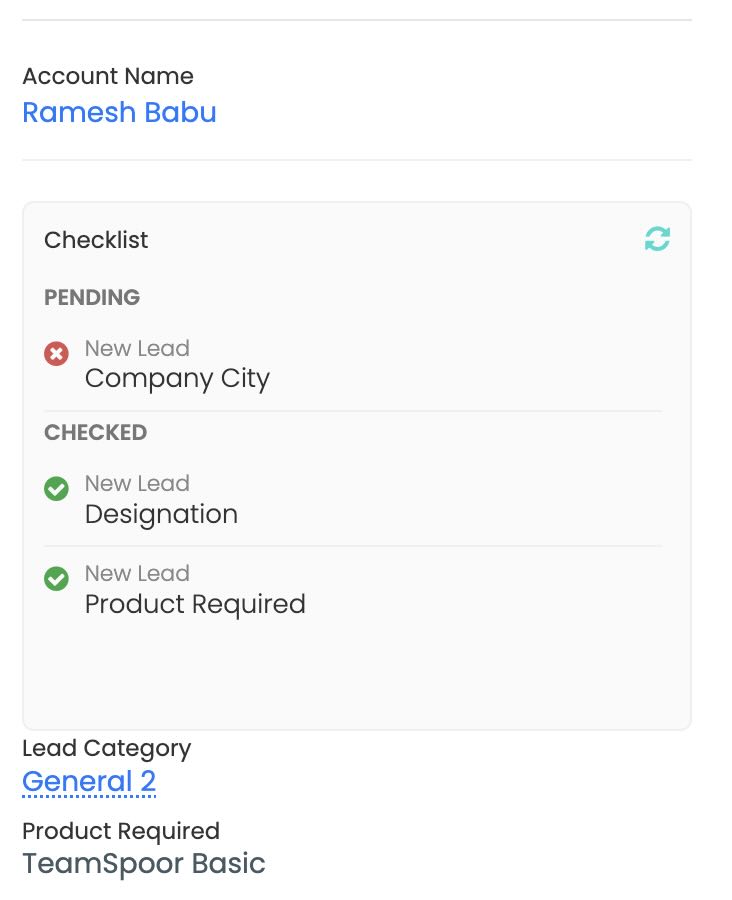
Teams lose momentum when required CRM data lives in memory, chat threads, or personal follow-up lists.
Without clear checklist rules, records move forward incomplete, managers chase updates manually, and downstream teams inherit avoidable rework.
Inconsistent records
Critical fields get skipped, stage exits vary by rep, and qualification quality depends on who owns the record.
Manual chasing
Managers spend time reminding teams what is missing instead of coaching, forecasting, or moving work forward.
Messy handoffs
Onboarding, service, and finance inherit partial context, which causes extra calls, delayed approvals, and avoidable follow-up.
ZNICRM turns your CRM checklist rules into clear, live guidance inside the record.
Instead of training people to remember exceptions, you configure the required checkpoints once and let the product show what is done, what is blocked, and what should happen next.
- Map checklist rules to departments, workflows, or qualification criteria.
- Display missing items as live pending details where users already work.
- Standardize record quality before stage changes, approvals, or handoffs.
Everything you need to keep data quality high without creating a rigid process.
Each feature is designed to help your team understand completion status fast, act confidently, and move records forward with less rework.
Department-scoped checklists
Define different checklist logic for sales, onboarding, support, finance, or any team that needs its own completion criteria.
Stage readiness control
Use checklist requirements as a practical gate so records are ready before they move into the next business step.
Dynamic pending details
Translate admin rules into clear cards that show users exactly which detail is missing and why it matters.
Central admin control
Manage checklist settings from one place instead of relying on spreadsheets, reminders, or ad hoc training docs.
Contact-level visibility
Users can see completion state inside the contact view, which keeps the next action attached to the actual record context.
Audit-friendly completion
Standardize what “ready” means so managers can review records faster and teams can defend process consistency.
From reactive cleanup to predictable execution.
- Reps remember rules differently
- Managers discover missing fields late
- Handoffs trigger extra back-and-forth
- Completion standards stay consistent
- Pending items show up early and clearly
- Teams receive cleaner, ready-to-use records
Cleaner pipeline and onboarding data
You reduce hidden data debt by making required details visible while the record is still active, not after the team has moved on.
Faster team handoffs with less follow-up
Sales, service, and finance can trust the record they receive because the completion criteria are already enforced.
Better visibility for managers and admins
Instead of chasing updates manually, leaders can see which requirements are done, blocked, or consistently missing across the workflow.
Set the rule once. Let the record guide the team every time.
ZNICRM keeps the process simple for users while giving admins enough structure to standardize qualification, onboarding, and data completeness.
Design the checklist
Choose the fields, actions, or approvals that matter for a given department or workflow.
Attach it to context
Apply the rule to the right records so users only see the checklist items that are relevant to them.
Surface pending details
The record shows exactly what is incomplete so users can take action without searching for instructions elsewhere.
Move forward with confidence
Once the checklist is complete, the next approval, handoff, or stage change happens with better data quality.
See how checklist visibility can feel inside a modern CRM workflow.
The page below mixes screenshot, mobile, and video-style placeholders so teams can imagine the feature in day-to-day execution, not just in admin settings.
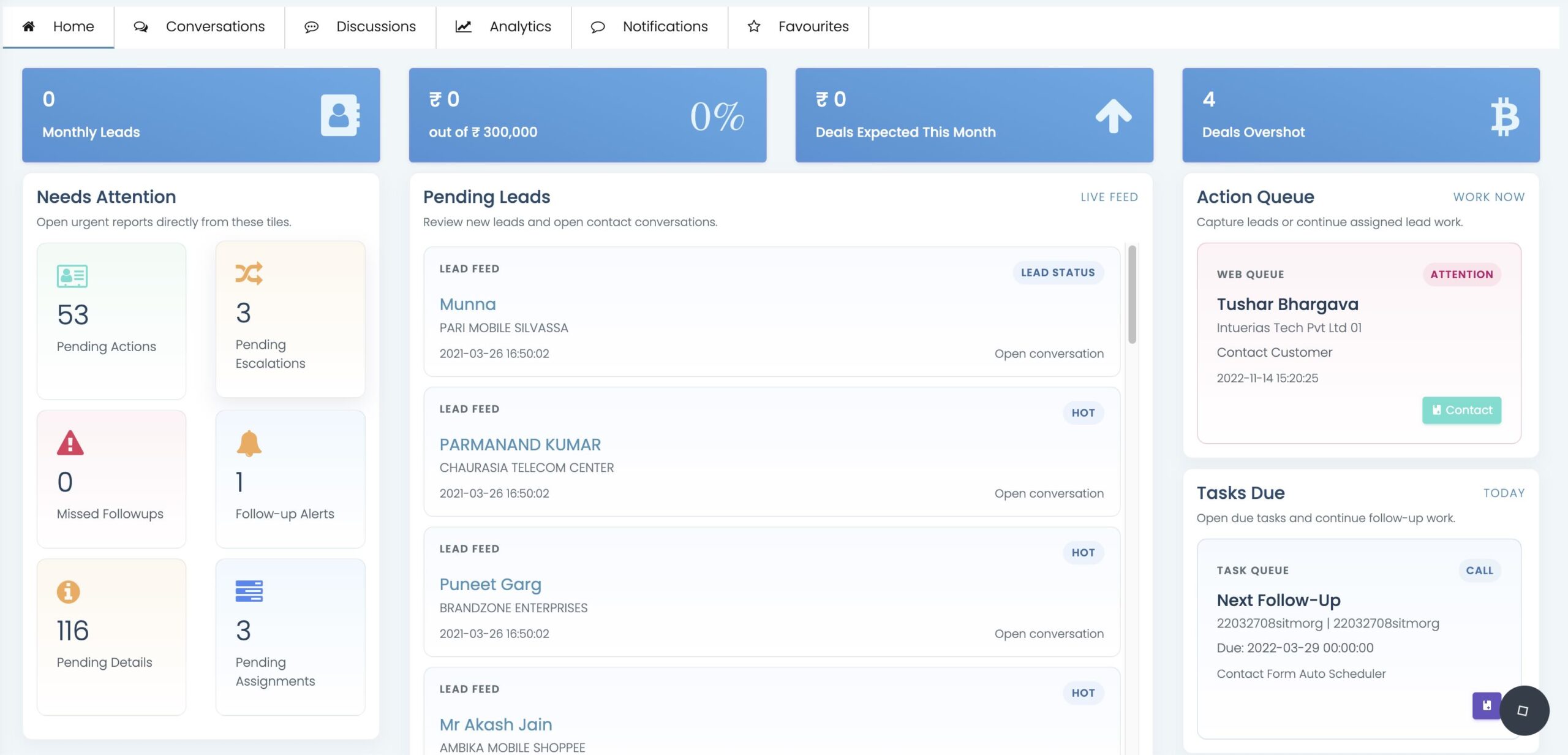
Dashboard and record context
Use dashboard views to monitor completeness and open the record view to see which pending details are blocking the next action.
Mobile-ready status checks
Keep owners aligned even when they need a quick checklist view from a smaller screen.
Teams adopt checklist workflows faster when the value is visible immediately.
The checklist feature has been a game-changer for the teams. It’s like having a built-in quality control system that keeps everyone on the same page and ensures teams never miss a critical step in the process.
“The checklist cards made stage readiness obvious. Our team stopped guessing whether a lead was actually qualified.”
“We now hand records from sales to onboarding with much less cleanup. The required details are already there when the next team opens the contact.”
“Admins liked that they could define the rule once, and the team liked that the software showed exactly what was still missing.”
Answers to common questions about the CRM checklist feature.
Intentional setup, simple daily use
Make required data impossible to miss.
If your team depends on clean qualification, reliable onboarding handoffs, or better pending detail visibility, ZNICRM CRM checklists give you a practical way to standardize the process without adding noise.